UTM Parameters for Shopify: A Setup for Meta Ads and Google Ads
UTM tags let Shopify know which campaign brought each order. A naming standard, the exact tags to use on Meta Ads and Google Ads, and the mistakes that break tracking.
On this page
UTM parameters are tags added to the end of an ad's link that tell Shopify and analytics tools where a visitor came from: the source, the medium, the campaign and the ad. When every ad link carries them, Shopify orders can be matched to campaigns without relying on what Meta or Google report. Use one naming standard, use the platforms' dynamic values so names fill in automatically, and never tag internal links.
Key takeaways
- The five UTM parameters are utm_source, utm_medium, utm_campaign, utm_content and utm_term.
- Meta Ads fills campaign, ad set and ad names automatically with dynamic URL parameters.
- Google Ads uses auto-tagging; add UTMs too if you want Shopify and other tools to read the campaign.
- Pick one naming standard (lowercase, no spaces) and never change it mid-month.
- Never add UTMs to links inside your own site; they split sessions and break attribution.
What each parameter means
| Parameter | What it records | Example |
|---|---|---|
| utm_source | Where the visitor came from | facebook, instagram, google |
| utm_medium | The type of traffic | paid_social, cpc, email |
| utm_campaign | The campaign | diwali_prospecting |
| utm_content | The ad or creative | ugc_video_03 |
| utm_term | The keyword or ad set | gold_hoops or broad_women_25_44 |
Shopify reads UTM parameters on the landing page and stores them with the visit, so orders can be reported by campaign in its marketing and sales reports.
Meta Ads: use dynamic parameters
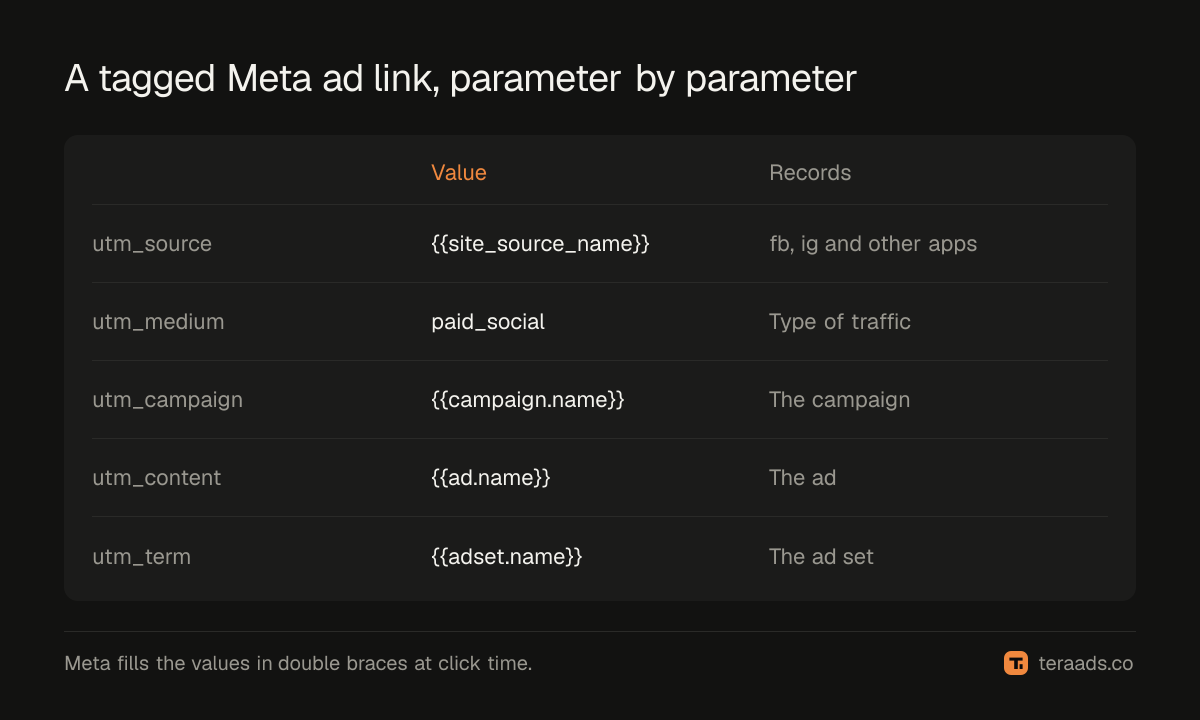
In Meta Ads Manager, the ad's URL parameters field accepts dynamic values that Meta fills in at click time. A standard set:
utm_source={{site_source_name}}&utm_medium=paid_social&utm_campaign={{campaign.name}}&utm_content={{ad.name}}&utm_term={{adset.name}}
{{site_source_name}} records which Meta app the click came from, as a short code such as fb for Facebook or ig for Instagram. If you rename campaigns, consider adding {{campaign.id}} and {{ad.id}} as well, because IDs never change.
Add the parameters in the URL parameters field rather than pasting them into the website URL, so they apply cleanly to every ad.
Google Ads: auto-tagging plus UTMs
Google Ads auto-tagging adds a click ID (gclid) that Google Analytics and Google Ads use. Shopify and most other tools don't read it as a campaign name, so add UTMs as well using a tracking template or final URL suffix at account level:
utm_source=google&utm_medium=cpc&utm_campaign={campaignid}&utm_content={creative}&utm_term={keyword}
Google fills the values in braces (ValueTrack parameters). For Performance Max and Shopping, {keyword} is often empty, which is normal.
Set it up, step by step
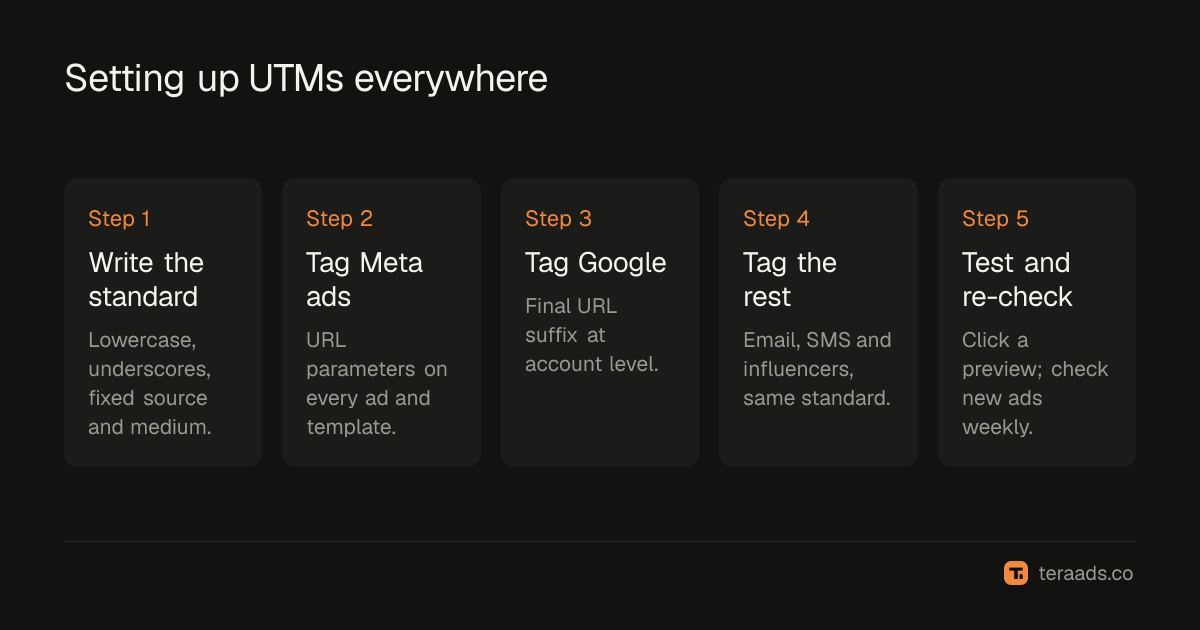
- Write your naming standard. Lowercase, underscores instead of spaces, the same source and medium values everywhere.
- Tag Meta at ad level. Add the URL parameters to every active ad, and to your templates for new ones.
- Tag Google at account level. Add a final URL suffix so every campaign inherits it.
- Tag email, SMS and influencers. Use the same standard with their own source and medium.
- Test a link. Click a live ad preview, check the landing URL carries the tags, and confirm the visit appears with the right campaign in Shopify's reports.
- Check weekly. New ads created by duplicating old ones can lose their parameters.
Mistakes that break tracking
- Tagging internal links. A banner on your homepage with UTMs starts a new visit and steals credit from the ad that brought the buyer.
- Mixed naming. "Facebook", "facebook" and "fb" become three sources in reports.
- Spaces and special characters. They get encoded inconsistently; use underscores.
- Redirects that drop parameters. Some link shorteners and redirects strip the query string. Test the final landing URL.
- Changing names mid-month. Renaming a campaign splits its orders across two names unless you also track IDs.
What UTMs fix, and what they don't
UTMs let you compare campaigns on Shopify orders instead of platform-reported purchases, which is the basis of reconciling Meta with Shopify. They record the last tagged click before the visit, so they won't capture people who saw an ad, didn't click and bought later. That's why Shopify, GA4 and the ad platforms will still disagree a little; GA4 vs Shopify covers the other reasons.
With campaigns attached to orders, you can work out profit by campaign, as in Shopify profit tracking.
A naming standard you can copy
| Field | Rule | Example |
|---|---|---|
| Source | Platform, lowercase | facebook, google, newsletter |
| Medium | Traffic type, fixed list | paid_social, cpc, email, sms, influencer |
| Campaign | Goal + offer or season | prospecting_diwali, retargeting_evergreen |
| Content | Format + creative + version | ugc_video_03, static_hoops_02 |
| Term | Ad set or keyword | broad_women_25_44, gold_hoops |
Name the campaigns themselves in Ads Manager with the same pattern, so the dynamic values fill in clean names.
Reading UTMs in Shopify
Shopify keeps the UTM values from the visit that led to an order. On a single order, the conversion details show the source and campaign of the visit. In Shopify's analytics, reports by marketing campaign and traffic source use the same values, so you can compare orders and sales by campaign without opening Ads Manager. Export orders with their campaign to work out profit by campaign in a sheet.
UTMs and privacy changes
Browser privacy features and consent choices limit cookies and pixels, but UTM parameters travel in the link itself, so they still reach your store when a visitor clicks. That makes them one of the more durable ways to attach campaigns to orders. They don't identify people, only the link that was clicked, which keeps them simple to use under privacy rules.
Tera Ads connects to Shopify, Meta Ads and Google Ads and shows every campaign from both platforms in one table, with profit worked out from your Shopify orders. It is free for one business.
Frequently asked questions
Do I need UTMs if I use the Meta pixel?
Yes, if you want Shopify to know which campaign brought each order. The pixel reports to Meta; UTMs report to your store and analytics tools.
Does Google Ads auto-tagging replace UTMs?
For Google Analytics and Google Ads, auto-tagging is enough. For Shopify and other tools that read UTMs, add a final URL suffix with UTM parameters as well.
Will UTMs slow down my site or hurt SEO?
No. They are query parameters on ad links only. Search engines don't see them on your organic pages if you don't use them internally.
Should utm_source be facebook or instagram?
Use Meta's {{site_source_name}} dynamic value so it fills in automatically by placement. If you prefer one value, use "facebook" for all Meta traffic and keep it consistent.
Why are some Shopify orders missing a campaign?
The buyer may have come back later through a direct visit or search, the link may have lost its parameters in a redirect, or the ad may be missing tags. Check new ads first.