Google Shopping Disapproved Products: Causes, Fixes and What It Costs
Disapproved products can't show in Shopping or Performance Max. The common causes for Shopify stores, how to fix each in Merchant Center, and how to prevent repeats.
On this page
A disapproved product is one Google Merchant Center has blocked from showing in Shopping ads, Performance Max and free listings, usually because of a data problem (price or availability mismatch, missing identifiers, bad images) or a policy problem. Each disapproved product is a product your campaigns can't sell, and it quietly pushes budget onto fewer products. Most disapprovals in Shopify stores come from the same handful of causes, and most are fixable in an afternoon.
Key takeaways
- Disapproved products don't show at all; "limited" products show in fewer places. Both cost you sales.
- Check the Needs attention view in Merchant Center: it lists each issue and how many products it affects.
- The most common causes for Shopify stores are price and availability mismatches, missing product identifiers, image problems and landing page errors.
- Fix the issue at the source (Shopify product data or your feed app), not by hand in Merchant Center, or it comes back.
- Recheck weekly, and after every theme, app or price change.
Why disapprovals cost more than they look
Shopping and Performance Max campaigns can only spend on products that are approved. When a bestseller is disapproved, Google spends the same budget on your remaining products, often weaker ones. Nothing in Ads Manager says "₹30,000 of sales lost to disapprovals"; you just see ROAS slip. That makes disapprovals one of the seven places spend leaks, covered in the wasted ad spend audit.
Where to find them
In Merchant Center, product problems appear under Products, in the Needs attention view, grouped by issue with the number of products affected. Google's help page on product status explains that products which aren't approved, or are limited, should be diagnosed from that tab (Google Merchant Center Help). Account-wide problems, like a suspension or a misrepresentation review, appear separately as account or policy issues, and they need a different fix.
The common causes and how to fix them
| Issue | What it usually means | Fix at the source |
|---|---|---|
| Price mismatch | Feed price differs from the price on the product page | Make the feed sync after every price change; check sale prices and currency |
| Availability mismatch | Feed says in stock, page says sold out (or the reverse) | Sync inventory more often; hide sold-out variants consistently |
| Missing or invalid identifiers | GTIN or brand missing or wrong | Add real GTINs; for handmade or own-brand items, set brand and mark identifiers as not existing where allowed |
| Image problems | Watermarks, promotional text, placeholder or too-small images | Use clean product images with no overlays, at the required size |
| Landing page not working | 404, password-protected store, slow or blocked page | Fix the URL, remove the password, check robots rules |
| Missing shipping or tax info | No shipping settings for the target country | Set shipping in Merchant Center for every country you target |
| Policy issues | Restricted products, misleading claims | Change the product data or claims; request review |
Price and availability mismatches
Google crawls your product pages and compares them with your feed. If the page shows ₹1,299 and the feed says ₹1,499, or a variant is sold out on the page but in stock in the feed, the product is disapproved. Sales are the classic trigger: you change prices in Shopify, the feed updates hours later, and Google catches the gap in between. Make sure your feed app syncs quickly, and avoid switching prices on and off many times a day.
Identifiers
Google uses GTIN (barcode numbers), brand and MPN to match products. Branded goods without GTINs are often limited or disapproved. For your own products, set your brand name, and where your products genuinely don't have GTINs, mark that in the feed rather than inventing numbers.
Images
Promotional overlays ("50% OFF", "Free shipping"), watermarks and logos on product images are common reasons in fashion and jewellery stores. Use a clean main image and keep the lifestyle shots for additional images.
Landing pages
A store still on its password page, a product URL that changed after a theme update, or a page that blocks Google's crawler all lead to disapprovals across many products at once. These show up as large, sudden spikes in the Needs attention count.
Fix the source, not the symptom
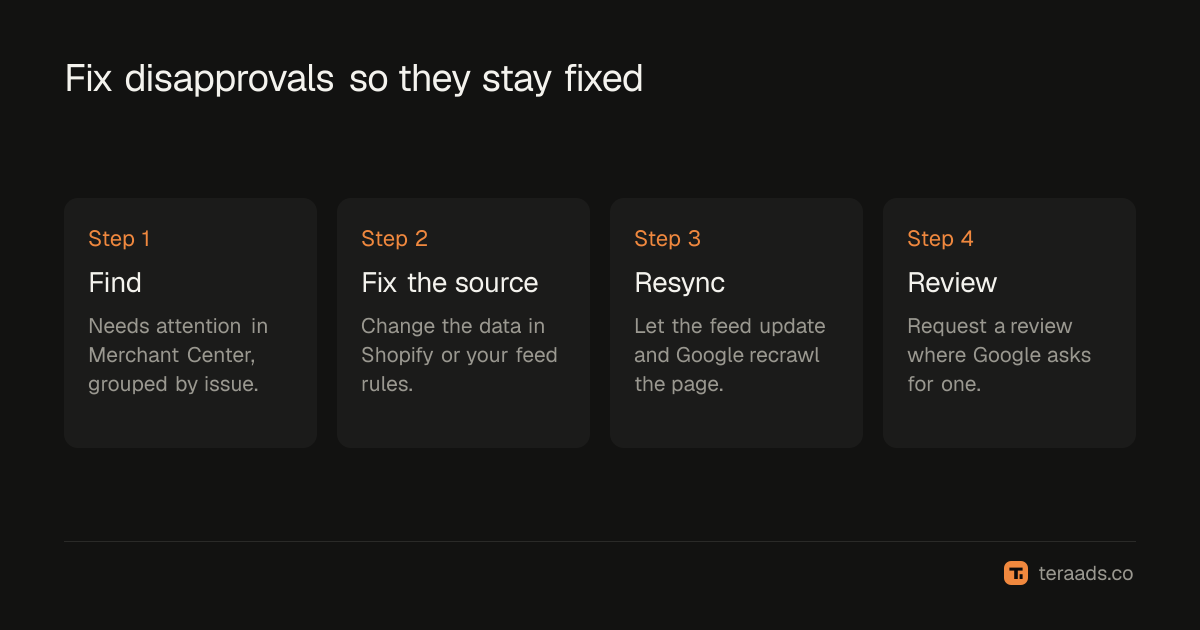
It is tempting to edit products directly in Merchant Center. Don't, for anything that comes from Shopify. The next feed sync overwrites your change and the disapproval comes back. Fix the data in Shopify or in your feed app's rules, let it sync, and then request a review if Google asks for one. Some reviewers report that reviews need to be requested product by product, so batch your fixes before requesting.
How much a fix is worth
An illustration: a store with 120 products, 18 of them disapproved, including two bestsellers.
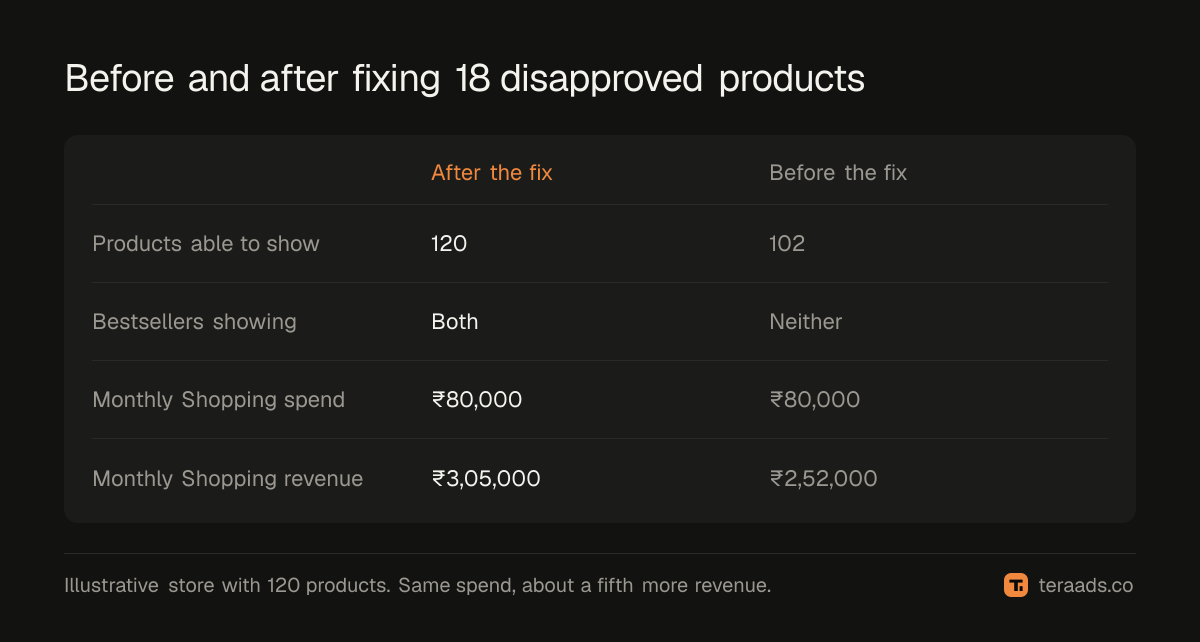
Before the fix, Performance Max spent its budget on 102 products and missed the two bestsellers. After fixing the price-sync and image issues, the bestsellers returned and revenue on the same spend rose by about a fifth. Your numbers will differ; the direction rarely does.
Prevent repeats
- Sync inventory and prices often, and especially before and during sales.
- Keep a clean image standard for main product images.
- Test after every theme or app change: open a few product URLs from the feed and check they load.
- Write specific titles. They don't prevent disapprovals, but they decide which searches your approved products match. The related cleanup on the search side is in finding wasted search terms.
- Check the Needs attention count weekly. A sudden jump is almost always one root cause affecting many products.
Tera Ads includes a Google Ads deep dive that lists disapproved Shopping products next to wasted search terms and a scaling plan, and shows every Meta Ads and Google Ads campaign in one table with profit worked out from your Shopify orders. It is free for one business. If you're tracking profit by hand, the Shopify profit tracking guide shows what to include.
Frequently asked questions
What is the difference between disapproved and limited?
A disapproved product can't show at all in the affected destinations. A limited product can show, but in fewer places or countries, often because of missing identifiers or shipping settings.
How long does it take for a fixed product to be approved again?
It depends on the issue and whether a review is needed. Data fixes often clear after Google recrawls the page and the next feed update; policy issues may need a manual review that takes longer.
Why do my products keep getting disapproved after I fix them?
Usually because the fix was made in Merchant Center and the next feed sync overwrote it, or because prices and stock change faster than the feed updates. Fix the data in Shopify or your feed rules instead.
Do disapproved products affect Performance Max campaigns?
Yes. Performance Max uses your Merchant Center products for its shopping placements, so disapproved products can't be shown there either.
Can a few disapproved products get my whole account suspended?
Ordinary data issues affect only those products. Repeated or serious policy problems, like misleading claims or misrepresentation, can lead to account-level action, which is far more disruptive. Fix policy issues first.