Find Wasted Search Terms in Google Ads and Stop Paying for Them
The search terms report shows what people actually typed before clicking your ads. How to find the terms that waste money and turn them into negative keywords.
On this page
A wasted search term is a real search that triggered your ad and cost you clicks without bringing profitable orders. You find them in the Google Ads search terms report: sort by cost, filter to terms with no conversions or very poor ones, and add the irrelevant ones as negative keywords so your ads stop showing for them. For most shopping brands this is the fastest, safest saving in the whole account.
Key takeaways
- Keywords are what you bid on; search terms are what people actually typed. The gap is where money leaks.
- Google's own advice is to add irrelevant search terms as negative keywords.
- Judge terms on cost and conversions over at least 30 days, and on conversion value, not clicks.
- Use negative keyword lists at account level for terms that are never relevant, like "free", "job" or "DIY".
- Recheck weekly: broad match and Performance Max keep finding new searches.
Keywords vs search terms
When you add a keyword to a campaign, you are telling Google which searches you'd like to appear for. With broad match and phrase match, Google also shows your ad for searches it judges similar. The search terms report lists the exact searches that triggered your ads, with clicks, cost and conversions for each (Google Ads Help).
The gap between the two can be large. A brand selling oxidised jewellery that bids on "oxidised earrings" might find clicks on "how to clean oxidised earrings", "oxidised earrings side effects" or "oxidised earrings wholesale market delhi". Each of those clicks costs real money and almost never becomes an order.
What counts as a wasted search term
| Type | Example (jewellery brand) | Action |
|---|---|---|
| Information intent | "how to clean silver jewellery" | Negative |
| Wrong product | "silver price today" | Negative |
| Job and wholesale | "jewellery shop job", "wholesale earrings" | Negative (account list) |
| Free or cheap intent | "free earrings", "earrings under 50" | Negative, unless you sell at that price |
| Competitor brand | A competitor's brand name | Decide on purpose; often expensive |
| Relevant but unprofitable | "gold plated earrings" with high cost per order | Lower bids or separate it; not always negative |
The last row matters: a relevant term that converts at a loss is a bidding problem, not a negative-keyword problem. Negative keywords are for searches you never want to pay for.
How to find wasted search terms
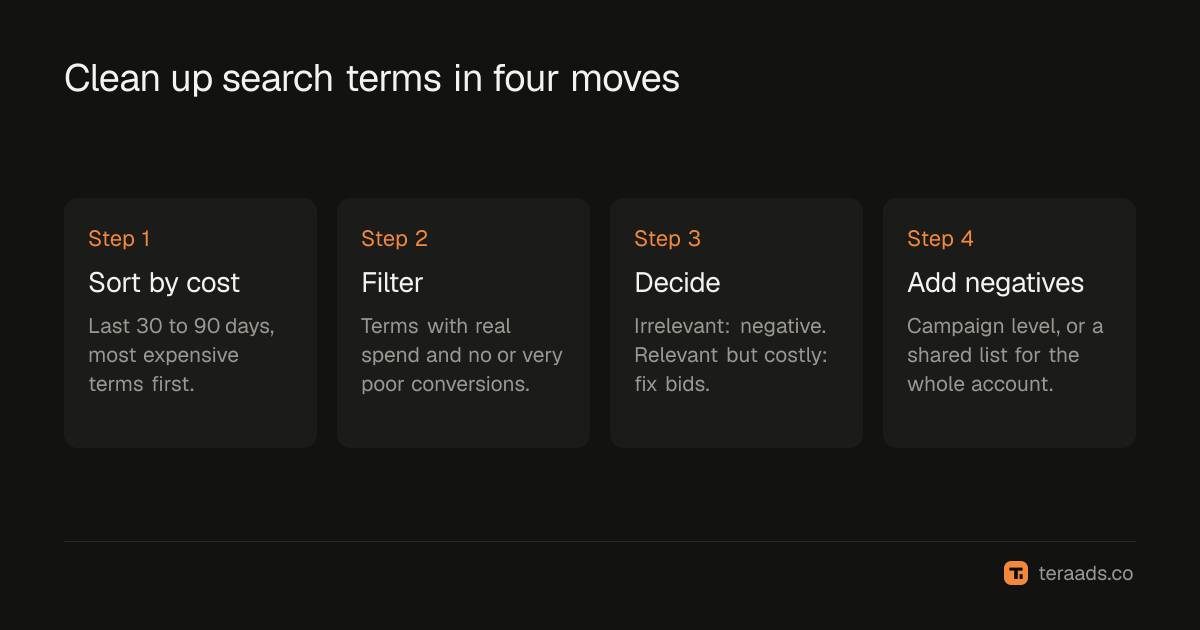
- Open the search terms report. In Google Ads, go to the search terms view for the account or a campaign and set the date range to the last 30 to 90 days.
- Sort by cost, highest first. The expensive terms matter most; a term that cost ₹40 isn't worth your time today.
- Filter to zero or very low conversions. Look at terms with meaningful spend and no conversions, then at terms whose cost per conversion is far above your target.
- Read each term and decide. Is it irrelevant (add as negative), relevant but unprofitable (adjust bids or structure), or relevant and fine (keep, maybe add as its own keyword)?
- Add negatives at the right level. Campaign-level for terms wrong for one campaign; a shared negative keyword list for terms wrong for the whole account.
- Note the rupees saved. Multiply each term's monthly cost by the share you expect to stop, so you know what the cleanup was worth.
Choosing the negative match type
Negative keywords have their own match types, and they behave differently from normal keywords:
- Negative broad blocks any search that contains all of its words, in any order. A negative broad "free earrings" blocks "free earrings" and "earrings for free", but also "earrings free delivery", which you probably want to keep. Be careful with short negatives.
- Negative phrase blocks searches containing the words in that order.
- Negative exact blocks only that exact search.
Start with phrase or exact for anything ambiguous. Use single-word broad negatives only for words that are never relevant to you, like "job" or "salary".
Performance Max and Shopping
Shopping and Performance Max campaigns don't use keywords you choose, but they still match to searches. Google provides search term insights for Performance Max, grouped into search categories, and you can add negative keywords at the account level to stop some searches across Performance Max and other campaigns. Check the current options in your account, since Google has been adding controls over time.
For Shopping, your product titles and descriptions act like keywords. A vague title ("Earrings 23") matches vaguely; a specific one ("Oxidised silver jhumka earrings, handmade") matches specific, buying searches. Product data quality also decides whether products can show at all; see why Shopping products get disapproved.
What a cleanup is worth
These numbers are an illustration of a mid-sized account spending ₹1,50,000 a month on Search and Shopping:
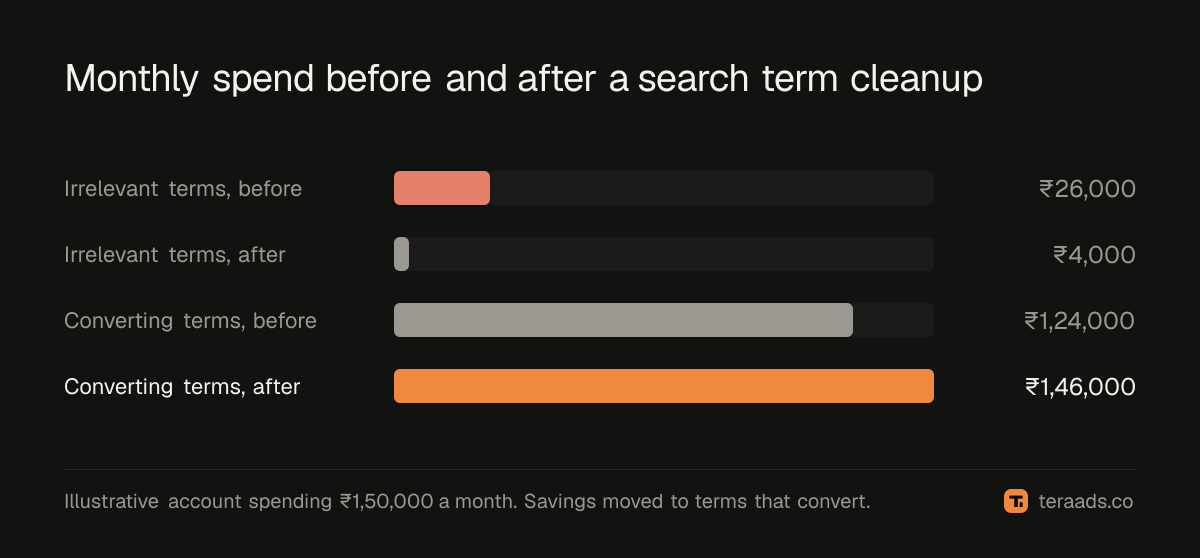
Clearing irrelevant terms saved about ₹22,000 a month here, with almost no lost orders. That money can go to the campaigns and terms that do convert, which is where the real gain comes from. Decide what "converts" means against your break-even ROAS, not Google's default conversion count.
Mistakes to avoid
- Adding negatives on too little data. Ten clicks and no sale is noise for a ₹2,000 product. Wait for enough spend.
- Blocking your own brand or best terms by accident. A negative broad "silver" on a silver jewellery account is a disaster. Read your negative list before saving.
- Judging on clicks or CTR. Judge on cost and conversion value.
- Doing it once. New searches appear every week, especially with broad match and Performance Max.
- Ignoring the Shopify side. Google conversions can include orders that are later cancelled or returned. Check terms against kept orders when you can.
Make it part of a weekly routine
A ten-minute weekly pass over the top terms by cost keeps the account clean. Tera Ads includes a Google Ads deep dive that lists wasted search terms, alongside disapproved Shopping products and a scaling plan, and shows every Meta Ads and Google Ads campaign in one table with profit worked out from your Shopify orders. It is free for one business.
Search terms are one of the seven leaks in a typical account. The others, from high-RTO campaigns to overlapping Meta audiences, are in the 30-minute wasted ad spend audit.
Frequently asked questions
How often should I check the search terms report?
Weekly for active campaigns, especially those using broad match or Performance Max. A monthly deeper review across 90 days catches slower patterns.
Can I add negative keywords directly from the search terms report?
Google's help page says you can't add them directly from the report itself. Note the terms, then add them to the campaign's negative keywords or to a shared negative keyword list.
Should I add competitor names as negative keywords?
Only if competitor searches lose you money. Some brands bid on competitor names on purpose; others find them expensive and low-converting. Decide based on your own cost per order.
Will negative keywords reduce my traffic?
They reduce irrelevant traffic. Total clicks may fall, but conversions usually hold, so your cost per order improves.
What is a shared negative keyword list?
A list of negatives you create once and apply to many campaigns. It is the right place for terms that are never relevant to your business, like "jobs", "free" or "second hand".