How to Find Wasted Ad Spend in Meta and Google Ads: A 30-Minute Audit
Most ad accounts leak 10–30% of spend in the same seven places. A 30-minute audit across Meta Ads and Google Ads to find them, with what to fix first.
On this page
- Before you start: get the right baseline
- The seven places spend leaks
- The 30-minute audit
- Leak 1: search terms that never convert
- Leak 2: campaigns that win orders that come back
- Leak 3: your own ad sets bidding against each other
- Leak 4: creatives that have stopped working
- Leak 5: products that can't sell
- Leak 6 and 7: zombie campaigns, wrong places
- What to fix first
- Make the audit a habit, not a project
- Frequently asked questions
Wasted ad spend is money spent on ads that brings back no kept orders, or orders that cost more than they earn. It hides in the same places in almost every account: search terms that never convert, campaigns that win cheap orders that come back as RTO, audiences bidding against each other, tired creatives, products that can't sell, and budget left running on autopilot settings nobody checks. A 30-minute audit finds most of it.
Key takeaways
- Start from kept orders in Shopify, not from Ads Manager, so waste isn't hidden by attributed sales.
- In Google Ads, the search terms report is usually the biggest single source of waste.
- In Meta, look for overlapping audiences, high frequency and campaigns whose orders come back as RTO.
- Disapproved or out-of-stock products waste budget on Shopping and Performance Max.
- Fix the biggest leak first and give each change a week before judging it.
Before you start: get the right baseline
Waste is relative to results, and results should be orders you kept. If you judge campaigns on Ads Manager ROAS, a campaign full of cash-on-delivery orders that later return looks like a winner. So first pull, for the last 30 days:
- Ad spend by campaign from Meta Ads and Google Ads.
- Shopify orders by campaign (from UTM parameters), with cancellations, refunds and RTO marked.
- Your break-even ROAS. If you don't have one, the break-even ROAS guide takes ten minutes.
The seven places spend leaks
| Leak | Where to look | Typical sign |
|---|---|---|
| Irrelevant search terms | Google Ads search terms report | Clicks with zero conversions on unrelated searches |
| High-RTO campaigns | Shopify orders + shipment outcomes by campaign | Good ROAS in Ads Manager, poor true ROAS |
| Audience overlap | Meta Audiences, overlap tool | Ad sets with similar audiences and rising CPMs |
| Creative fatigue | Meta ad-level breakdown | Frequency above 3–4, CTR falling week on week |
| Unsellable products | Merchant Center, Shopify stock | Spend on products that are disapproved or out of stock |
| Zombie campaigns | Both platforms, sorted by spend | Spending every day, last profitable week long ago |
| Wrong locations or placements | Location and placement reports | Spend in regions you don't deliver to or that have high RTO |
The 30-minute audit
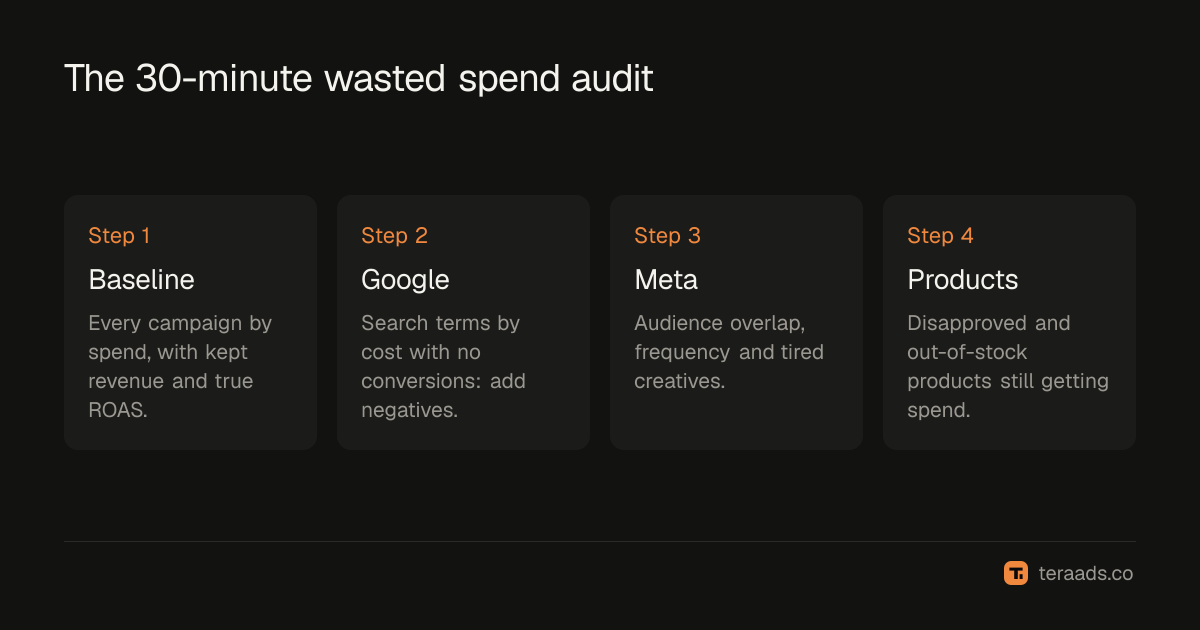
- List every campaign by spend. Put Meta and Google campaigns in one table for the last 30 days, sorted by spend. Your biggest campaigns are where waste costs the most.
- Add kept revenue per campaign. Join Shopify orders by UTM campaign and subtract cancellations, refunds and RTO. Calculate true ROAS per campaign.
- Mark every campaign below break-even. These are candidates to fix, cut or restructure. A campaign meant to find new customers can sit below break-even on purpose, but only by an amount you decided.
- Open the Google Ads search terms report. Sort by cost, filter to zero conversions, and add irrelevant terms as negative keywords. The full method is in finding wasted search terms.
- Check Meta audience overlap and frequency. Compare your main prospecting audiences in the overlap tool and look at frequency by ad set. Overlapping ad sets compete in the same auctions; see the audience overlap guide.
- Check product status. In Merchant Center, look for disapproved and limited products, and in Shopify for products with zero stock that are still advertised.
- Write down the top three leaks and the rupee value of each. Fix the biggest first.
Leak 1: search terms that never convert
Broad and phrase match keywords, and Performance Max, can show your ads for searches that only look related. A jewellery brand bidding on "silver earrings" can pay for "silver earrings meaning in dream" or "silver price today". Google's own guidance is to review the search terms report and add irrelevant terms as negative keywords (Google Ads Help). In most accounts this is the fastest money back.
Leak 2: campaigns that win orders that come back
The algorithms optimise for the purchase event you send them. Cash-on-delivery purchases are easy to win, and some of those buyers refuse delivery. A campaign can report 3x in Ads Manager and keep only 70% of that revenue. Rank campaigns by true ROAS after RTO, not platform ROAS; the gap between the two is often the biggest hidden waste in Indian accounts. The method is in true ROAS after RTO and COD.
Leak 3: your own ad sets bidding against each other
When two ad sets target heavily overlapping audiences, Meta has to choose between them in the same auctions, delivery becomes unstable, and you pay more to reach the same people. Merging overlapping ad sets, or excluding one audience from the other, usually lowers costs without losing reach.
Leak 4: creatives that have stopped working
Every creative wears out. When the same people see an ad four, five, six times, click-through falls and cost per purchase rises, while the ad keeps spending. Look at ad-level frequency and CTR trend; pause ads whose CTR has fallen by a third or more from their first two weeks, and rotate in new ones.
Leak 5: products that can't sell
Shopping and Performance Max campaigns spend on your product feed. Disapproved products can't show, which pushes budget onto fewer products, and out-of-stock products can still receive traffic if the feed lags. Both waste spend or opportunity. The fix list is in why Google Shopping products get disapproved.
Leak 6 and 7: zombie campaigns, wrong places
Old campaigns keep spending because nobody turned them off: a test from three months ago, a sale campaign after the sale. Sort by spend and ask of each one, "would I start this today?" Then check location and placement reports: spend in pincodes you can't deliver to, or regions with very high RTO, is waste even if it converts.
What to fix first
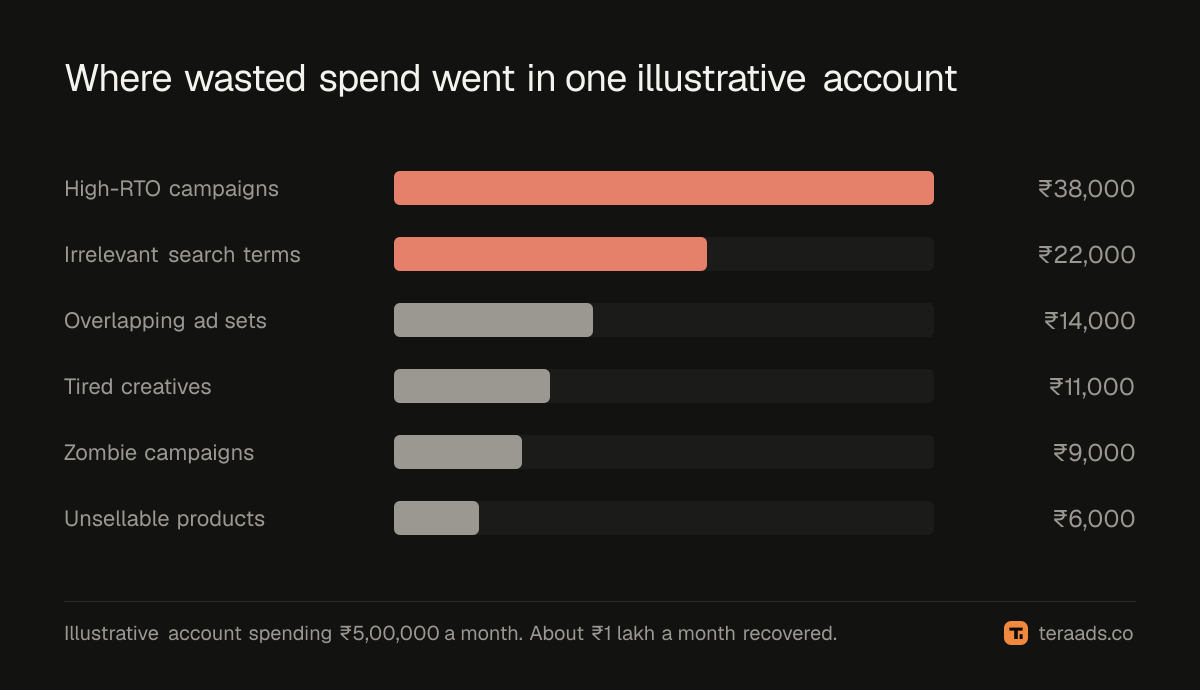
Rank leaks by rupees per month, not by how bad they look. A rule of thumb that works for most brands:
- Search terms and zombie campaigns: quick, safe, immediate savings.
- High-RTO campaigns: biggest hidden waste for COD-heavy brands, but changes take a week or two to show.
- Overlap and fatigue: structural fixes; plan them, don't rush them.
Change one thing per campaign at a time and give it a week, so you can tell what worked.
Make the audit a habit, not a project
The audit is only useful if you repeat it, and repeating it by hand means exporting from three tools every week. Tera Ads does the joining for you: every Meta Ads and Google Ads campaign in one table, with winners and money-wasters marked, and profit worked out from your Shopify orders after ad spend and RTO. It also includes Google deep dives (wasted search terms, disapproved Shopping products) and Meta deep dives (audience overlap, creatives that still work). It is free for one business.
If your Meta numbers and Shopify numbers don't match, read why they never agree before cutting anything.
Frequently asked questions
How much ad spend is typically wasted?
It varies widely, but it is common to find 10% to 30% of spend going to campaigns, search terms or products that bring back no profitable orders, especially in accounts nobody has audited for a few months.
Should I pause every campaign below break-even ROAS?
Not automatically. Check whether it is a prospecting campaign meant to win first orders, whether its data is mature (recent orders may still be in transit), and whether a smaller fix, like negative keywords or a new creative, would rescue it.
How often should I audit my ad accounts?
A quick pass weekly and the full audit monthly. Search terms and frequency change quickly; structure and audiences change slowly.
Is low CTR always wasted spend?
No. CTR is a signal, not a result. A low-CTR ad that brings kept orders at a good cost is fine. Judge ads on cost per kept order, and use CTR to spot fatigue.
Can I find wasted spend from Ads Manager alone?
Partly. Ads Manager shows spend and the purchases Meta attributes, but not refunds, RTO or the overlap with Google. Without Shopify order data, campaigns with high returns look like winners.