Meta Audience Overlap: How to Find It and When to Fix It
Overlapping ad sets compete in the same Meta auctions and raise your costs. How to check audience overlap, read the numbers, and fix it without losing reach.
On this page
Audience overlap is when two or more of your Meta ad sets target many of the same people, so your own ads compete for the same auctions. Some overlap is normal and harmless. Heavy overlap between ad sets with similar goals makes delivery unstable, raises costs and splits the learning Meta needs to optimise. You check it with the audience overlap tool in Ads Manager's Audiences section, then merge or exclude audiences where it matters.
Key takeaways
- Overlap matters when ad sets with the same goal and similar budgets chase the same people.
- Meta's overlap tool compares saved and custom audiences; the percentage depends on which audience you compare against.
- Broad targeting and Advantage+ audiences make classic overlap checks less useful, but self-competition still happens.
- Fix heavy overlap by consolidating ad sets or excluding audiences, not by adding more narrow ones.
- Judge the fix on cost per kept order over a week or two, not on CPM alone.
Why overlap costs money
Meta runs an auction for every ad impression. When two of your ad sets are eligible to show to the same person, Meta generally avoids entering both in the same auction against each other, and picks one. That sounds harmless, but in practice:
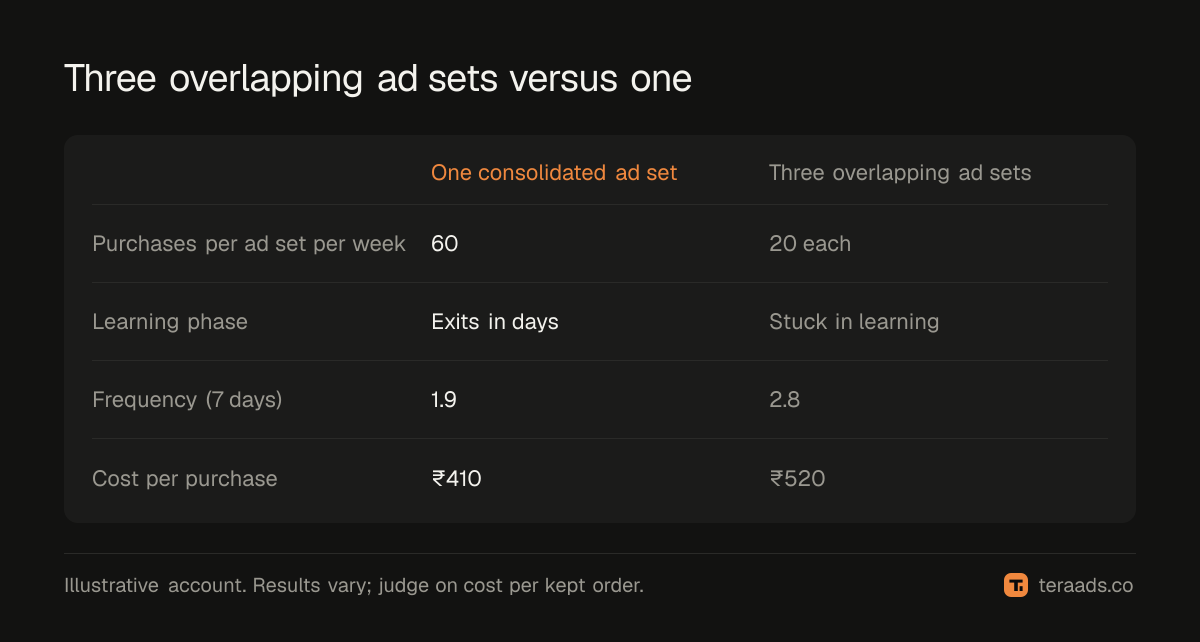
- Delivery becomes uneven. One ad set wins most auctions, the other under-delivers and may never leave the learning phase.
- Learning is split. Each ad set gathers fewer conversions, so each optimises worse than one combined ad set would.
- Frequency climbs. The same people see more of your ads from different ad sets, which speeds up creative fatigue.
The cost doesn't appear as a line item. It shows up as higher cost per purchase and ad sets that never stabilise, which is why it belongs in any wasted ad spend audit.
How to check overlap in Ads Manager
- Open Audiences in Meta Ads Manager. This lists your saved, custom and lookalike audiences.
- Select the audiences you want to compare. Typically your main prospecting audiences, or interest audiences used in different ad sets.
- Choose the option to show audience overlap. Meta shows how many people the selected audience shares with each comparison audience, as a count and a percentage.
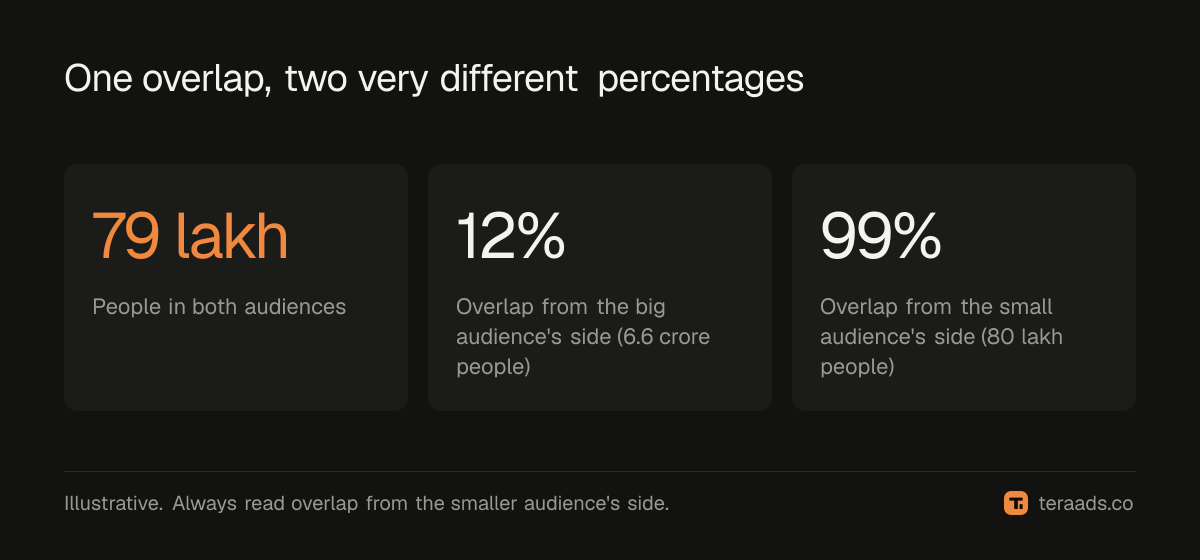
- Read the percentage from the right side. The share is relative to the audience you selected first. A small audience inside a big one can be 90% overlapped from its side and 5% from the big one's side.
- Note pairs that are used by live ad sets with similar goals. Overlap between audiences you don't run together doesn't matter.
Third-party guides disagree on how many audiences the tool compares at once and which audience types it accepts, and Meta changes the interface from time to time (Semrush's walkthrough is one clear example). Check the current menu labels in your own account.
How much overlap is too much
There is no official threshold. Practitioners use rough bands, and the context matters more than the number:
| Overlap (from the smaller audience's side) | What it usually means | Typical action |
|---|---|---|
| Under 10% | Little shared reach | Leave it |
| 10–30% | Some competition | Watch delivery and frequency |
| 30–50% | Meaningful self-competition if goals match | Consider merging or excluding |
| Above 50% | Mostly the same people | Consolidate into one ad set |
Overlap between a prospecting ad set and a retargeting ad set is usually fine if retargeting excludes recent buyers and the prospecting ad set excludes site visitors. Overlap between two prospecting ad sets with the same goal and budget is the expensive kind.
What about broad targeting and Advantage+?
Many accounts now run broad targeting or Advantage+ audiences, where Meta finds the buyers itself. The overlap tool can't tell you much about those, because there is no saved audience to compare. But self-competition still exists: three broad prospecting ad sets in the same country are, in effect, the same audience three times.
The signs to look for are behavioural rather than a percentage:
- Several prospecting ad sets with similar goals, each spending a little and none getting out of learning.
- CPMs rising across all of them at once.
- Frequency in prospecting climbing above what you'd expect for cold audiences.
How to fix overlap
Consolidate. Merge ad sets that target similar people with the same goal into one, with the combined budget. This is usually the strongest fix: one ad set with enough conversions learns faster than three starving ones.
Exclude. Where you need separate ad sets (different offers, different creative angles, retargeting vs prospecting), exclude one audience from the other. Exclude purchasers from prospecting, and recent site visitors from cold campaigns if you retarget them separately.
Separate by goal, not by interest. Splitting ad sets by small interest differences ("earrings" vs "jewellery" vs "fashion accessories") usually creates overlap without creating insight. Split by goal, offer or creative concept instead.
Change one thing at a time. Consolidating resets learning. Do it at a quiet time, not on the first day of a sale.
How to judge whether the fix worked
Compare cost per purchase and frequency for a week or two before and after, on kept orders rather than Ads Manager purchases. Meta's reported purchases can include orders that are later returned or claimed by Google too; the reasons are in why Meta Ads and Shopify never agree. In India, check RTO as well: an ad set that wins more cheap cash-on-delivery orders after consolidation can look better than it is, which the true ROAS guide explains.
Tera Ads includes a Meta Ads deep dive covering funnel, audience overlap and creatives that still work, and shows every Meta Ads and Google Ads campaign in one table, with profit worked out from your Shopify orders after returns. It is free for one business.
Frequently asked questions
Does audience overlap make me bid against myself?
Meta generally avoids putting two of your ad sets against each other in the same auction and picks one to enter. The cost comes from uneven delivery, split learning and higher frequency, rather than from literally outbidding yourself.
Should I worry about overlap between prospecting and retargeting?
Usually not, if each excludes the other's core audience: exclude recent visitors and buyers from prospecting, and keep retargeting to people who engaged or visited.
Can I check overlap for Advantage+ audiences?
Not with the classic overlap tool, because there's no saved audience to compare. Look for behavioural signs instead: several similar ad sets in learning, rising CPMs and high frequency.
Is more ad sets always worse?
No. Separate ad sets make sense for different goals, offers or creative tests. The problem is many ad sets with the same goal chasing the same people.
How long should I wait after consolidating ad sets?
At least a week, and long enough for the new ad set to leave the learning phase, before judging results.