Meta Conversions API for Shopify: Setup, Deduplication and Checks
The Conversions API sends purchases from the server, so Meta sees sales the pixel misses. How to set it up on Shopify, avoid double counting and check it.
On this page
The Meta Conversions API (CAPI) sends conversion events, such as purchases, from a server rather than the shopper's browser. Browser pixels miss events when ad blockers, privacy settings or closed pages get in the way; the server copy fills those gaps, which gives Meta better data to optimise on. On Shopify, the simplest setup is Meta's Facebook & Instagram sales channel app with the highest data sharing level, plus checks that events aren't counted twice.
Key takeaways
- CAPI sends events server-side, so Meta receives purchases the browser pixel misses.
- Use pixel and CAPI together, with a shared event ID so Meta can remove duplicates.
- On Shopify, Meta's sales channel app can send CAPI events without custom code.
- Check Event Match Quality and deduplication in Events Manager after setup.
- CAPI improves optimisation; it doesn't make Meta's numbers match Shopify exactly.
Why the pixel alone isn't enough
The Meta pixel runs in the buyer's browser. If the buyer uses an ad blocker, declines tracking, has strict browser privacy settings or closes the page before it loads, the purchase event may never reach Meta. Meta then optimises on incomplete data: campaigns that work look weaker, and the system learns from fewer buyers.
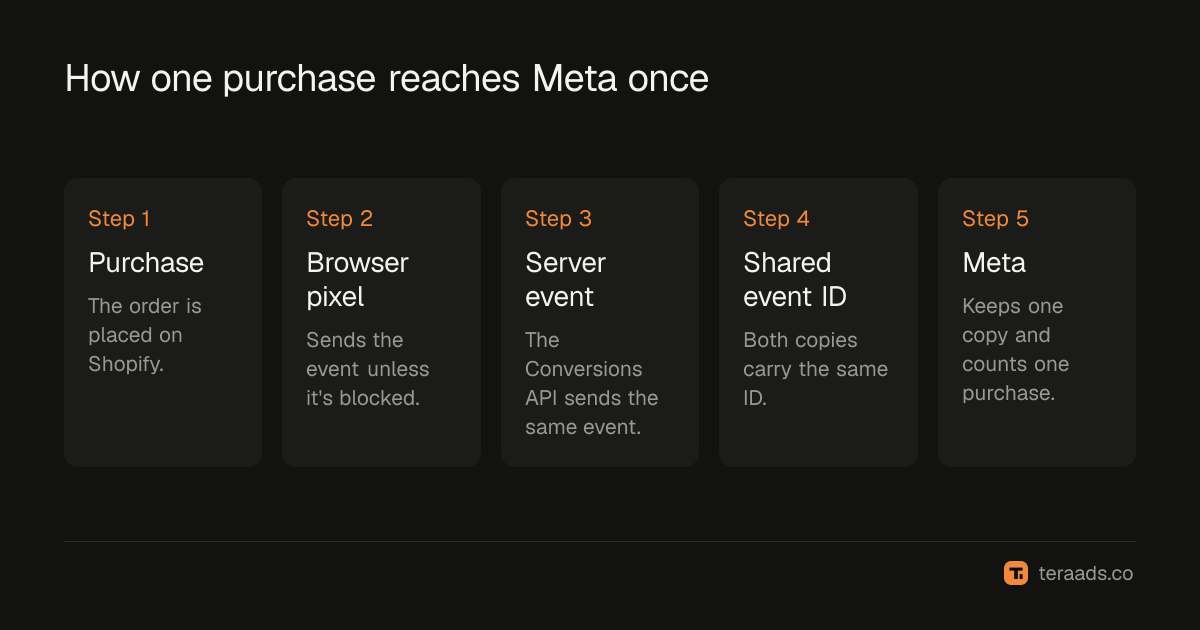
CAPI sends the same events from a server, independent of the browser. Meta combines both sources, removes duplicates and gets a fuller picture.
| Browser pixel | Conversions API | |
|---|---|---|
| Where it runs | Buyer's browser | A server (Shopify or your own) |
| Blocked by ad blockers or privacy settings | Often | No |
| Setup on Shopify | Meta sales channel app or theme | Meta sales channel app, or a partner or custom integration |
| Best used | Together with CAPI | Together with the pixel |
How to set it up on Shopify
- Install or open the Facebook & Instagram app (Meta's sales channel for Shopify) and connect your business account, ad account and pixel.
- Set data sharing to the highest level available. In the app's data sharing settings, choose the option that includes the Conversions API (shown as Maximum in recent versions), so events go through both browser and server.
- Remove duplicate pixels. Delete old pixel code pasted into the theme or added by other apps; one pixel managed by the app is enough.
- Check in Events Manager. Open your pixel's overview and confirm Purchase events show both "Browser" and "Server" as connection methods.
- Check deduplication. In the event details, Meta shows whether events are being deduplicated. Pixel and server events for the same purchase should share an event ID.
- Place a test order and confirm one Purchase event arrives with the right value and currency.
Event Match Quality
Events Manager shows an Event Match Quality score for server events, which reflects how well Meta can match each event to a person. Sending more customer information, such as hashed email and phone number, raises it. The Shopify app handles this automatically at higher data sharing levels. If the score is low, check that customer data is being shared and that consent settings allow it.
Deduplication: avoiding double counting
When both the pixel and CAPI send the same purchase, Meta needs to know they're the same event. It uses the event name and an event ID that both copies share. If the IDs don't match, Meta counts the purchase twice and your reported conversions inflate.
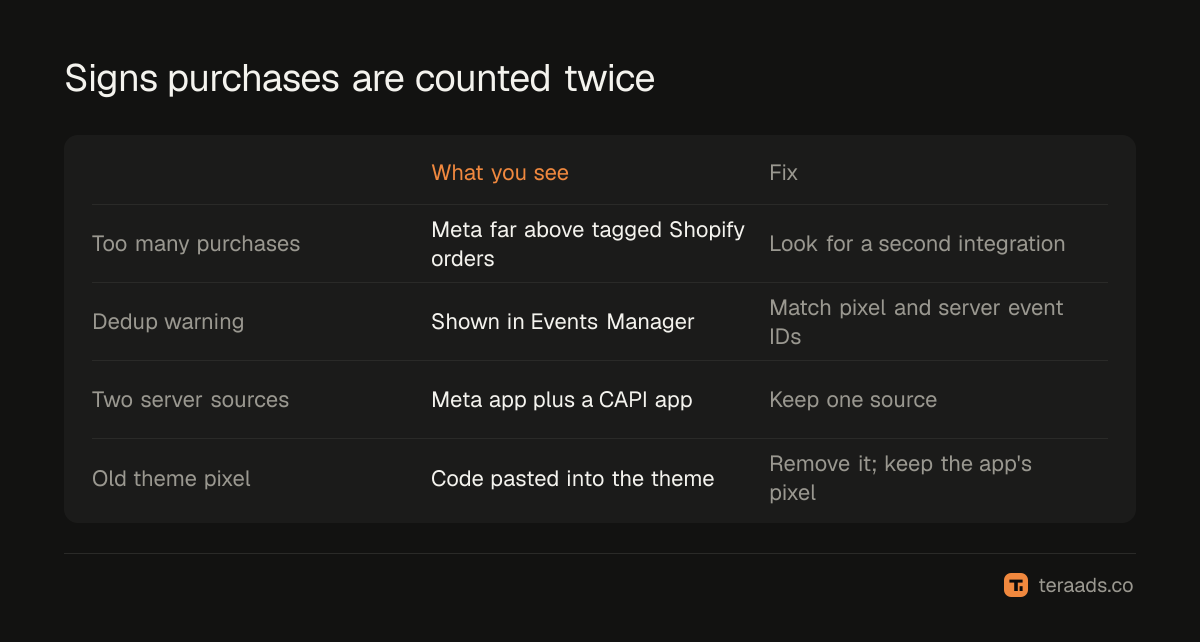
Signs of duplication:
- Meta reports noticeably more purchases than Shopify orders tagged as Meta, beyond the usual attribution gap.
- Events Manager shows a deduplication warning.
- Two apps both send server events for purchases.
Fix it by keeping one source of server events and making sure the pixel and server use the same event ID, which the official app does by default.
What CAPI does and doesn't fix
CAPI gives Meta better data for optimisation and attribution. It doesn't make Meta's purchase count equal Shopify's, because Meta still credits view-through purchases, counts orders later cancelled or returned, and models some conversions. The reconciliation steps in Meta Ads vs Shopify sales still apply, as do the window changes in attribution windows after January 2026. For campaign decisions, tag ads with UTMs so Shopify records campaigns independently; see the UTM guide.
Consent and privacy
Server events don't bypass a customer's privacy choices. Shopify's customer privacy settings and consent banner decide what data can be shared, and Meta's app follows them. If you sell to regions with strict consent rules, expect some events to be limited whatever your setup. In India, the Digital Personal Data Protection Act applies to the customer data you collect and share, so keep your privacy policy clear about what goes to advertising platforms.
Share only what's needed. Hashed email and phone number improve matching, and there's no reason to send more personal data than the integration asks for. If you build a custom server integration instead of using the official app, hash customer details before sending, as Meta requires, and limit access to the integration's access token to the people who need it.
Common mistakes
Running two server integrations. The Meta app plus a third-party CAPI app can double-send purchases.
Leaving old pixel code in the theme. It fires alongside the app's pixel and causes duplicates.
Wrong currency or value. Purchase values must match the store currency, or ROAS figures will be off.
Never checking Events Manager. Setups break silently after theme or app changes; look monthly.
Expecting perfect matches with Shopify. CAPI narrows the gap; it doesn't close it.
Tera Ads uses Shopify orders as the truth for sales and puts Meta Ads and Google Ads spend beside them, with every campaign from both platforms in one table. It is free for one business.
Frequently asked questions
Do I need the Conversions API if I have the Meta pixel?
It's strongly recommended. The pixel misses events blocked in the browser; CAPI sends them from the server so Meta optimises on more complete data.
Does Shopify support the Conversions API?
Yes. Meta's Facebook & Instagram sales channel app for Shopify can send server events when data sharing is set to the highest level.
What is event deduplication?
Meta's way of recognising that a pixel event and a server event describe the same purchase, using a shared event name and event ID, so it's counted once.
Will CAPI increase my reported ROAS?
Often a little, because Meta sees purchases it previously missed. Judge real results on Shopify orders, not on the change in Meta's numbers.
What is a good Event Match Quality score?
Higher is better. If yours is low, make sure customer details such as email and phone are shared with Meta through your integration and permitted by your consent settings.