Google Shopping Product Titles: A Formula That Wins More Searches
Product titles decide which Google Shopping searches you appear in. A title formula by category, what goes in the first 70 characters, and how to test.
On this page
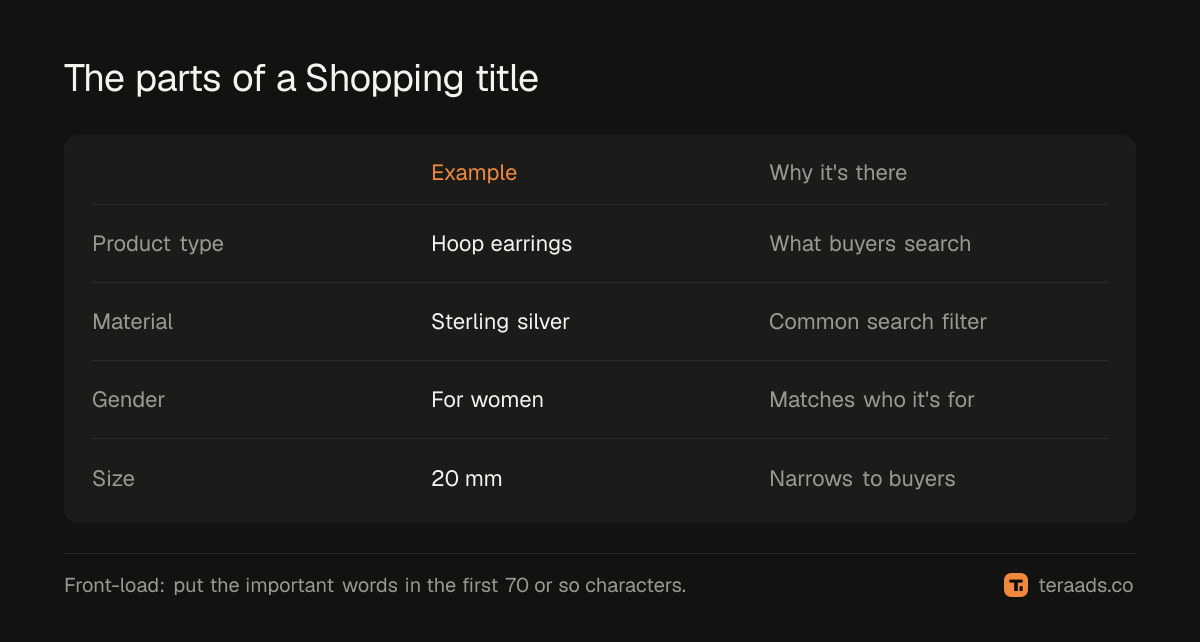
Your product title is the strongest signal Google uses to match Shopping ads to searches, and it's the first thing shoppers read. A good title says what the product is, then its most-searched attributes, in plain words: product type, brand where it helps, material or colour, size or variant, and who it's for. Titles can run to 150 characters, but put the important words in roughly the first 70, because longer titles are often cut.
Key takeaways
- Lead with the product type shoppers search for, not a collection or model name.
- Add the attributes people actually search: material, colour, size, gender, pack size.
- Front-load: the first 70 or so characters carry the most weight and are what shows.
- Don't add promotional text such as "sale" or "free shipping"; it breaks Google's rules.
- Test title changes on a group of products and compare impressions and clicks over weeks.
Why titles matter so much
Shopping ads have no keywords you choose. Google matches products to searches mainly from your feed: title, description, category and attributes (Google's product data specification). The title carries the most weight. A product called "Aurora" can only match searches for "Aurora"; one called "Aurora sterling silver hoop earrings for women, 20 mm" can match dozens of real searches.
The title is also the ad copy. On a crowded results page, a clear, specific title earns the click.
A title formula by category
| Category | Formula | Example |
|---|---|---|
| Jewellery | Type + material + stone or style + gender + size | Sterling silver hoop earrings for women, 20 mm |
| Apparel | Gender + type + fabric + fit + colour + size | Men's cotton crew-neck T-shirt, regular fit, navy, L |
| Beauty | Brand + product type + key benefit + size | Aurora vitamin C face serum for dull skin, 30 ml |
| Home | Type + material + size + colour + pack | Ceramic dinner plates, 10 inch, matte white, set of 6 |
| Food | Brand + product + flavour + weight + pack | Aurora roasted almonds, salted, 500 g, pack of 2 |
Put your brand first only when people search for it by name. For a new brand, the product type matters more.
How to rewrite your titles
- Find your top products. In Google Ads or Merchant Center, sort products by impressions or cost over the last 30 days. Start with the top 20 to 50.
- Check what people search. Look at search terms from your Shopping and Performance Max campaigns to see the words buyers use.
- Write the new title. Product type first, then the attributes buyers searched, in the formula for your category.
- Update the feed. Change the product title in Shopify, or override the feed title in your feed app if you want a different storefront title.
- Wait and compare. Give Google two to four weeks, then compare impressions, clicks and conversions against the previous period.
What not to put in titles
- Promotional text: "sale", "free shipping", "best price", "50% off". These break Merchant Center policy and can cause disapprovals; see the disapproved products guide.
- All capitals or decorative symbols.
- Keyword stuffing: repeating terms or listing unrelated searches.
- Internal codes that mean nothing to buyers, such as SKU numbers, unless buyers search for model numbers in your category.
Titles and attributes work together
Titles don't replace attributes. Colour, size, gender, age group and material belong in their own feed attributes too, especially for apparel and accessories where some are required. Matching the title to the attributes helps Google understand the product and avoids mismatches. The feed attributes guide lists what to fill.
Testing titles properly
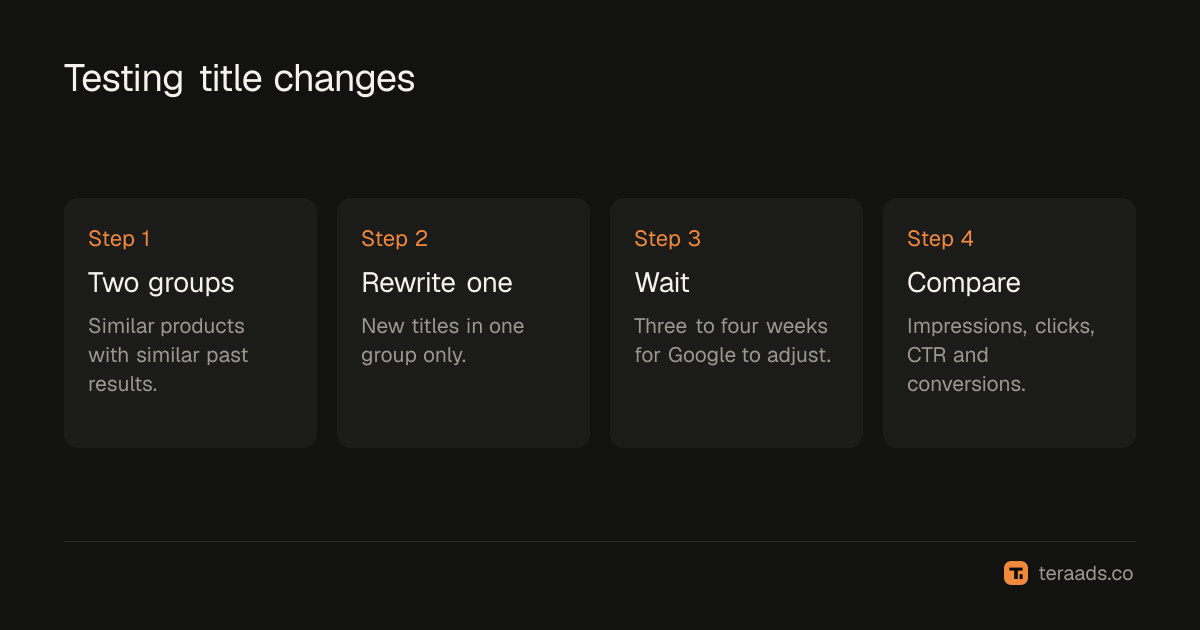
Title changes take time to show. A simple test:
- Pick two similar groups of products with similar past performance.
- Rewrite titles in one group only.
- Compare over three to four weeks: impressions, clicks, CTR and conversions for both groups.
Better titles usually show first as more impressions on relevant searches, then more clicks. Watch the search terms report too; better titles should bring more relevant searches and fewer wasted ones. In Performance Max, the Performance Max guide covers the search terms report.
Using descriptions and product types too
Titles carry the most weight, but Google also reads the description and product type. Use the description to cover what the title can't: materials, dimensions, occasions, care, and the other words buyers use. Write it for people first, in plain sentences, and include the important terms naturally rather than as a list.
The product_type attribute lets you describe your own category path, such as "Jewellery > Earrings > Hoops". It helps Google understand the product and gives you a way to group products in campaigns. Keep it consistent across the catalogue.
Finally, images matter as much as titles for clicks. A clear product image on a plain background, without promotional overlays, earns more clicks for the same title. Google's policies forbid watermarks and promotional text on images, and breaking them can cause disapprovals, which the disapproved products guide explains.
Titles for variants
When a product comes in several colours or sizes, each variant is a separate item in the feed. Put the variant's own colour or size in its title, and use item_group_id to link the variants together. A shopper searching for "black hoop earrings" should see the black variant's title and image, not the silver one. Shopify's Google & YouTube app and most feed apps can build variant titles automatically from options; check a few in Merchant Center to make sure they read well.
Tera Ads includes a Google Ads deep dive that lists disapproved Shopping products next to wasted search terms and a scaling plan, and shows every Meta Ads and Google Ads campaign in one table with profit worked out from your Shopify orders. It is free for one business.
Frequently asked questions
How long should a Google Shopping title be?
Up to 150 characters are allowed. Put the most important words in roughly the first 70, because ads often show only the start of the title.
Should I put my brand name first?
Only if shoppers search for your brand. For newer brands, start with the product type and add the brand later in the title.
Can my Google Shopping title differ from my Shopify product title?
Yes. Many feed apps let you override the feed title, so your store can keep a short display name while the feed uses a descriptive one. Keep them consistent in meaning.
How soon will title changes affect results?
Google processes feed updates within a few days, but performance changes take a few weeks to judge. Compare over three to four weeks.
Do titles matter for Performance Max?
Yes. Performance Max uses the same feed for its Shopping placements, so better titles improve its matching too.