Performance Max for Shopify Stores: Setup, Controls and Common Mistakes
How Google's Performance Max works for a Shopify store, which controls you now have (negatives, search terms, channel reports), and the mistakes that waste budget.
On this page
Performance Max is a Google Ads campaign type that runs one budget across Search, Shopping, YouTube, Display, Discover, Gmail and Maps, using your Merchant Center product feed and the assets you give it. For a Shopify store it is often the main Google campaign. In 2025 Google added real controls: campaign-level negative keywords, a search terms report and channel reporting. Use them, keep the feed clean, and judge it on profit, not its own ROAS.
Key takeaways
- Performance Max is only as good as your product feed; most problems start in Merchant Center.
- You can now add campaign-level negative keywords and see search terms, so check them weekly.
- Separate brand searches, or Performance Max will take credit for people already looking for you.
- Split products by margin or performance into asset groups or campaigns, so budget goes where profit is.
- Judge it on kept orders and profit from Shopify, not on Google's reported ROAS.
How Performance Max works for a store
You give Google three things: a goal (usually purchases, with a value), a budget, and inputs. The inputs are your Merchant Center feed, plus images, videos, headlines and descriptions grouped into asset groups. Google then decides where to show what, across all its channels, from one campaign.
For a Shopify store the feed does most of the work. Shopping placements usually take most of the spend for product-heavy stores, so product titles, images, prices and attributes matter more than ad copy. The Merchant Center feed attributes guide covers what to fill in.
The controls you have now
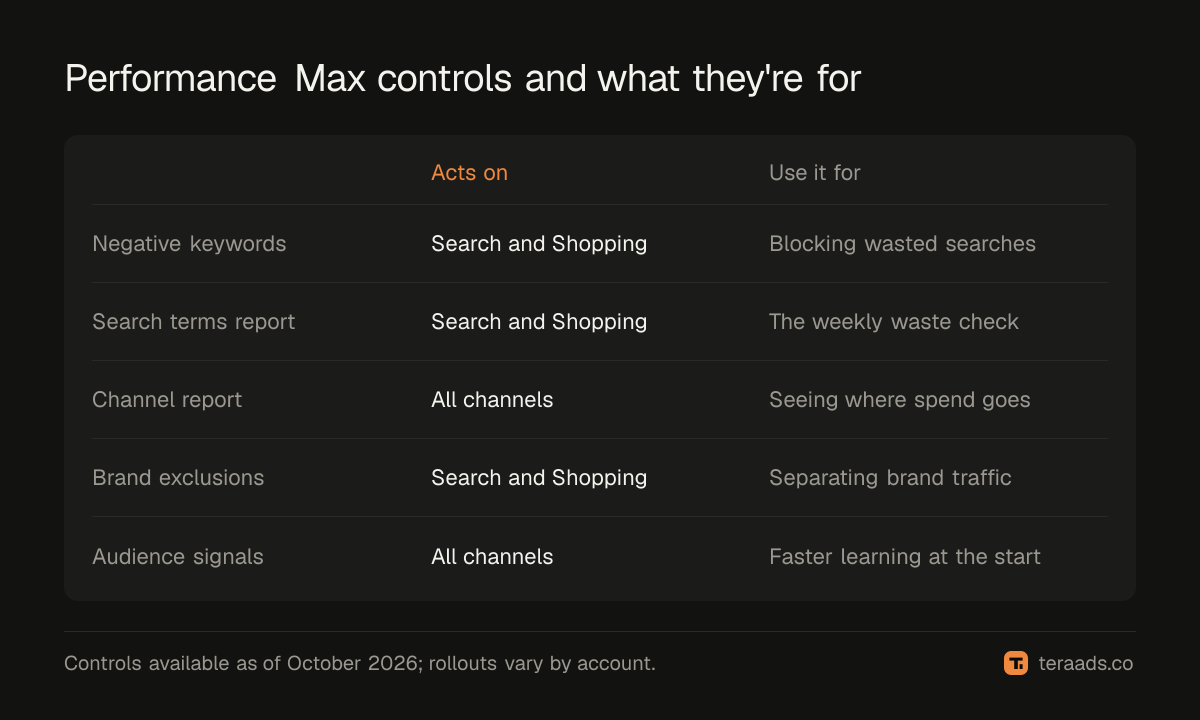
For years Performance Max was a black box. In 2025 Google added controls that change how you should manage it (Google's summary of new Performance Max controls):
| Control | What it does | Use it for |
|---|---|---|
| Campaign-level negative keywords | Stops ads on matching searches in Search and Shopping inventory | Blocking irrelevant and loss-making searches |
| Search terms report | Shows the searches that triggered your ads, with clicks, cost and conversions | The weekly waste check |
| Channel performance report | Splits results by Search, Shopping, YouTube, Display and more | Seeing where the money actually goes |
| Brand exclusions | Keeps the campaign off searches for brands you list | Separating brand from non-brand |
| Asset and audience signals | Tells Google what good customers look like | Faster, better targeting at the start |
Google raised the limit to 10,000 negative keywords per Performance Max campaign in 2025 (PPC Land), and search terms now appear in a report much like the one for Search campaigns (Google's search terms report for Performance Max). Rollouts are gradual, so check what your own account shows.
A clean setup for a Shopify store
- Fix the feed first. No disapproved products, complete titles, correct prices, all required attributes. See the disapproved products guide.
- Track purchases with value. The Google & YouTube app for Shopify or Google tag, with purchase values, and no duplicate conversion actions counting the same order.
- Split by what matters. Separate best-sellers, low-margin products and new products into different asset groups or campaigns, so you can give each a budget and target that fits.
- Exclude your brand. Run a small brand Search campaign and add brand exclusions to Performance Max, so you can see the value of new customers separately.
- Add audience signals. Your customer list, site visitors and the search themes your buyers use.
- Set a realistic target. Start without a tight ROAS target, or with one close to what you already achieve, and tighten it once the campaign has data.
Common mistakes that waste budget
Letting brand traffic flatter the results
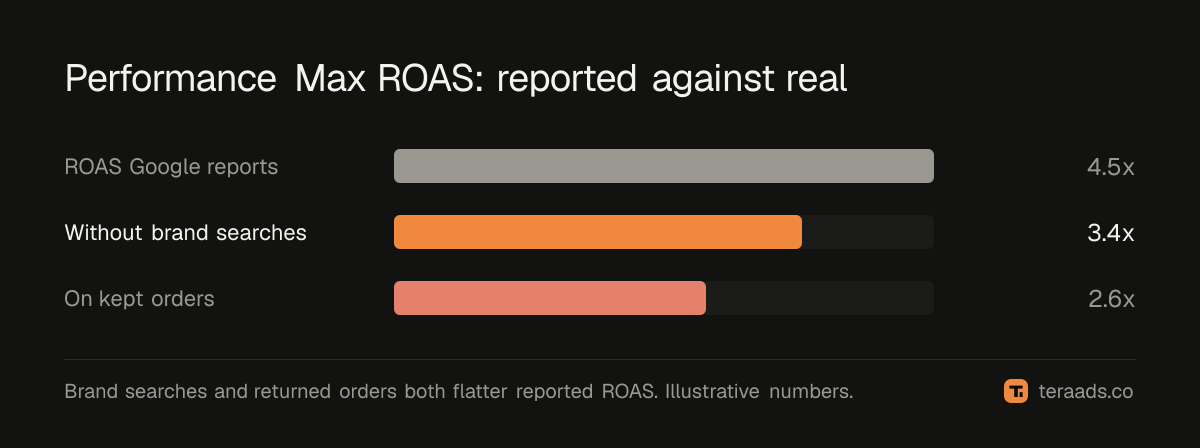
Without brand exclusions, Performance Max often shows on searches for your own name. Those people were coming anyway, so the campaign looks far more profitable than it is.
Ignoring search terms
Now that you can see them, there's no reason to pay for irrelevant searches. Run the same weekly check you would on Search, as in the wasted search terms guide.
One campaign for every product
A single campaign spends where conversion is easiest, often on cheap products or ones with thin margins. Group products by margin so profit, not volume, drives budget.
A starving campaign
When most of the budget goes unspent, the cause is usually limited eligible products or policy issues, not too low a budget. Raising the budget won't help until the feed is fixed.
Judging on Google's ROAS
Google reports conversions it attributes to its ads, including orders later cancelled or returned. For a brand with cash-on-delivery orders, real ROAS can be far lower. True ROAS after RTO and COD shows the gap.
A weekly Performance Max routine
- Search terms: add negatives for irrelevant or loss-making searches.
- Channel report: check that spend isn't drifting to placements that don't sell.
- Merchant Center: fix any new disapprovals or warnings.
- Products: check which products get spend and whether they make money after returns.
- Results: compare Google's conversions with Shopify orders from Google for the same week.
Asset groups that earn their place
Each asset group pairs a set of products with its own images, videos, headlines and audience signals. Make one per real product theme, such as earrings, necklaces or gift sets, rather than one per product. Give each group enough products to learn from, and its own creative that matches those products. A gift-set group with gifting images and a gifting audience signal will usually beat a single catch-all group.
Tera Ads includes a Google Ads deep dive that lists wasted search terms, disapproved Shopping products and a scaling plan, and shows every Meta Ads and Google Ads campaign in one table with profit worked out from your Shopify orders. It is free for one business.
Frequently asked questions
Is Performance Max good for Shopify stores?
For most product-based stores it is the main Google campaign, because it combines Shopping with other placements. It works best with a clean feed, accurate conversion tracking and brand traffic separated out.
Can I add negative keywords to Performance Max?
Yes. Campaign-level negative keywords are available and apply to Search and Shopping inventory. Google raised the limit to 10,000 per campaign in 2025.
Can I see search terms in Performance Max?
Yes. Google added a search terms report for Performance Max in 2025, rolling out gradually. It shows the searches that triggered your ads with clicks, cost and conversions.
Should I run Standard Shopping alongside Performance Max?
Some advertisers do, for tighter control over specific products. If both target the same products they compete for the same auctions, so test carefully and watch which campaign gets the spend.
Why is my Performance Max not spending its budget?
Usually because few products are eligible: disapprovals, missing attributes, policy limits or a tight ROAS target. Fix the feed and loosen the target before adding budget.