MCP Connectors Explained: How AI Assistants Reach Your Ad Accounts
MCP lets Claude, ChatGPT and other assistants use tools like Meta Ads and Google Ads. What it is, how sign-in and permissions work, and the risks to manage.
On this page
MCP, the Model Context Protocol, is an open standard that lets an AI assistant use tools in another service, such as reading campaign reports from Meta Ads. A service publishes an MCP server listing its tools; an assistant such as Claude or ChatGPT connects to it, usually after you sign in, and calls those tools when you ask a question. The assistant can only do what the server offers and your permissions allow.
Key takeaways
- An MCP server describes tools; an MCP client, the assistant, decides when to call them.
- Remote servers are hosted by the service and reached over the internet; local servers run on your own computer.
- Sign-in usually uses OAuth, so the assistant gets a limited permission rather than your password.
- Meta and Google both publish official MCP servers for ads, with different capabilities.
- The risks are wrong answers, too much access and unreviewed changes, all of which you can manage.
How MCP works
Think of an MCP server as a menu of actions a service is willing to perform for an assistant. Each tool has a name, a description and the inputs it needs, such as "get insights for an ad account between two dates". When you ask a question, the assistant reads the menu, picks the tools that help, calls them, and uses the results to answer.
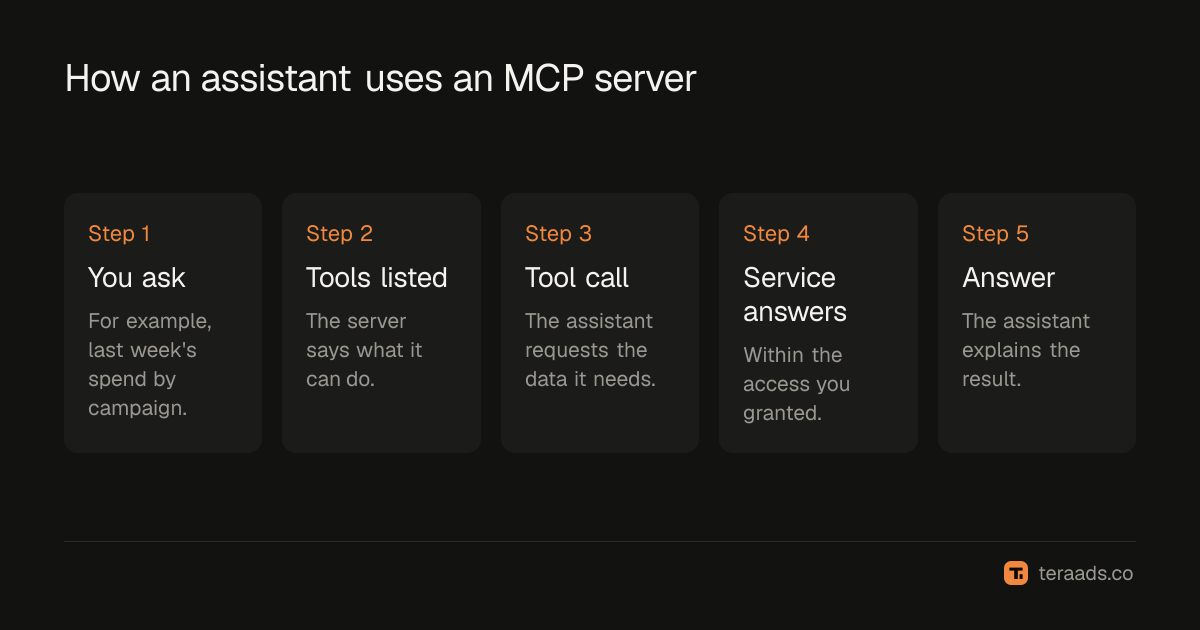
The protocol is the same whatever the service. That's why one assistant can work with Meta Ads, Google Ads, a spreadsheet and your email through separate connectors, and why one connector can work with several assistants.
Remote and local servers
| Remote server | Local server | |
|---|---|---|
| Where it runs | On the service's own infrastructure | On your computer or your own server |
| How you add it | Paste a URL, then sign in | Install it and add it to the assistant's configuration |
| Who maintains it | The service | You |
| Example | Meta's ads MCP server | Google's open-source Google Ads MCP server, run yourself |
| Best for | Non-technical users | Developers and teams with their own setup |
Hosted assistants such as Claude on the web connect to remote servers from their own cloud, so a remote server has to be reachable on the internet. Local servers suit desktop assistants and coding tools that can run programs on your machine.
Sign-in and permissions
Most remote servers use OAuth, the same sign-in pattern as "Log in with Google". You're sent to the service's own login page, you approve access, and the assistant receives a token with limited permissions. Your password never goes to the assistant, and you can revoke the access later from the service's settings.
What the assistant can do depends on three things: the tools the server offers, the permissions you granted at sign-in, and your own role in the account. If you only have read access to an ad account, no connector can give the assistant more.
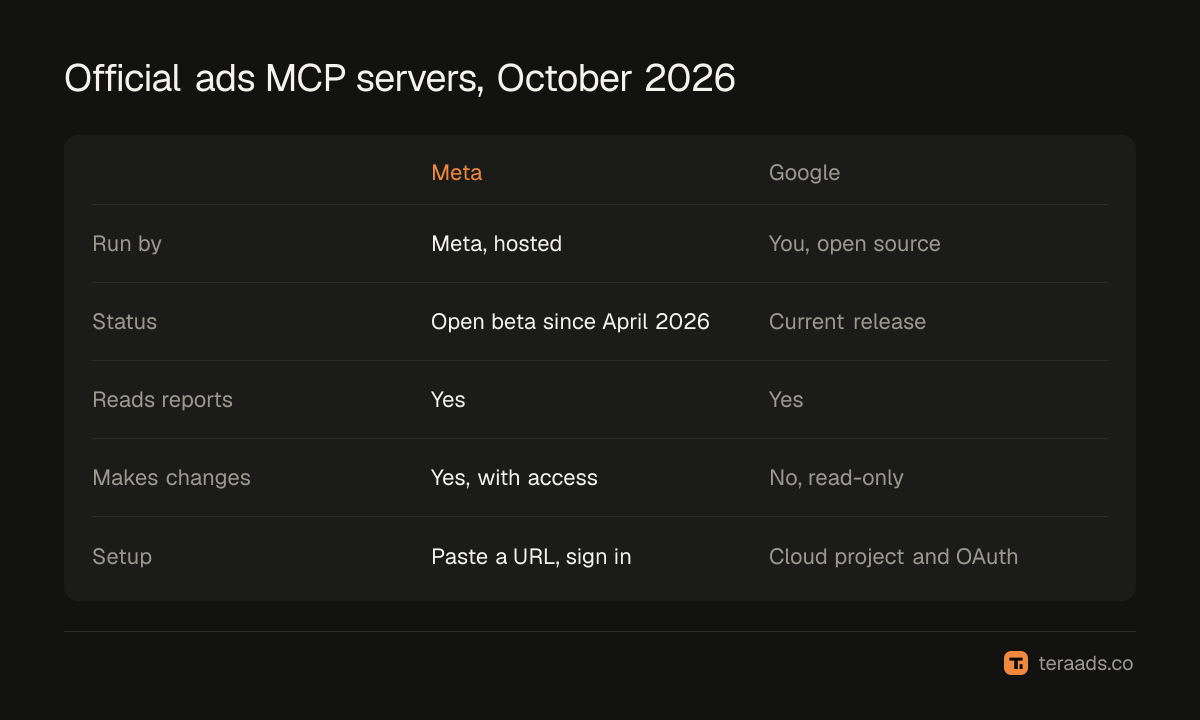
The official ads servers in October 2026
Meta. Meta announced its ads AI connectors in open beta on 29 April 2026: a hosted MCP server plus a command line tool. Its tools cover reporting, creating and editing campaigns, catalogs, signal diagnostics, A/B tests and lift studies, Help Center search and activity logs. A July 2026 update added rules that let business portfolio owners limit what agents can do. The Claude and Meta Ads guide shows the setup.
Google. Google publishes an open-source Google Ads MCP server. Its current release is read-only: it lists the accounts you can access, runs Google Ads Query Language searches for metrics and budgets, and describes the fields available. You run it yourself, locally or on your own cloud, with a Google Cloud project that has Google Ads API access. It can't change bids, pause campaigns or create assets.
Third-party servers exist for both platforms too, some with write access. They're run by other companies, so read their privacy and security terms before connecting.
Which assistants support MCP
Claude supports custom connectors to remote MCP servers on all its plans, with Free accounts limited to one. OpenAI documents full MCP support in ChatGPT, including actions that change data, for its Business, Enterprise and Edu workspaces, with developer mode controlled by workspace admins; check OpenAI's current help pages for personal plans. Desktop and coding assistants, such as Claude Code, can also run local servers. ChatGPT for ad analysis covers the ChatGPT side.
The risks, and how to manage them
- Wrong or partial answers. The assistant can misread a report or pick the wrong date range. Ask it to state dates, settings and currency, and check early answers by hand.
- Too much access. Grant only the accounts and permissions the task needs; reporting doesn't need write access.
- Unreviewed changes. Where a server can change campaigns, ask for a plan first and approve each change.
- Third-party data handling. A connector run by another company sees your data. Prefer official servers, or read the provider's terms.
Safe AI access to ad accounts turns these into a simple policy.
Common mistakes
Assuming the assistant sees everything. It only sees what the connector's tools return.
Connecting with an admin login by default. Use the narrowest role that works.
Forgetting to revoke. Remove connectors you no longer use, from both the assistant and the service.
Treating answers as reports. An assistant's summary is a starting point; your source of truth for sales is still your store.
Tera Ads uses your Shopify orders as the truth for sales and shows Meta Ads and Google Ads spend beside them, so assistant answers have something solid to be checked against. It is free for one business.
Frequently asked questions
What is an MCP server?
A service's list of tools that AI assistants can call, such as fetching campaign reports. It follows the open Model Context Protocol, so many assistants can use it.
Is MCP safe for ad accounts?
It can be, with care: sign in through the service's own login, grant the narrowest access, review changes before they happen and revoke access you no longer need.
What's the difference between a connector and an MCP server?
The server is what the service publishes. "Connector" is what assistants such as Claude call the link you add to reach that server.
Do Meta and Google have official MCP servers?
Yes. Meta hosts an ads MCP server, in open beta since April 2026. Google publishes an open-source Google Ads MCP server that is read-only in its current release.
Do I need to code to use MCP?
Not for remote servers like Meta's: you paste a URL and sign in. Running a local server, such as Google's, needs some technical setup.