How to Use Claude With Meta Ads: Connect, Ask and Stay in Control
Meta's official ads connector lets Claude read and manage your ad account. How to connect it, what to ask first, and how to keep changes under your control.
On this page
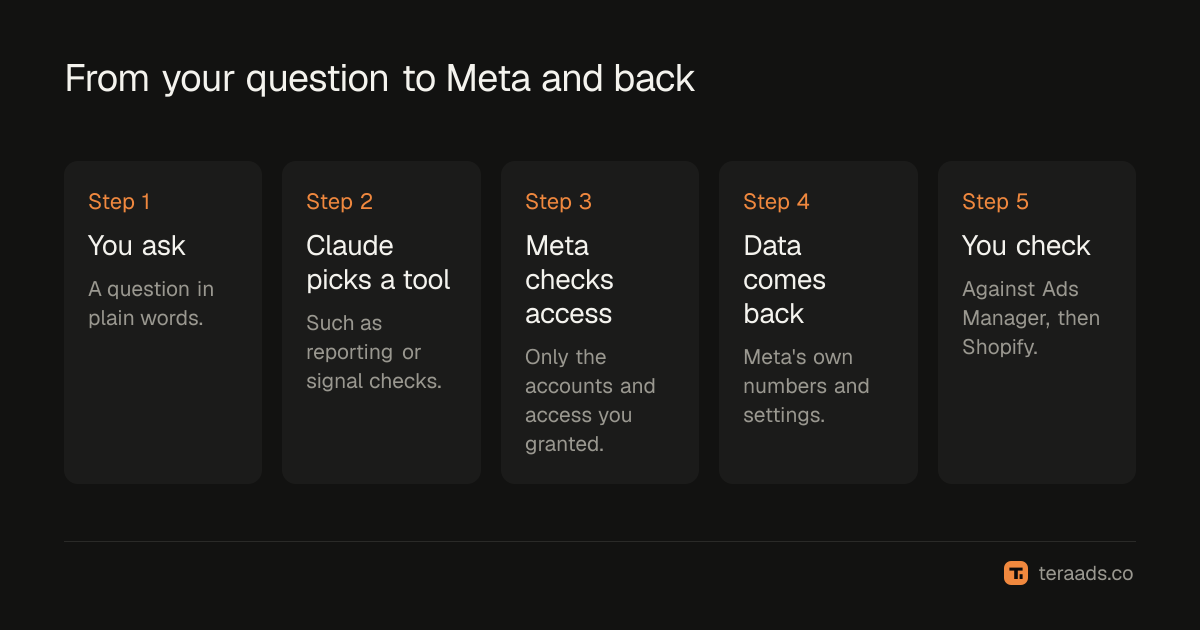
You can connect Claude to Meta Ads through Meta's official ads MCP server, which Meta opened as a beta in April 2026. Add it to Claude as a custom connector, sign in with Facebook and choose the ad accounts it may use. Start with reporting questions, check the first answers against Ads Manager, and review every change yourself before it goes live, especially anything that touches budgets.
Key takeaways
- Meta's ads AI connectors, announced on 29 April 2026, let any MCP-compatible assistant, including Claude, work with your ad account.
- Setup is a sign-in, not a developer project: add the server address in Claude and log in with Facebook.
- Claude reports what Meta reports, so the usual gaps between Meta and Shopify still apply.
- The connector can create and edit ads, so decide in advance what Claude may change.
- Business portfolio owners can set rules that limit what AI agents may do on an ad account.
What the Meta ads connector is
Meta announced its ads AI connectors in open beta on 29 April 2026. They include an MCP server that Meta hosts and a command line tool for developers. MCP, the Model Context Protocol, is an open standard that lets an AI assistant call tools in another service; MCP connectors explained covers how it works. Meta's server works with any MCP-compatible assistant, and no developer credentials or coding are needed to use it.
According to Meta's documentation, the server's tools cover these areas:
| Area | What an assistant can do |
|---|---|
| Reporting | Pull performance insights and detailed reports |
| Ads and campaigns | Create and edit campaigns, ad sets and ads |
| Catalogs | Create catalogs, add product data, troubleshoot feeds |
| Signals and datasets | Check the health and quality of your pixel and Conversions API signals |
| Help | Search Meta's Business Help Center |
| Tests | Create and review A/B tests and conversion lift studies |
| Activity logs | See changes made to an ad account, like campaign history in Ads Manager |
In July 2026 Meta added two things: the option to connect an AI application through your own developer app, and rules that let people with full control of a business portfolio govern what AI agents can do on its ad accounts, including budget changes and catalog updates.
Before you start
- A Claude account. Anthropic offers custom connectors on its Free, Pro, Max, Team and Enterprise plans; Free accounts are limited to one custom connector. On Team and Enterprise plans, an owner adds the connector for the organisation and members then connect individually.
- Access to the ad account. Use a Facebook login with the right role in your business portfolio. If an agency runs your ads, agree who connects and with what access.
- A decision about changes. Decide whether Claude will only report, or also prepare changes for you to approve. Write it down; the guide to safe AI access has a simple policy you can copy.
Connecting Claude, step by step
- Open Claude's connector settings. In Claude on the web or the desktop app, open the connectors section of your settings and choose to add a custom connector.
- Add Meta's server address. Name it something clear, such as "Meta Ads", and paste the address from Meta's documentation; at the time of writing it was https://mcp.facebook.com/ads. Beta details change, so check the current address first.
- Sign in with Facebook. Claude opens Meta's sign-in. Log in with the account that has access to your business portfolio.
- Choose ad accounts and access. Grant only the ad accounts Claude needs, and the narrowest access that covers what you want it to do.
- Turn it on in a conversation. Enable the connector in a chat and ask something simple, such as "List my active campaigns with yesterday's spend for each."
- Check the answer against Ads Manager. Compare spend and results for a day or two before you rely on anything bigger.
Good first questions
Start with questions whose answers you can check in Ads Manager in a minute. Once the numbers match, move to questions that save real time. The prompt library for ads analysis has more.
| Question | Why it's useful |
|---|---|
| "Which ad sets spent the most last week, and what was the cost per purchase for each?" | A quick, checkable summary |
| "Which ads have frequency above 3 and falling click-through rate over 14 days?" | Spots creative fatigue early |
| "Compare this week's CPM and CTR with the previous four weeks, by campaign." | Separates auction changes from creative problems |
| "Is my pixel and Conversions API signal healthy? List any warnings." | Uses the signal diagnostics tools |
| "Which ad sets are still in the learning phase, and why?" | Explains unstable results |
Ask for the date range, attribution setting and currency in every answer. It makes mistakes obvious and saves arguments later.
Read Meta's numbers the way you read Ads Manager
Claude doesn't have its own view of your sales. It reports what Meta reports: purchases and revenue that Meta attributes to your ads, under your attribution setting, including orders later cancelled or refused. Everything in why Meta Ads and Shopify disagree still applies.
For cash-on-delivery brands this matters most. A campaign Claude calls your best performer by Meta ROAS may have the most refused orders. Before acting on a recommendation to scale, check that campaign's kept orders in Shopify; true ROAS after RTO and COD shows how. A good habit is to tell Claude your break-even ROAS and your typical RTO rate at the start of a conversation, and ask it to flag any campaign whose platform ROAS is close to that line.
Changes: keep a person in the loop
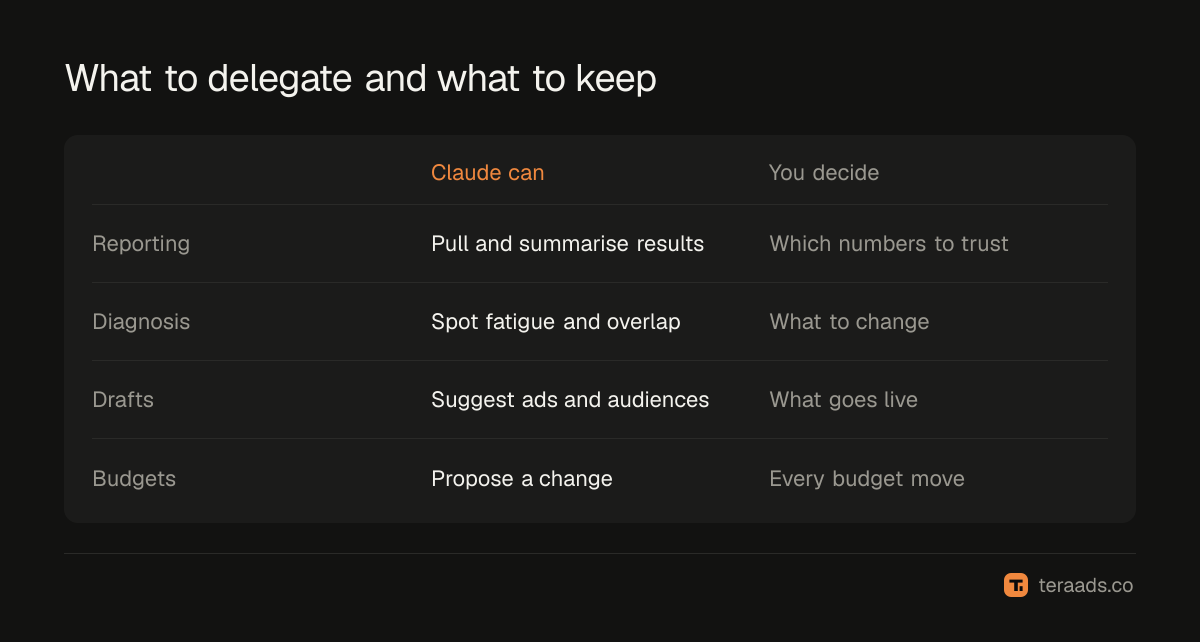
Because the connector can create and edit campaigns, an instruction such as "pause the worst ad sets" can become real changes in seconds. Some simple rules keep that safe:
- Ask for a plan before any change. "List what you would change and why, but don't change anything yet." Read it, then approve specific items.
- Never delegate budget changes blindly. Review every budget or bid change yourself, and keep changes small.
- Use portfolio rules. If you have full control of the business portfolio, use Meta's MCP server rules to limit what agents can do, for example blocking budget changes.
- Check the activity log afterwards. Confirm that only the approved changes were made.
Common mistakes
Trusting the first answer. Check a few numbers against Ads Manager before relying on any summary.
Mixing attribution settings. Compare like with like; ask Claude to state the setting it used.
Granting more access than needed. Reporting doesn't need permission to change budgets.
Scaling on Meta ROAS alone. For COD stores, confirm results with kept Shopify orders first.
Letting changes go unlogged. Keep a note of what was changed, when and why, so you can judge the result later.
Tera Ads puts Meta Ads and Google Ads spend beside your Shopify orders, with profit after returns for every campaign, so you can check what an assistant tells you against real sales. It is free for one business.
Frequently asked questions
Can Claude connect to Meta Ads?
Yes. Meta's ads MCP server works with MCP-compatible assistants, and Claude supports custom connectors. Add the server address in Claude and sign in with Facebook.
Is the Meta ads connector official?
Yes. Meta announced its ads AI connectors, including the MCP server, in open beta on 29 April 2026.
Can Claude change my Meta campaigns?
The connector includes tools to create and edit ads, ad sets and campaigns, depending on the access you grant. Ask for a plan first and approve changes yourself.
Do I need a paid Claude plan?
Anthropic offers custom connectors on all plans, but Free accounts can add only one. Paid plans also give more usage for longer analysis.
Will Claude's numbers match Shopify?
No. Claude reports Meta's attributed results, which include orders later cancelled or returned. Use Shopify orders as the truth for sales.