Safe AI Access to Ad Accounts: Permissions, Rules and Reviews
Connecting Claude or ChatGPT to Meta Ads and Google Ads is useful and risky. A simple access policy: who connects, what AI may change, and how to review it.
On this page
Give AI assistants the least access that does the job: read-only for reporting, and changes only after a person approves them. Connect through the platform's official sign-in, limit the accounts and permissions you grant, use Meta's portfolio rules to block budget changes, and check activity logs weekly. Write the policy down so everyone who connects an assistant follows the same rules, and revoke access you no longer use.
Key takeaways
- Decide one of three levels for each assistant: report only, prepare changes, or make approved changes.
- Connect with a login whose role matches that level; the assistant can't exceed your own access.
- Meta lets business portfolio owners set rules limiting what AI agents may do, including budget changes.
- Google's official Google Ads MCP server is read-only in its current release.
- Review activity logs and revoke unused connections regularly.
Why this needs a policy
Assistants connected to ad accounts can do in seconds what used to take an hour in Ads Manager, including mistakes. A misunderstood instruction such as "cut the losers" can pause campaigns that were still learning, or move budget based on platform ROAS that ignores returns. None of this needs bad intent; it only needs too much access and no review step. A one-page policy prevents most of it.
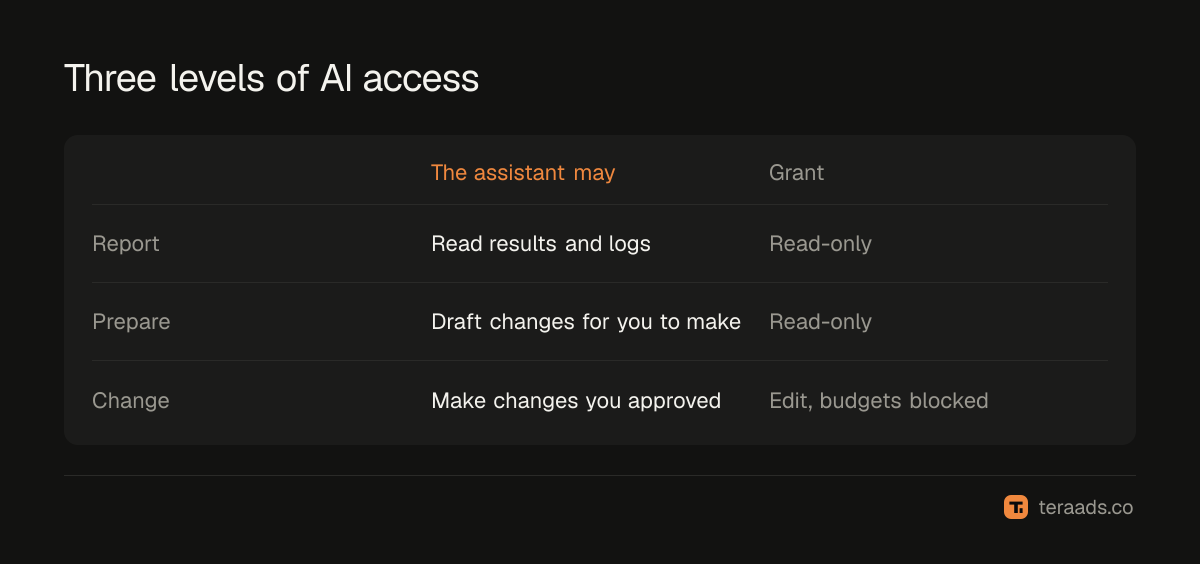
Three levels of access
| Level | What the assistant may do | Typical use | Access to grant |
|---|---|---|---|
| Report | Read performance, settings and logs | Weekly summaries, diagnosis | Read-only permissions |
| Prepare | Read, and draft changes for a person to make | Audit plus a to-do list | Read-only, with changes made by hand |
| Change with approval | Make specific changes a person approved | Pausing named ads, uploading approved creatives | Edit permissions, no budget rules where possible |
Start every assistant at Report. Move to Change with approval only after weeks of accurate reports, and only for low-risk tasks.
Platform controls you can use
Meta. When you connect an assistant to Meta's ads MCP server, you sign in with Facebook and choose what to grant. Since July 2026, people with full control of a business portfolio can set MCP server rules that govern what AI agents can do on its ad accounts, including budget changes and catalog updates. Use them. In Business settings, the person who connects should hold only the ad account tasks the assistant needs; someone with view-only performance access can't let an assistant edit campaigns. The Claude and Meta Ads guide walks through the sign-in.
Google. Google's official open-source Google Ads MCP server is read-only in its current release: it can query metrics and budgets but can't change bids, pause campaigns or create assets. Google Ads user access levels include Read only, Standard and Admin; connect with the lowest level that works. Third-party servers with write access exist; treat them like any other tool that can spend your money.
The assistant. Claude and ChatGPT both let you see and remove the connectors you've added. In team workspaces, admins decide which connectors members may use.
Rules for changes
- Plan first, always. Ask the assistant to list proposed changes with reasons and expected effects, without making them.
- Approve by name. Approve specific items ("pause ads 3 and 7"), not categories ("pause the bad ones").
- Never let an assistant change budgets on its own. Budget moves need context the assistant may lack, such as cash flow, stock and festive plans. See scaling Meta budgets safely.
- Keep changes small. Small steps are easy to judge and to reverse.
- Log every change. Date, what changed, who approved it and why.
Reviewing what happened
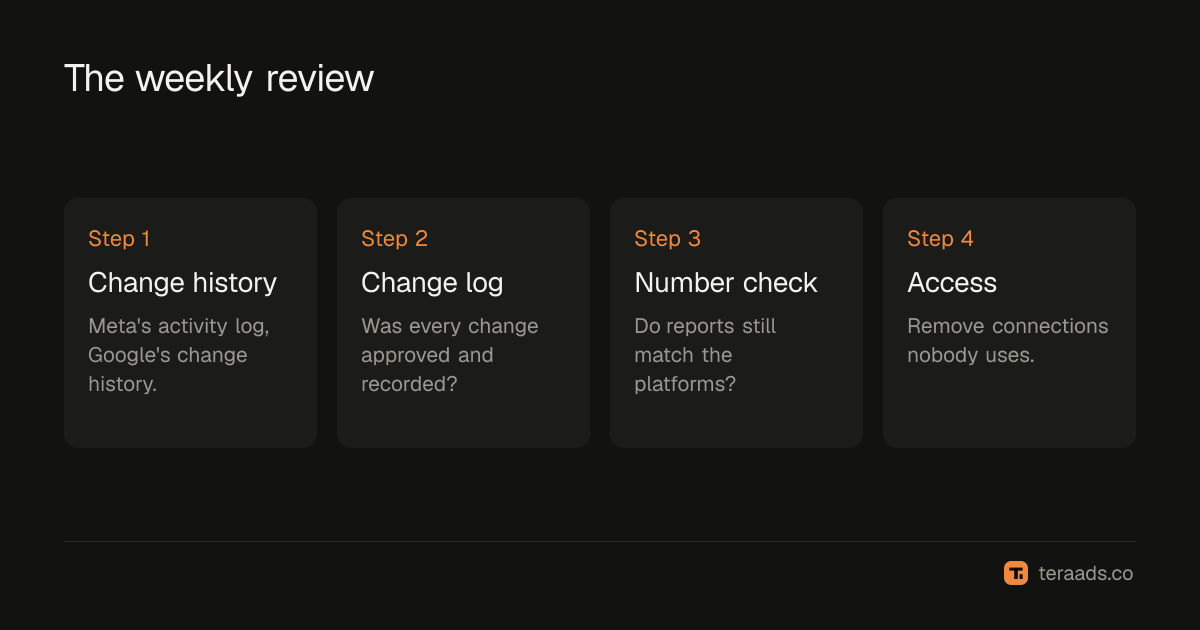
Once a week, open the account's change history: Meta's activity log and Google Ads change history. Compare it with your change log. Any change nobody remembers approving is a reason to tighten access. Also check that the assistant's reports still match the platform for the same dates; drift usually means a changed setting, such as the attribution window.
Data and privacy
Ad performance data is commercially sensitive but rarely personal. Order exports are different: they contain customer names, phones and addresses. Remove those before giving files to any assistant, and never paste passwords, tokens or payment details into a chat. Prefer official connectors over third-party ones, and read the provider's data terms when you do use a third party. In India, the Digital Personal Data Protection Act applies to customer data you share, so keep your privacy policy clear about the tools you use.
Revoking access
Remove a connection in two places: in the assistant's connector settings, and on the platform side, such as the business integrations area of your Facebook settings or the connected apps page of your Google account. Do it when a person leaves, when an agency relationship ends, or when an assistant hasn't been used for a month. MCP connectors explained describes how these sign-ins work.
Agencies and freelancers
If an agency or freelancer manages your ads, agree the same rules with them in writing. Ask which assistants they connect to your accounts, through which connectors and with what access. Their own login, not yours, should be the one connected, so their access can be removed in one step when the relationship ends. If they use third-party tools with write access, ask for the provider's name and data terms. Ask for their change log alongside their monthly report, and check it against the platform's change history. Good agencies welcome this; it protects them as well as you.
Common mistakes
Connecting as the business owner by default. Your full access becomes the assistant's potential access.
Approving vague instructions. "Optimise the account" is not an approval.
Ignoring the change history. It's the only record of what an assistant actually did.
Forgetting old connections. Unused access is risk with no benefit.
Trusting platform ROAS for changes. For cash-on-delivery stores, check kept orders before any budget move.
Tera Ads shows Meta Ads and Google Ads spend beside your Shopify orders and profit after returns, so any change an assistant proposes can be checked against real sales first. It is free for one business.
Frequently asked questions
Is it safe to connect AI to my ad account?
It can be, with the narrowest access that works, official connectors, a person approving every change and a weekly review of the change history.
Can I give an AI assistant read-only access to Meta Ads?
Yes. Grant only reporting permissions when you connect, and connect with a login whose role can view performance but not manage campaigns.
Can Meta stop AI agents changing budgets?
Since July 2026, business portfolio owners with full control can set MCP server rules that limit what AI agents can do, including budget changes.
Is Google's Google Ads MCP server read-only?
Yes, in its current release. It can query accounts, metrics and budgets but can't change bids, pause campaigns or create assets.
How do I remove an assistant's access?
Remove the connector in the assistant's settings, and revoke the app on the platform side, such as your Facebook business integrations or Google connected apps.