How to Use ChatGPT for Ad Analysis: Exports, Prompts and Checks
ChatGPT can find patterns in your Meta, Google and Shopify exports in minutes. How to prepare the data, what to ask, how to check answers and what to keep private.
On this page
The simplest way to use ChatGPT for ad analysis is to export reports from Meta Ads Manager, Google Ads and Shopify as spreadsheets, upload them, and ask specific questions with your targets stated up front. ChatGPT can join the files, calculate metrics and spot patterns in minutes. Remove customer names and phone numbers first, ask it to show its calculations, and check a few numbers by hand before acting on anything.
Key takeaways
- Exports work on any plan and give ChatGPT exactly the data you chose, nothing more.
- State your break-even ROAS, RTO rate and date range before asking questions.
- Ask for calculations and the rows behind each conclusion, so you can check them.
- Strip personal data from Shopify exports before uploading.
- Live connectors to ad accounts exist, but their availability in ChatGPT depends on your plan.
Why exports first
Live connections to ad accounts are useful, but exports have real advantages for analysis. You choose the columns and dates, so the data is exactly what you meant. You can combine sources that no single connector covers, such as Meta spend, Google spend and Shopify orders with delivery status. And you keep a copy of what was analysed, so a conclusion can be rechecked later.
Preparing the data
| Source | What to export | Key columns |
|---|---|---|
| Meta Ads Manager | Ad set or ad level, daily breakdown | Date, campaign, ad set, ad, spend, impressions, clicks, purchases, purchase value |
| Google Ads | Campaign report and search terms report | Date, campaign, cost, clicks, conversions, conversion value, search term |
| Shopify | Orders, without customer details | Order number, date, total, payment method, UTM campaign or source, cancelled or refunded |
| Shipping platform | Shipments | Order number, final status (delivered, RTO) |
Keep exports to the period you're asking about, such as the last 30 or 60 days. Use the same currency and time zone across files.
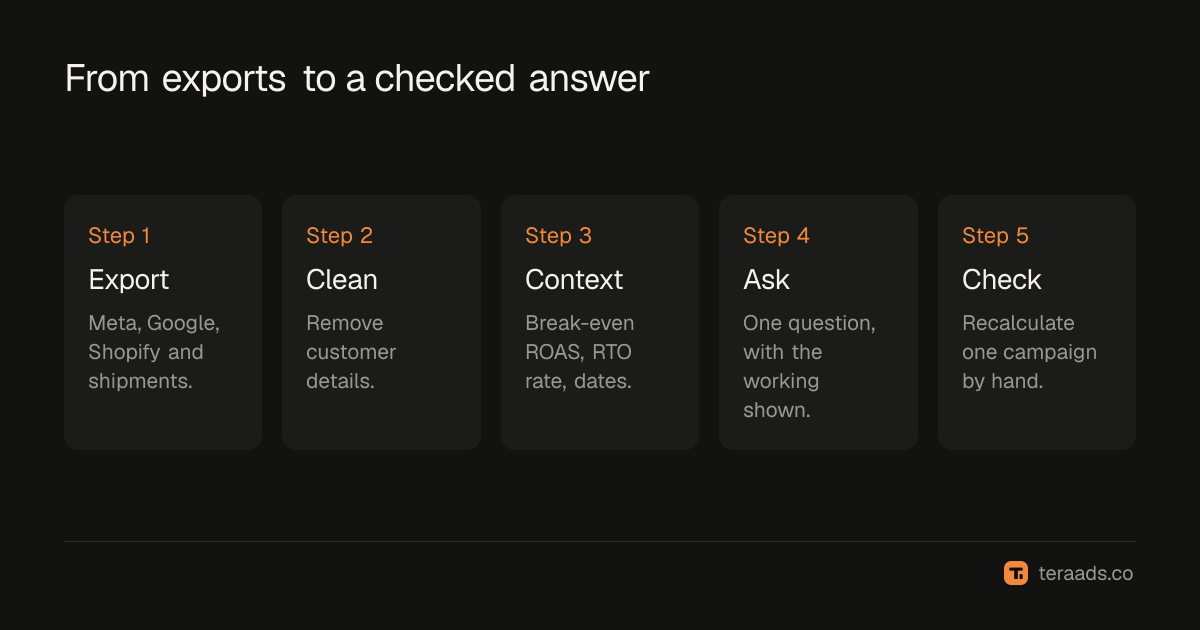
Running the analysis, step by step
- Strip personal data. Delete customer names, phone numbers, emails and addresses from order and shipment exports. Order numbers are enough to join files.
- Upload the files to a new ChatGPT conversation and say what each one is.
- Give the context. "We're a jewellery brand. Break-even ROAS on kept orders is 2.5x. About 60% of orders are cash on delivery, and our RTO rate is around 25%."
- Ask one clear question at a time. For example: "Using the Shopify and shipment files, calculate kept revenue by UTM campaign, then real ROAS using Meta spend by campaign."
- Ask to see the working. "Show the formula and a table of the rows you used for the top three campaigns."
- Check by hand. Pick one campaign and recalculate its spend and kept revenue yourself in the spreadsheet.
- Ask what to do, last. Only once the numbers are right, ask for recommendations and the evidence for each.
Questions that work well
- "Which ad sets have spent more than ₹5,000 in the last 30 days with a cost per purchase above ₹1,200?"
- "Which search terms cost more than ₹1,000 with no conversions? Group them by theme." See wasted search terms.
- "Compare platform ROAS and real ROAS on kept orders for each campaign. Which campaigns change rank?"
- "Show daily spend, CPM and CTR for the top five ads. Where does CTR fall while frequency rises?"
- "Which products appear most in refused COD orders?"
The prompt library for ads analysis has more, organised by question type. For a structured walk through every leak, the 30-minute wasted spend audit works well with ChatGPT doing the arithmetic.
Checking the answers
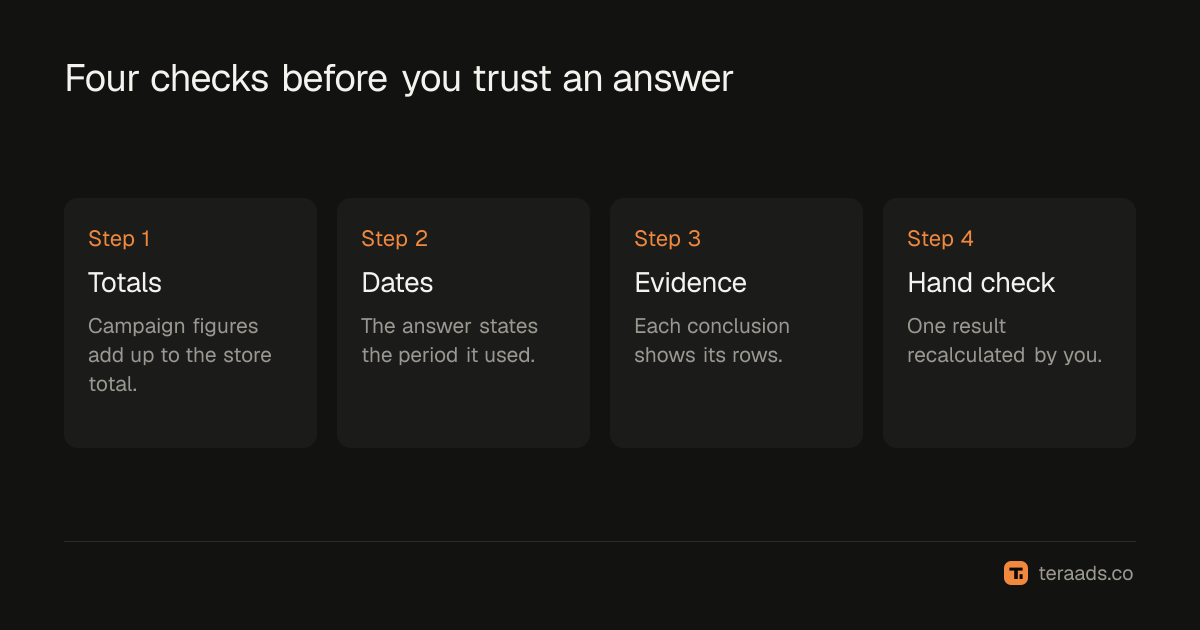
ChatGPT is good at arithmetic on uploaded files when it runs actual calculations, and less reliable when it summarises from memory of a long conversation. Watch for these errors:
| Problem | How to spot it | Fix |
|---|---|---|
| Wrong join | Revenue by campaign doesn't add up to the Shopify total | Ask for a reconciliation against totals |
| Wrong date range | Totals differ from Ads Manager for the same dates | Ask it to state the dates it used |
| Double counting | Meta revenue far above Shopify revenue | Remind it Meta counts attributed purchases, not orders |
| Confident guesses | Recommendations with no rows behind them | Ask for the evidence for each point |
Live connections instead of exports
Meta's official ads MCP server works with assistants that support MCP connectors, and OpenAI documents full MCP support in ChatGPT for Business, Enterprise and Edu workspaces, where admins control developer mode. Availability on personal plans has changed during 2026, so check OpenAI's current help pages. MCP connectors explained covers how these connections work and what they can access. Even with a live connection, joining ad data with delivery outcomes usually still needs an export from your shipping platform.
Privacy
Uploading files sends them to OpenAI. Remove personal data first, as above. On personal plans, check the data controls setting that decides whether your conversations may be used to improve models. OpenAI says it doesn't train on business workspace data by default. Don't upload files that contain payment details, passwords or access tokens.
Common mistakes
Uploading raw order exports. Customer details aren't needed for ad analysis; remove them.
Asking vague questions. "How are my ads doing?" gets a vague answer. Name the metric, the threshold and the period.
Forgetting returns. Without delivery outcomes, every analysis inherits Meta's and Google's view of sales.
Skipping the hand check. One recalculated campaign catches most errors.
Acting on unexplained recommendations. Ask for the rows behind every suggestion.
Tera Ads joins Shopify orders, returns, Meta Ads and Google Ads spend for you, with real ROAS for every campaign on one screen, so you start any analysis from numbers that already agree. It is free for one business.
Frequently asked questions
Can ChatGPT analyse Facebook ads data?
Yes. Export reports from Ads Manager as spreadsheets and upload them, or use a live connector where your ChatGPT plan supports it.
Is it safe to upload ad reports to ChatGPT?
Ad performance reports are low risk. Remove customer names, phones and addresses from order exports, and never upload passwords or tokens.
How accurate is ChatGPT at ad analysis?
Accurate when it runs calculations on clean files and you check its working. Ask for formulas and the rows used, and verify one result by hand.
Can ChatGPT connect directly to Meta Ads?
Meta's ads MCP server works with MCP-compatible assistants. In ChatGPT, full MCP support is documented for Business, Enterprise and Edu workspaces; check current plan details.
What should I export for a full analysis?
Ad-level spend and results from Meta, campaign and search term reports from Google, Shopify orders with UTM campaign, and shipment outcomes.