Performance Max Asset Groups for Shopify: How to Split and Fill Them
Asset groups decide which products, creative and signals Performance Max uses together. How to split them by product theme or margin, and what assets each needs.
On this page
A Performance Max asset group bundles a set of products (its listing group) with the headlines, images, videos and audience signals used to advertise them. Split asset groups by product theme or margin, so each group's creative matches its products and you can see which themes make money. Fill each group with a full set of assets, your own video included, and judge groups on Shopify orders after RTO, not Google's conversion value.
Key takeaways
- Each asset group pairs products with matching creative and signals; one group for everything blurs both.
- Split by theme (category, occasion, audience) or by margin, whichever drives your decisions.
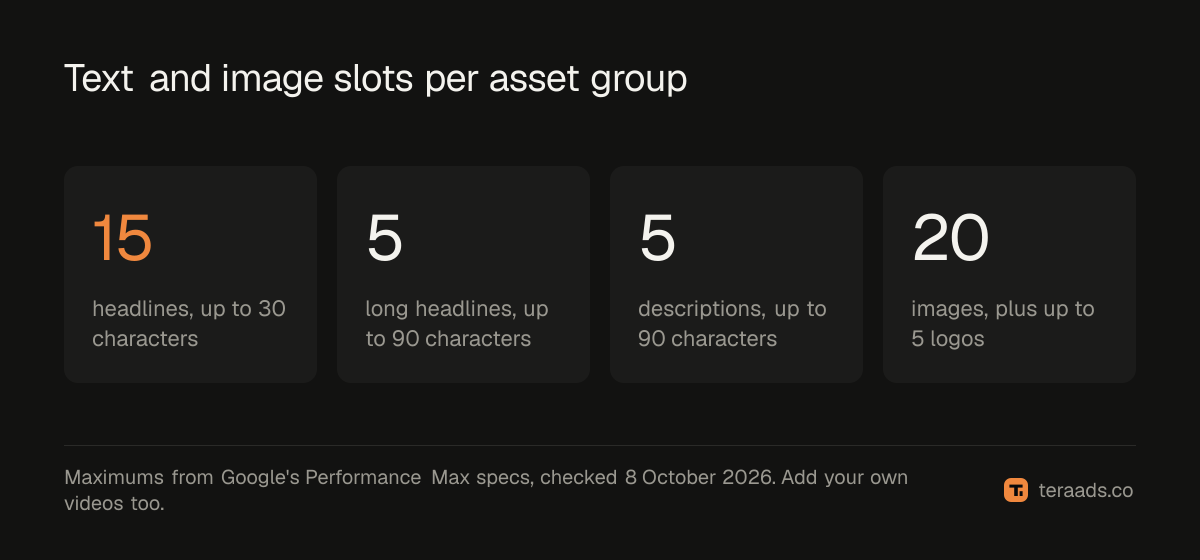
- Text limits: up to 15 headlines of 30 characters, 5 long headlines and 5 descriptions of 90 characters.
- Upload your own videos; otherwise Google may generate videos from your other assets.
- Judge asset groups on profit after RTO from Shopify orders, not platform ROAS.
How asset groups work
A Performance Max campaign can contain several asset groups. Each one has:
- A listing group: which products from your Merchant Center feed it can show.
- Assets: headlines, descriptions, images, logos and videos used across Search, Shopping, YouTube, Display, Discover and Gmail.
- Audience signals: hints such as customer lists or search themes that help Google start.
Google mixes and matches the assets for each placement. If one group contains every product and generic creative, Google can't match messages to products, and you can't see which product themes work. Performance Max for Shopify covers the campaign-level setup.
Splitting asset groups
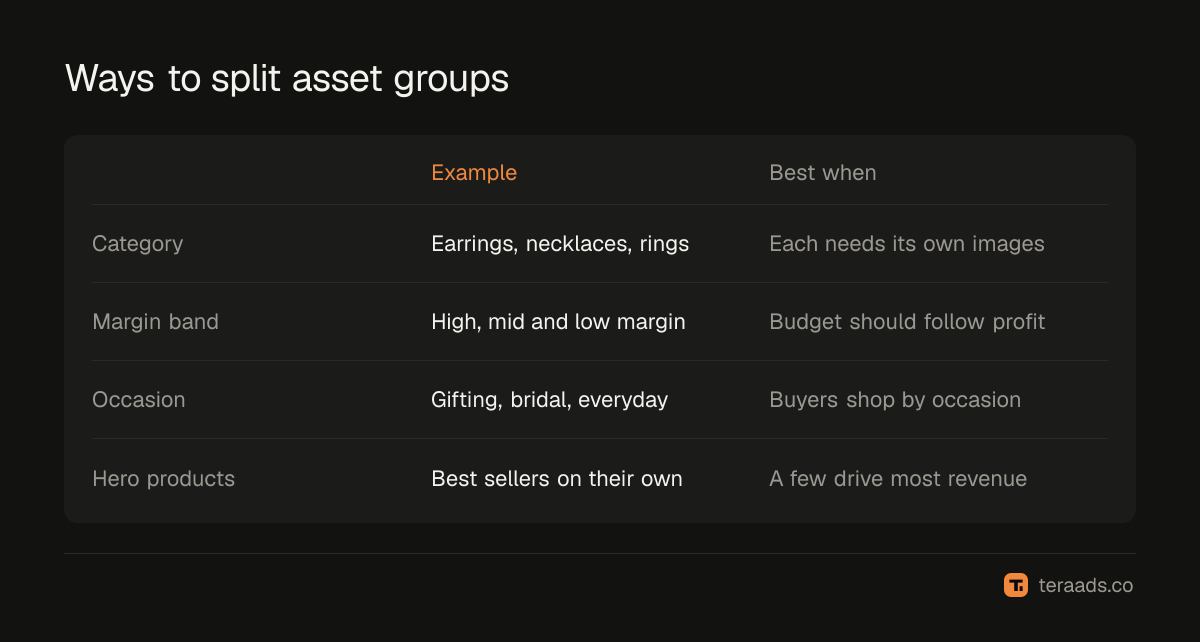
| Split by | Example | Best when |
|---|---|---|
| Product category | Earrings, necklaces, rings | Categories need different images and messages |
| Margin band | High-margin, mid-margin, low-margin | You want budget to follow profit |
| Occasion or audience | Gifting, bridal, everyday | Buyers search and respond by occasion |
| Hero products | Best sellers in their own group | A few products drive most revenue |
Keep the number manageable. Each group needs enough conversions to learn; many tiny groups behave like many tiny ad sets on Meta.
What each asset group needs
According to Google's Performance Max specs page, checked on 8 October 2026:
- Headlines: up to 15, each up to 30 characters, with at least one of 15 characters or fewer.
- Long headlines: up to 5, each up to 90 characters.
- Descriptions: up to 5, each up to 90 characters.
- Business name: up to 25 characters.
- Images: landscape, square and optional vertical, up to 20 in total, plus up to 5 logos.
- Videos: Google suggests 10 to 60 seconds in horizontal, vertical and square formats. If you don't upload video, Google may create videos from your other assets.
Fill all the text slots with genuinely different messages: product benefits, offers, trust signals, delivery and returns.
Building one, step by step
- Choose the split that matches how you make decisions, usually category or margin.
- Set the listing group using feed attributes, such as product type or a custom label; Merchant Center feed attributes explains custom labels.
- Write text for those products specifically: what they are, who they're for and why to buy now.
- Add images of those products, including lifestyle and on-person shots.
- Upload your own videos, even simple phone videos, in vertical, square and horizontal formats.
- Add audience signals, such as customer lists and search themes for that group.
- Review after two to four weeks on Shopify orders and RTO by group.
Measuring groups
Google reports conversions and value by asset group, but those include orders later refused and some credited to other channels. Use UTM parameters with a value for each asset group, or product-level order data, to see Shopify revenue by group, then subtract RTO. A group that looks strong in Google but brings many refused COD orders isn't a winner. Strong product titles help every group; see Google Shopping titles.
Search themes and brand exclusions
Two settings make asset groups more useful for Shopify brands.
Search themes. Each asset group can include search themes: phrases describing what your customers search for, such as "sterling silver hoops" or "gift for her under 2000". Google treats them as signals, not exact keywords, but they help a new asset group find relevant searches faster. Use the words from your best Shopping search terms.
Brand exclusions. Performance Max can show ads for searches of your own brand name, which are cheap and convert well, so they flatter the campaign's results while capturing buyers who would have found you anyway. Brand exclusions stop Performance Max serving on your brand searches, leaving them to a separate brand Search campaign where you can see their cost clearly.
How many asset groups
There's no single right number, but each asset group needs enough conversions to learn. A practical guide:
- Small catalogues or budgets: one to three asset groups, split by your biggest category or margin band.
- Larger catalogues: add groups for categories or hero products that have enough sales on their own.
- Merge groups that rarely get conversions; they dilute data without adding control.
Review the split every month or two. If one group gets almost all the spend, check whether the others have weak assets or just products that sell less, and adjust.
When you change the split, expect a short period of unstable results while Google relearns, so avoid restructuring in the run-up to a big sale or festival. Make one structural change at a time, and give it two to four weeks before judging, using Shopify orders after RTO by group rather than Google's reported conversion value.
Common mistakes
One asset group for the whole catalogue. Messages can't match products.
Too many tiny groups. Each lacks the data to learn.
Generic text. "High quality products" gives Google nothing to work with.
No video. Auto-generated videos rarely represent your brand well.
Judging on Google's conversion value. Use Shopify orders after RTO.
Tera Ads shows Google Ads and Meta Ads spend beside Shopify orders, with profit after RTO from Shiprocket for every campaign, plus deep dives into disapproved Shopping products and wasted search terms. It is free for one business.
Frequently asked questions
What is a Performance Max asset group?
A set of products, creative assets and audience signals that Performance Max uses together to build ads.
How should I split Performance Max asset groups?
By product category, margin band, occasion or hero products, whichever matches how you make budget decisions.
How many headlines does an asset group need?
Up to 15 headlines of 30 characters, with at least one of 15 characters or fewer. Fill them with different messages.
Do I need videos in Performance Max?
Google recommends them. Without your own videos, Google may generate videos from your other assets.
How do I measure asset group performance?
Track Shopify orders and RTO by group using UTMs or product-level data, not just Google's reported conversions.