Post-Purchase Surveys: Ask Customers How They Found You
A one-question survey after checkout shows where customers really heard of you, including channels no pixel tracks. How to set it up, word it and use the answers.
On this page
A post-purchase survey asks customers one question after they buy, usually "How did you first hear about us?", and shows channels that tracking misses, such as Instagram creators, friends and offline word of mouth. Add it to Shopify's thank-you page with a survey app, keep the answer list short and clear, and compare the answers with your attribution data each month. Use it as a second opinion, not a replacement for tracking.
Key takeaways
- Self-reported answers capture channels pixels can't see: word of mouth, creators, podcasts, offline.
- One required-feeling question with 6–8 options gets the most answers; keep it optional to avoid friction.
- Ask about where they first heard of you, which tracking handles worst.
- Compare survey shares with first-touch and platform data monthly; big gaps are worth investigating.
- People misremember, so treat answers as direction, not precise credit.
Why ask customers at all
Tracking sees clicks and some views. It doesn't see a friend recommending you over chai, a creator's story someone screenshotted, or a podcast mention. It also loses many clicks to privacy settings and app browsers. A post-purchase survey asks the one person who knows how they found you. For brands that rely on Instagram creators or word of mouth, it often reveals the biggest channel of all, one with no attributed sales in any dashboard.
Setting it up, step by step
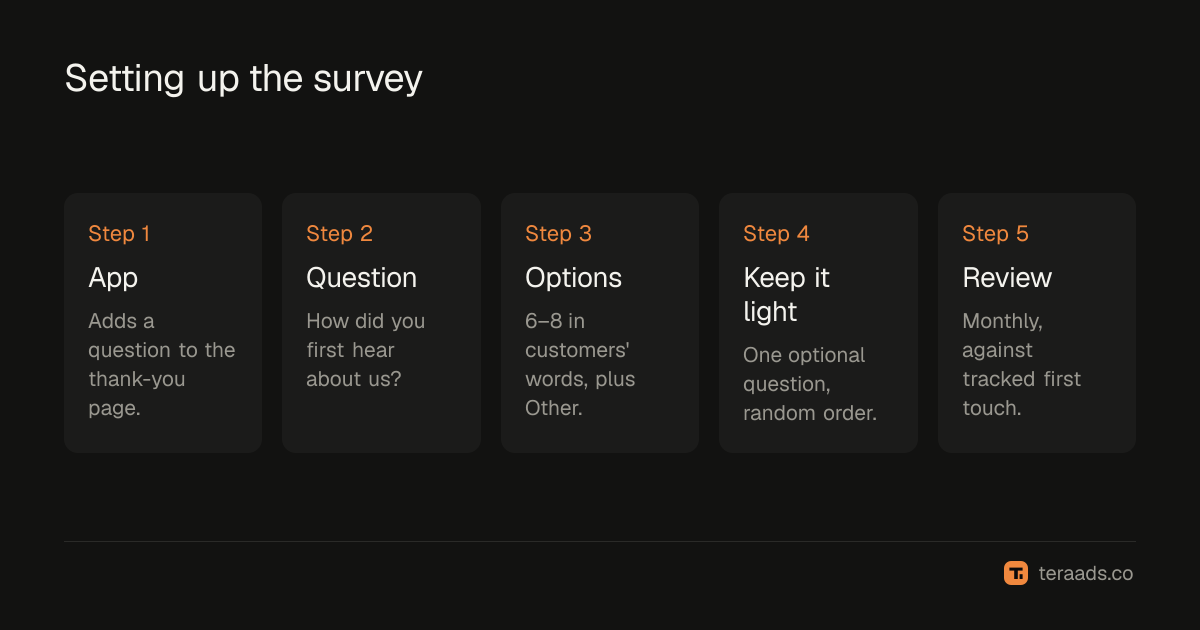
- Pick a survey app from the Shopify App Store that adds questions to the order status or thank-you page, which Shopify supports through checkout extensions.
- Write the question. "How did you first hear about us?" works for most brands.
- Write 6–8 answer options in your customers' language, plus "Other" with a text box.
- Randomise the order of options if the app allows, so the first option doesn't collect extra answers.
- Keep it optional and to one question, so it doesn't spoil the post-purchase moment.
- Review monthly. Export answers with order number and date, and compare with your other data.
Choosing the answer options
| Option | Why include it |
|---|---|
| Instagram or Facebook ad | Paid social; separates ads from organic |
| Instagram creator or influencer | Often the biggest untracked channel |
| Google search | Includes brand searches prompted by other channels |
| YouTube | Video ads and creator reviews |
| Friend or family | Word of mouth, invisible to tracking |
| WhatsApp message or group | Common in India; rarely tracked |
| Marketplace (Amazon, Myntra, Nykaa) | Customers who found you elsewhere first |
| Other (please tell us) | Catches channels you didn't list |
Avoid options that need marketing knowledge, such as "paid social" or "organic". Customers know "an Instagram ad" and "a post from someone I follow".
Reading the answers
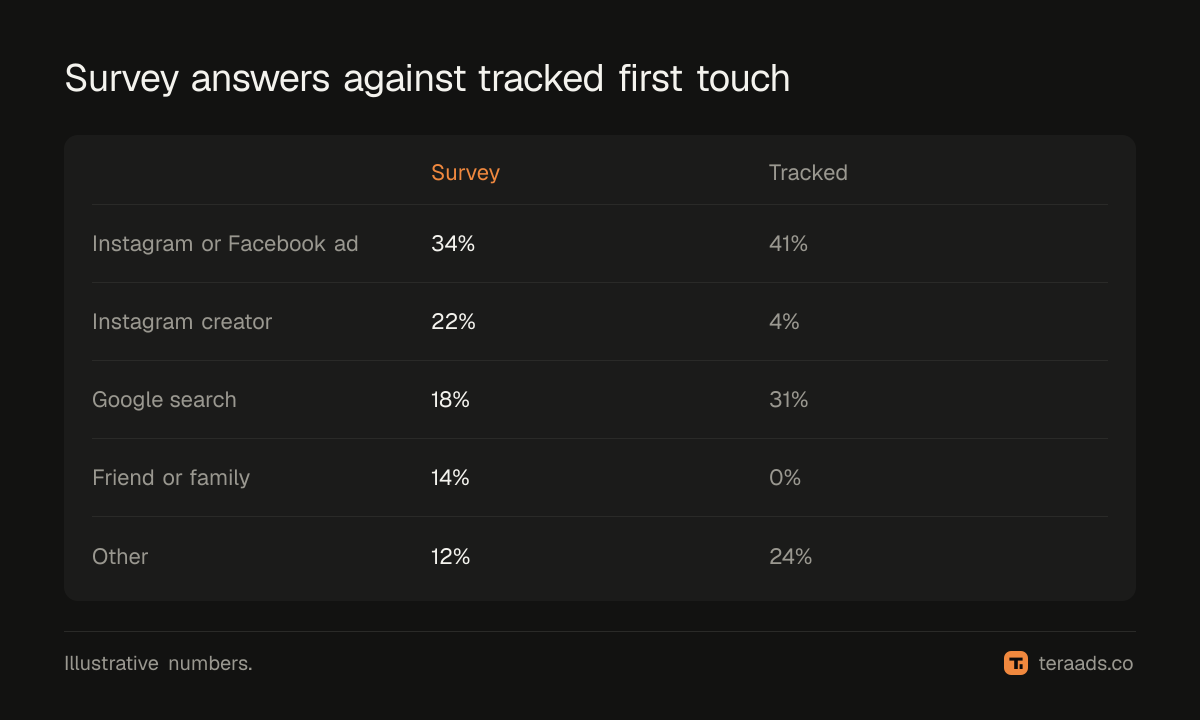
Compare survey shares with what your tracking says, for the same month:
| Channel | Share of survey answers | Share of first-touch orders in Shopify |
|---|---|---|
| Instagram or Facebook ad | 34% | 41% |
| Instagram creator | 22% | 4% |
| Google search | 18% | 31% |
| Friend or family | 14% | 0% |
| Other | 12% | 24% |
In this example, creators and word of mouth bring over a third of customers but almost no tracked orders. Google search looks bigger in tracking than in the survey, because many people who heard of the brand elsewhere then searched for it. That fits the pattern in first-click vs last-click attribution.
Using the results
- Fund untracked channels sensibly. If creators keep showing up in the survey, test a bigger creator budget and watch total sales.
- Explain brand search. A rise in brand searches after a creator campaign is likely the creator's effect.
- Check your ads' role. If paid social's survey share is much lower than its platform-attributed share, Meta may be claiming sales from other channels.
- Confirm with tests. Surveys suggest; incrementality tests confirm.
Good UTM tagging makes the tracked side of the comparison more accurate, so gaps are more meaningful.
Limits
People misremember, tick the first plausible option or name the last thing they saw. Response rates vary, and the people who answer may differ from those who don't. A survey can't divide credit when several channels mattered. Treat month-to-month changes and large gaps as signals; don't treat a survey share as precise attribution.
Getting more responses
Response rates depend on placement, wording and timing. The thank-you page catches customers straight after buying, when they're most willing, and usually gets the most answers. Keep the question near the top, use large tap targets on mobile, and save the answer with one tap if the app allows. A friendly line such as "Help a small brand: how did you first hear about us?" tends to work better than a formal request.
You can also ask by email or WhatsApp after delivery, which catches cash-on-delivery customers once their experience is complete, though fewer people reply. If you do, keep the question identical so the answers can be combined.
Once the main question works, some brands add one optional follow-up for specific answers. If someone picks "Instagram creator", ask which creator; if they pick "Friend or family", ask whether the friend had bought from you. These details turn a vague share into something you can act on, such as which creators to work with again. Answers linked to order numbers also let you compare channels later by order value, RTO rate and repeat purchases, which shows whether customers from creators or friends are worth more than those from ads. Keep any follow-up short, and drop it if responses to the main question fall.
Common mistakes
Asking too much. One question; more cuts responses.
Marketing jargon in options. Use the words customers use.
No "Other" box. You'll miss channels you didn't think of.
Reading it once. Monthly comparisons reveal trends.
Replacing tracking with surveys. Use both; each covers the other's blind spots.
Tera Ads shows Meta Ads and Google Ads spend beside your Shopify orders, with profit after returns, so survey findings can be checked against total sales and spend. It is free for one business.
Frequently asked questions
What is a post-purchase survey?
A short question shown after checkout, usually on the thank-you page, asking customers how they heard about the brand.
What question should a post-purchase survey ask?
"How did you first hear about us?" with 6–8 clear options and an "Other" box works for most D2C brands.
How do I add a post-purchase survey to Shopify?
Install a survey app from the Shopify App Store that adds questions to the thank-you or order status page.
Are post-purchase survey answers accurate?
They're directional. People misremember, but surveys reveal channels tracking can't see, such as word of mouth and creators.
Should I trust surveys over Meta and Google data?
Use both. Surveys catch untracked channels; tracking gives precise click data. Large gaps between them are worth testing.