Server-Side Tracking for Shopify: What It Fixes and What It Doesn't
Server-side tracking sends purchases to Meta and Google from a server, not the browser. What it recovers, the options on Shopify, and the limits no setup removes.
On this page
Server-side tracking sends conversion events, such as purchases, to ad platforms from a server instead of from the shopper's browser. Browser pixels lose events to ad blockers, privacy settings and pages closed too early; a server copy fills many of those gaps and gives Meta and Google better data to optimise on. It doesn't make platform numbers match Shopify, and it doesn't bypass consent. Pair it with the browser pixel and deduplication.
Key takeaways
- Browser tracking depends on the shopper's device; server tracking depends on your store's systems.
- On Shopify, Meta's and Google's official apps can send server events without custom code.
- Run server and browser events together, with deduplication, rather than replacing the pixel.
- Server tracking improves the data platforms learn from; it doesn't remove attribution differences.
- Consent and privacy rules apply to server events just as they do to pixels.
Why browser tracking misses events
A browser pixel only fires if the page loads fully, scripts are allowed and the shopper's settings permit it. Ad blockers, strict browser privacy modes, in-app browsers and people closing the tab right after paying all stop events. Apple's privacy features also strip some click identifiers from links; iOS privacy and ads covers those. The result is that platforms see fewer purchases than happened, and they optimise on incomplete data.
How server-side tracking works
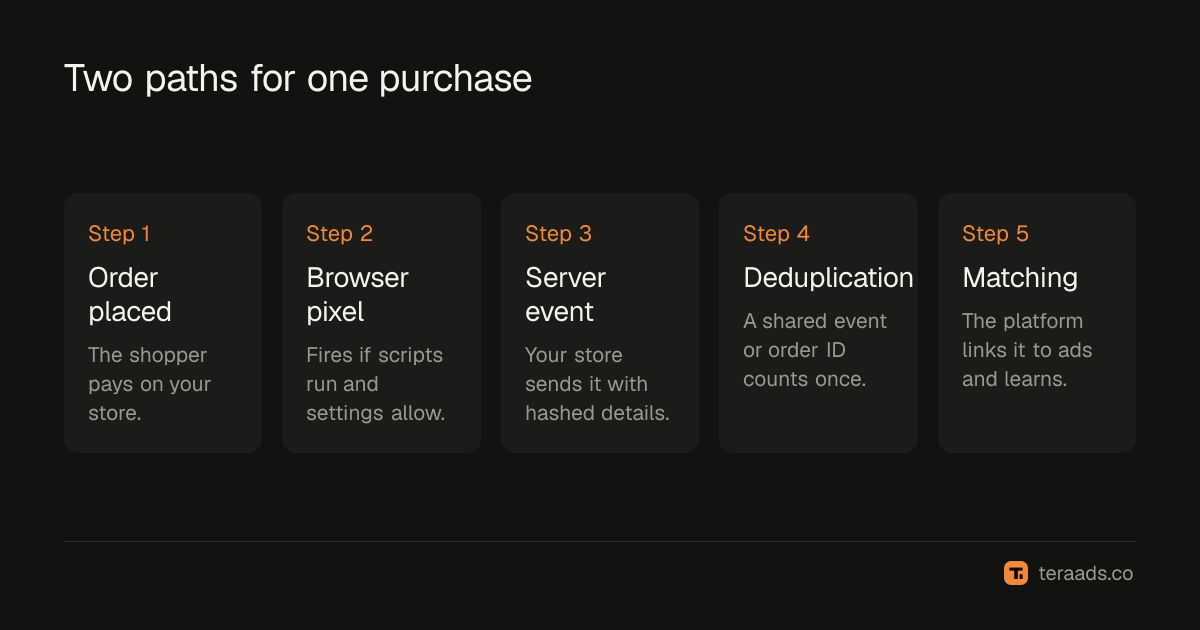
When an order is created, your store or a server you control sends the purchase event directly to the platform's API, with the order value and hashed customer details such as email and phone. The platform matches it to ad clicks or views using those details and any click identifiers captured during the visit.
| Browser pixel | Server-side events | |
|---|---|---|
| Runs on | The shopper's device | Your store or your server |
| Blocked by ad blockers | Often | No |
| Matching | Cookies and click IDs | Hashed customer details plus click IDs |
| Setup on Shopify | App pixels or custom pixels | Official apps, partner apps or your own server |
| Best used | Together with server events | Together with the pixel |
Options on Shopify
Meta Conversions API. Meta's Facebook & Instagram app for Shopify can send server events when data sharing is set to the highest level. The Conversions API guide has the steps and the deduplication checks.
Google enhanced conversions. The Google & YouTube app supports enhanced conversions, which send hashed customer details with conversions to improve matching. Google also accepts conversion uploads and adjustments from your own systems.
Server-side tagging. Google Tag Manager can run in a server container that you host, receiving events from your site and forwarding them to platforms. It gives more control but needs hosting and technical upkeep.
Partner apps. Many Shopify apps sell server-side tracking as a service. Check what they send, where they process data and how they avoid duplicates.
For most small brands, the official apps cover the essentials at no extra cost. Server-side tagging makes sense when you have many platforms and someone to maintain it.
Deduplication is essential
When both the browser and the server send the same purchase, the platform must recognise them as one. Meta uses the event name and a shared event ID; Google uses the order ID as a transaction ID. If IDs don't match, purchases count twice and reported ROAS inflates. After any setup change, compare platform purchases with Shopify orders for a settled week.
What it doesn't fix
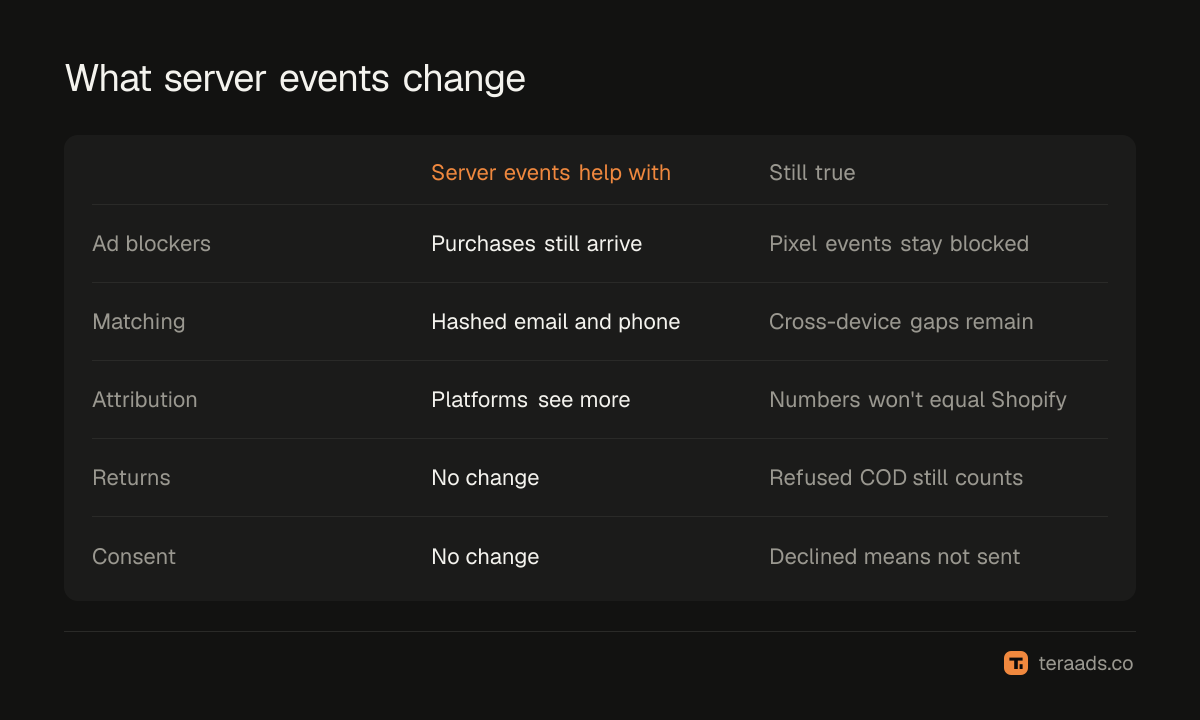
- Attribution differences. Meta still credits views and its own window; Google still uses its own model. Numbers won't equal Shopify's.
- Returns and refusals. Platforms count purchases when orders are placed; refused COD orders still count unless you send adjustments.
- Consent. Server events must respect the customer's privacy choices, as Shopify's privacy settings and the apps do.
- Broken basics. Without UTMs and clean conversion settings, better data still lands in the wrong place.
It's also not a fix for the Shopify app pixel data sharing setting; that applies to browser pixels and is covered in Shopify customer events and pixels.
Is it worth it?
For most Shopify brands running Meta and Google ads, yes, in its simple form: turn on the Conversions API through Meta's app and enhanced conversions through Google's app. It costs nothing extra and usually recovers events the pixel missed, which helps both reporting and optimisation. Custom server setups are worth it only when you advertise on many platforms, have strict data requirements or have outgrown the official apps.
Checking your setup works
After turning on server events, check three things within a week:
- Both sources arrive. In Meta Events Manager, purchase events should show both browser and server connection methods. In Google Ads, the conversion action's diagnostics should show enhanced conversions working.
- No double counting. Platform purchases shouldn't jump above Shopify orders for the same period. If they do, look for a second integration sending the same events.
- Match quality. Meta shows an Event Match Quality score for server events, and Google shows enhanced conversion coverage. Low scores usually mean customer details aren't being shared, often because of consent settings or app configuration.
Recheck after any app update, theme change or checkout change. Server-side setups fail silently, just like pixels, and the first sign is often a drop in reported conversions that looks like a performance problem. Note the date of each change, so a later shift in results can be traced to it.
Common mistakes
Replacing the pixel instead of adding to it. Use both, deduplicated.
Running two server integrations. The official app plus a partner app can double-send purchases.
Expecting perfect matches. Server tracking narrows the gap with Shopify; it doesn't close it.
Ignoring match quality. Without hashed email and phone, server events match poorly.
Never re-testing. App updates and checkout changes can break server events silently.
Tera Ads uses Shopify orders as the truth for sales, beside Meta Ads and Google Ads spend and profit after returns, so you can see whether better tracking changed what platforms report. It is free for one business.
Frequently asked questions
What is server-side tracking?
Sending conversion events to ad platforms from a server rather than the shopper's browser, so events blocked in the browser still arrive.
Does Shopify support server-side tracking?
Yes. Meta's Facebook & Instagram app can send Conversions API events, and Google's app supports enhanced conversions. Partner apps and server-side tagging are other options.
Is server-side tracking better than a pixel?
It's better used together with the pixel. Each catches events the other misses, and deduplication stops double counting.
Does server-side tracking get around iOS privacy or consent?
No. It must still respect customer consent. It recovers events lost to technical blocking, not events customers declined.
Will server-side tracking increase my ROAS?
Reported ROAS often rises a little because platforms see more purchases. Judge real results on Shopify orders and profit after returns.