Target ROAS Bidding in Google Ads: How to Set It Without Starving Campaigns
Target ROAS tells Google the return to aim for. How to pick a realistic target from break-even, when to change it, and why too high a target cuts sales.
On this page
Target ROAS is a Google Ads bidding setting that tells Google the conversion value you want back for each rupee spent, such as 400% for ₹4 of value per ₹1. Google then bids to hit that average. Set it from your break-even ROAS and recent results, not from hope: a target far above what the campaign achieves makes Google bid on fewer auctions and spend less, often cutting profitable sales. Change it in small steps and judge on profit.
Key takeaways
- Target ROAS is an average Google aims for across auctions, not a guarantee per sale.
- Start near the ROAS the campaign already achieves, then adjust.
- Your floor is break-even ROAS on kept orders, converted to Google's reported terms.
- A target that's too high shrinks spend and volume; too low buys unprofitable sales.
- Change targets in modest steps and give each change a couple of weeks.
How target ROAS works
With "maximise conversion value" and a target ROAS, Google predicts the value each auction is likely to bring and bids more where it expects high value, less where it expects low value. It aims for your target as an average over time. Some days and some sales will be above it, others below.
The bidding learns from your conversion data, so accurate purchase tracking with correct values is essential; see Google Ads conversion tracking on Shopify.
Choosing a target
Your target needs to sit between two numbers:
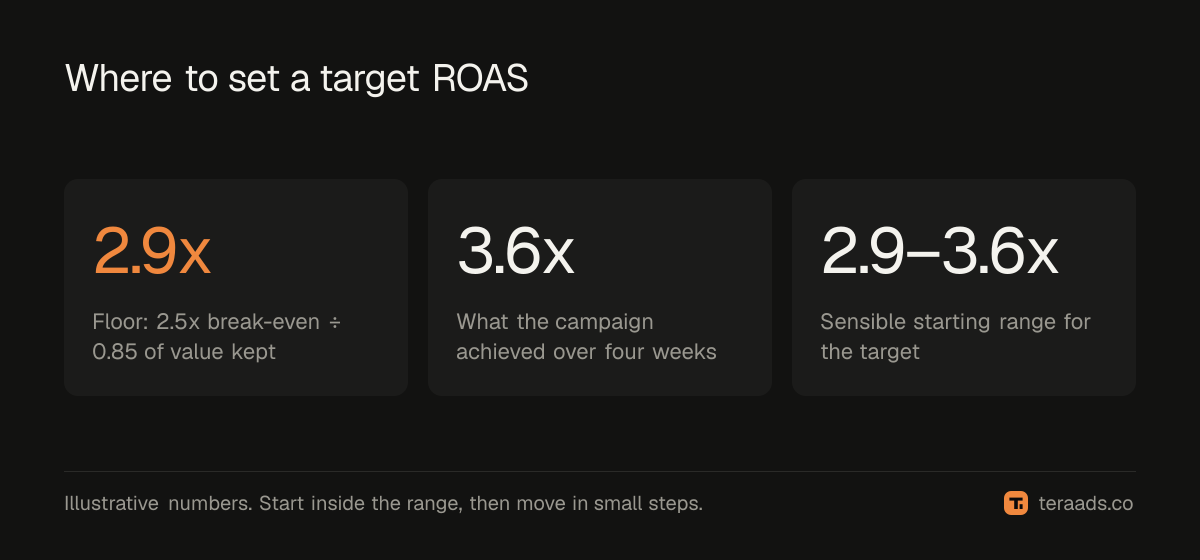
- The floor: the ROAS at which Google's reported value still means profit after returns. If Google reports orders before cancellations and RTO, your floor in Google's terms is higher than your true break-even. For example, if your break-even ROAS on kept orders is 2.5x and about 15% of Google-reported value is later cancelled or returned, you need about 2.5 ÷ 0.85 ≈ 2.9x reported.
- What's achievable: the ROAS the campaign has delivered over the last few weeks. A target far above this tells Google to bid on far fewer auctions.
| Situation | Suggested starting target |
|---|---|
| New campaign, little data | No target at first (maximise conversion value), then set one near achieved ROAS |
| Achieved ROAS well above your floor | Near achieved ROAS, or slightly below to allow growth |
| Achieved ROAS near your floor | At the floor; work on feed, creative and negatives before tightening |
| Achieved ROAS below your floor | Fix the campaign first; a higher target alone usually just cuts spend |
What happens when the target is too high
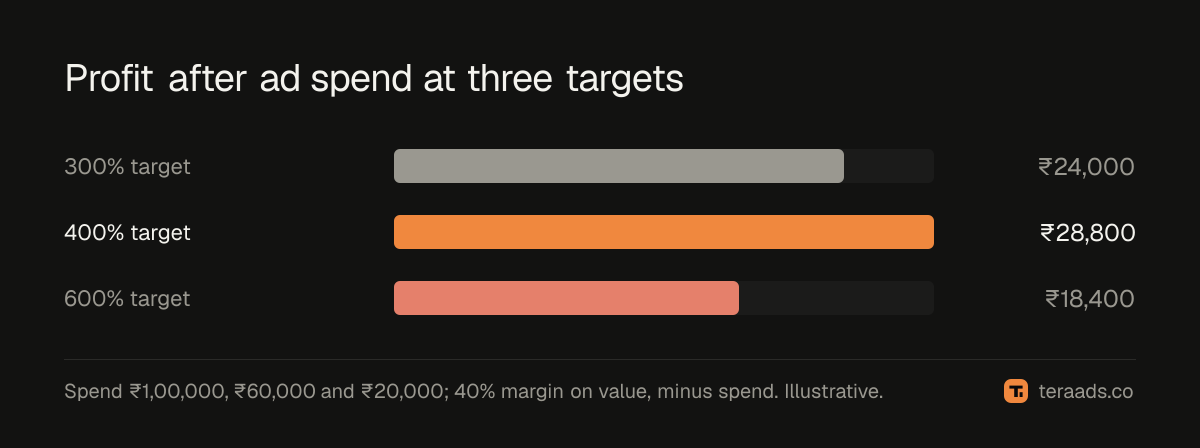
Raising the target tells Google to be pickier. It bids on fewer auctions, often the ones most likely to convert anyway, such as brand searches and returning visitors. Reported ROAS may rise slightly, but spend, impressions and total conversion value fall. Many accounts see total profit fall too, because they've given up sales that were profitable at a lower ROAS.
| Target ROAS | Spend | Conversion value | Reported ROAS | Profit before ads at 40% margin, minus spend |
|---|---|---|---|---|
| 300% | ₹1,00,000 | ₹3,10,000 | 3.1x | ₹24,000 |
| 400% | ₹60,000 | ₹2,22,000 | 3.7x | ₹28,800 |
| 600% | ₹20,000 | ₹96,000 | 4.8x | ₹18,400 |
Adjusting the target
- Change in steps. Move 10–20% at a time rather than doubling, so the bidding can adjust.
- Wait. Give each change a week or two of data; conversion delays mean early numbers mislead.
- Watch spend as well as ROAS. If spend drops sharply after a raise, the target is limiting the campaign.
- Separate products by margin. One target for products with very different margins forces a compromise. Split them into different campaigns or asset groups with their own targets; the Performance Max guide covers this.
Target ROAS and cash on delivery
Google counts the order value when the purchase happens. For COD-heavy stores, part of that value never arrives. Either raise targets to account for your cancellation and RTO rate, as in the floor calculation above, or send adjusted values. Then judge campaigns on kept Shopify orders and profit.
Target ROAS and the other bidding options
Target ROAS isn't the only choice. Maximise conversion value without a target spends the budget to get as much value as possible, with no return constraint; it suits new campaigns and campaigns limited by budget rather than efficiency. Target CPA aims for a cost per conversion and treats every purchase as equal, which suits stores whose orders have similar values. Manual CPC gives you control of each bid but can't use the auction-time signals that automated bidding uses.
For most Shopify stores with varied order values, value-based bidding, with or without a target, is the sensible default once tracking is accurate. Target ROAS is the tool for holding efficiency while you scale. A useful sequence: start without a target, let the campaign gather a few weeks of conversions, add a target near what it achieves, then raise budget and adjust the target as results settle.
Budget and target interact. If a campaign doesn't spend its budget, the target is probably too high. If it spends everything and ROAS is well above your floor, the budget is the limit, and raising it is usually the better move.
Common mistakes
Setting the target to the ROAS you wish you had. Google can only find the auctions that exist.
Big jumps. Large target changes disrupt bidding and make results swing.
Ignoring returns. A target that looks profitable on reported value can lose money after RTO.
One target for everything. Products with different margins need different targets.
Judging too soon. Conversions arrive over days; wait before reacting.
Tera Ads includes a Google Ads deep dive that lists wasted search terms, disapproved Shopping products and a scaling plan, and shows every Meta Ads and Google Ads campaign in one table with profit worked out from your Shopify orders. It is free for one business.
Frequently asked questions
What target ROAS should I set in Google Ads?
Start near what the campaign already achieves, and never below the reported ROAS that equals break-even after returns. Adjust in small steps.
Why did my spend drop after setting target ROAS?
The target is probably higher than the campaign can achieve on most auctions, so Google bids on fewer of them. Lower it gradually.
Is target ROAS the same as break-even ROAS?
No. Break-even ROAS is a profit threshold you calculate; target ROAS is the bidding instruction you give Google. Set the target at or above break-even, adjusted for returns.
How long does target ROAS take to settle?
Allow a week or two after each change, longer for low-volume campaigns, because conversions are reported with a delay.
Should new campaigns start with target ROAS?
Often it's better to start with maximise conversion value without a target, gather data, then add a target near what the campaign achieves.