Address Verification for COD Orders: Stop Bad Addresses Before Dispatch
Incomplete and wrong addresses turn into failed deliveries and RTO. How to catch them at checkout, confirm them before dispatch, and fix them fast after an NDR.
On this page
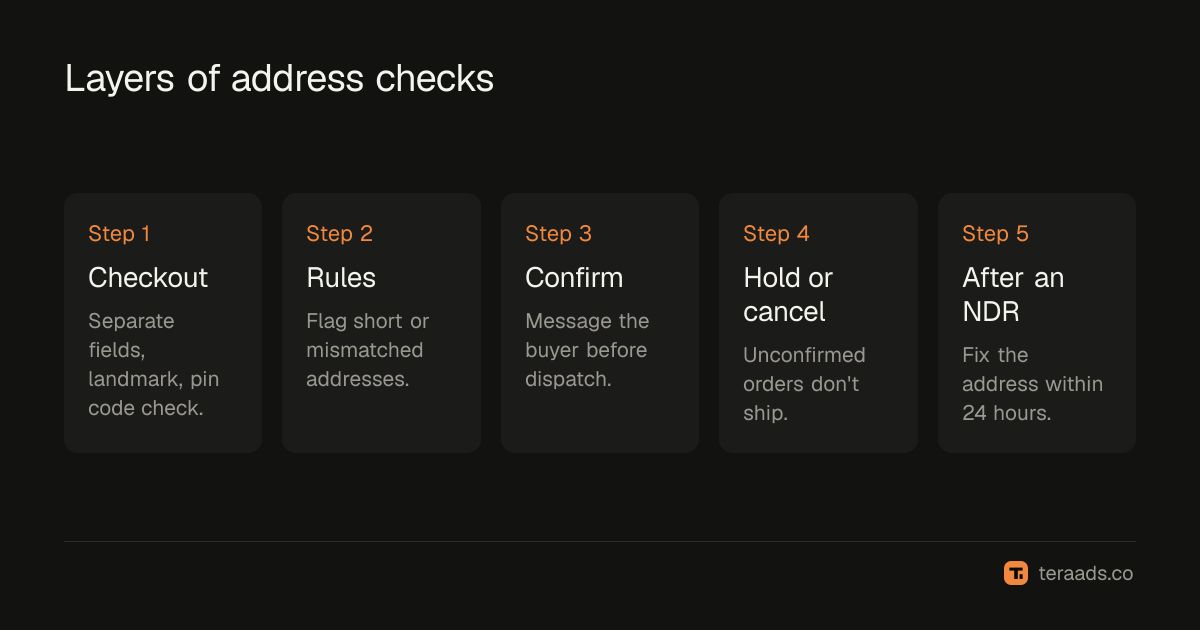
Address verification means checking that an order's address is complete and deliverable before you ship it, then confirming it with the buyer when it looks risky. Wrong and incomplete addresses are among the causes of failed delivery that are easiest to prevent, because the evidence is in the order before it leaves your warehouse. Ask for the right fields at checkout, flag weak addresses automatically, confirm them by message, and fix any that still fail within a day of the NDR.
Key takeaways
- A bad address fails twice: once on the delivery attempt and again as an RTO with freight both ways.
- Most problems are visible before dispatch: missing house numbers, no landmark, mismatched pin codes, very short addresses.
- Checkout design prevents many errors; automated checks and a confirmation message catch most of the rest.
- Shiprocket describes automated WhatsApp messages that verify addresses and capture cancellations before shipping.
- After an NDR for address reasons, a corrected address and reattempt within 24 hours saves many parcels.
Why addresses fail
In India, addresses vary widely in format. Many buyers write a building name without a flat number, a locality without a street, or a landmark that only locals recognise. Others type a pin code from memory and get it wrong. Shiprocket's RTO management page lists "incorrect address" among the common causes of RTO, alongside unaccepted orders, customer unavailability and closed premises.
A courier who can't find the address marks an NDR and may try again, but every extra day makes refusal or return more likely. Fixing the address before dispatch is cheaper than any of that.
Catching problems at checkout
The best verification happens while the buyer is still on your site:
- Separate fields for house or flat number, building, street, locality, landmark, city, state and pin code, rather than one long box.
- Make the landmark field visible, with a short example, because couriers use it.
- Validate the pin code against the city and state, and warn when they don't match.
- Require a mobile number with 10 digits, and ask buyers to confirm it, because the courier will call it.
- Check serviceability so buyers in areas your couriers don't reach find out before paying.
Shopify's checkout and apps offer different levels of field control and validation; test what your checkout allows, and keep the form short enough not to cost conversions.
Flagging weak addresses automatically
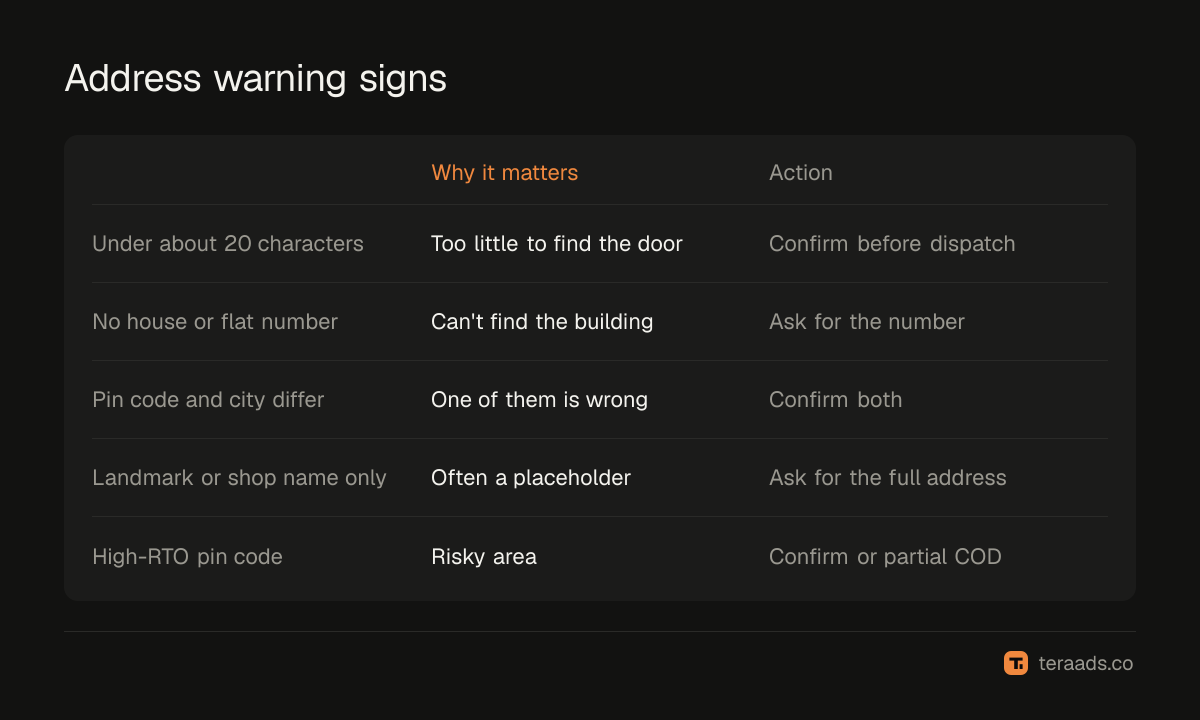
Some addresses look fine to a buyer but not to a courier. Simple rules catch most of them:
| Warning sign | Why it matters | Action |
|---|---|---|
| Address shorter than about 20 characters | Too little detail to find the door | Confirm before dispatch |
| No house, flat or plot number | Courier can't find the exact building | Ask for the number |
| Pin code doesn't match city | One of them is wrong | Confirm both |
| Only a landmark or a shop name | Often a placeholder | Ask for the full address |
| Repeated characters or test text | Fake or careless order | Confirm or cancel |
| Pin code with high past RTO | Risky area | Confirm, or require partial COD |
You can apply these as order tags, in a sheet, or with apps that score orders. Start with the rules that catch the most problems in your own data; the pin code RTO analysis shows where your risky areas are.
Confirming before dispatch, step by step
- Pick which orders to confirm. All COD orders above a value, every flagged address, and orders from high-RTO pin codes.
- Send a confirmation message within an hour of the order, showing the address as written and asking the buyer to confirm or correct it.
- Accept corrections in a simple format, such as a reply with the missing flat number or landmark.
- Update the order and shipment before the label is printed.
- Hold unconfirmed orders for a short time, then call once, and cancel if there's still no reply.
Shiprocket describes automated WhatsApp communication to verify addresses and capture cancellations before shipping on its RTO management page; other tools and apps offer similar flows. The COD order confirmation guide has message templates and timing.
After an NDR for address reasons
Some bad addresses will still slip through. When a courier raises an NDR saying the address was incomplete or not found:
- Contact the buyer the same day for the missing detail, ideally with a landmark and an alternate phone number.
- Update the address and request a reattempt through your shipping platform within 24 hours.
- Note the pattern. If the same locality keeps failing, add it to your confirmation rules.
NDR management covers the full daily routine for failed deliveries.
Measuring whether it works
Track two numbers each month on settled shipments: the share of NDRs with address-related reasons and the RTO rate on flagged-and-confirmed orders compared with unflagged ones. If address NDRs fall and confirmed orders deliver about as well as the rest, the checks are doing their job. If confirmed orders still fail often, the problem may be intent rather than address, and partial COD or prepaid incentives will work better; see reducing RTO in India.
Balancing checks against conversions
Every extra field and message adds friction. A form that demands too much loses orders, and a confirmation step that delays dispatch slows delivery for good buyers too. Keep the checkout to the fields couriers actually need, confirm only the orders your rules flag, and set a short hold window so confirmed orders still ship the same day. Review the rules quarterly and drop any that flag many orders but rarely find a real problem.
Common mistakes
One free-text address box. Buyers skip the details couriers need.
Confirming every order. Good buyers wait and dispatch slows; confirm the risky ones.
No deadline for unconfirmed orders. Held orders pile up and ship late anyway.
Fixing NDR addresses slowly. After a day or two, many parcels head back regardless.
Not feeding NDR reasons back into rules. The same localities keep failing.
Tera Ads shows RTO from Shiprocket beside your Shopify sales and Meta Ads and Google Ads spend, so profit after returns is visible for every campaign and you can see whether fewer failed deliveries reach the bottom line. It is free for one business.
Frequently asked questions
What is address verification for COD orders?
Checking that an order's address is complete and deliverable before dispatch, and confirming it with the buyer when it looks risky.
How do wrong addresses cause RTO?
The courier can't find the buyer, raises an NDR, and if the address isn't fixed quickly the parcel returns to you with freight paid both ways.
Which orders should I confirm before shipping?
COD orders above a value you choose, any order with a flagged address, and orders from pin codes with high past RTO.
Can Shiprocket verify addresses?
Shiprocket's RTO management page describes automated WhatsApp messages that verify addresses and capture cancellations before shipping. Check your plan for availability.
What should I do after an address NDR?
Contact the buyer the same day, update the address and request a reattempt within 24 hours.