Pin Code RTO Analysis: Find the Areas Where COD Loses Money
RTO is never spread evenly. How to analyse returns by pin code and city, set a fair minimum sample, and decide where to restrict COD or change courier.
On this page
Pin code RTO analysis means calculating your return-to-origin rate for each delivery pin code or city, so you can treat high-risk areas differently instead of punishing every buyer. RTO is always concentrated: a small share of pin codes usually produces a large share of returns. Find them with enough orders to trust the number, then ask for an advance, switch off COD, or change courier only there.
Key takeaways
- RTO varies widely by place; Shipway's FY25 data reported city rates from about 18% to 35%.
- Group small pin codes up to city or district level so each group has enough orders to judge.
- Judge each area on COD orders, over orders old enough to have settled.
- Act in steps: confirm orders first, then partial COD, and only then switch off COD.
- Re-run the analysis monthly, because courier performance and buyer mix change.
Why location matters so much
The same product, price and ad can return at very different rates depending on where it ships. Distance and transit time play a part: Shipway's FY25 analysis found RTO rising from about 20% in the nearest delivery zone to about 28% in the farthest, and reported city rates from about 18% in Vadodara to about 35% in Patna (Shipway's FY25 RTO findings). Local factors add more: courier coverage, address quality, and how familiar buyers are with ordering online.
That's why a blanket rule, such as switching off COD everywhere, gives up good orders to stop bad ones. Location lets you be precise.
How to run the analysis
- Export shipments with outcomes. From your shipping platform (Shiprocket, for example), export shipments with pin code, city, state, payment mode, courier and final status (delivered or RTO).
- Keep settled orders only. Use orders at least three weeks old, so most have reached a final status.
- Filter to COD. Prepaid RTO is low everywhere; the decisions are about COD.
- Group small areas. Pin codes with few orders can't be judged alone. Roll them up to city or district.
- Calculate RTO per group. RTO orders ÷ (delivered + RTO orders).
- Rank by rupees lost, not just rate. A 40% RTO area with 10 orders matters less than a 30% area with 500.
How many orders are enough?
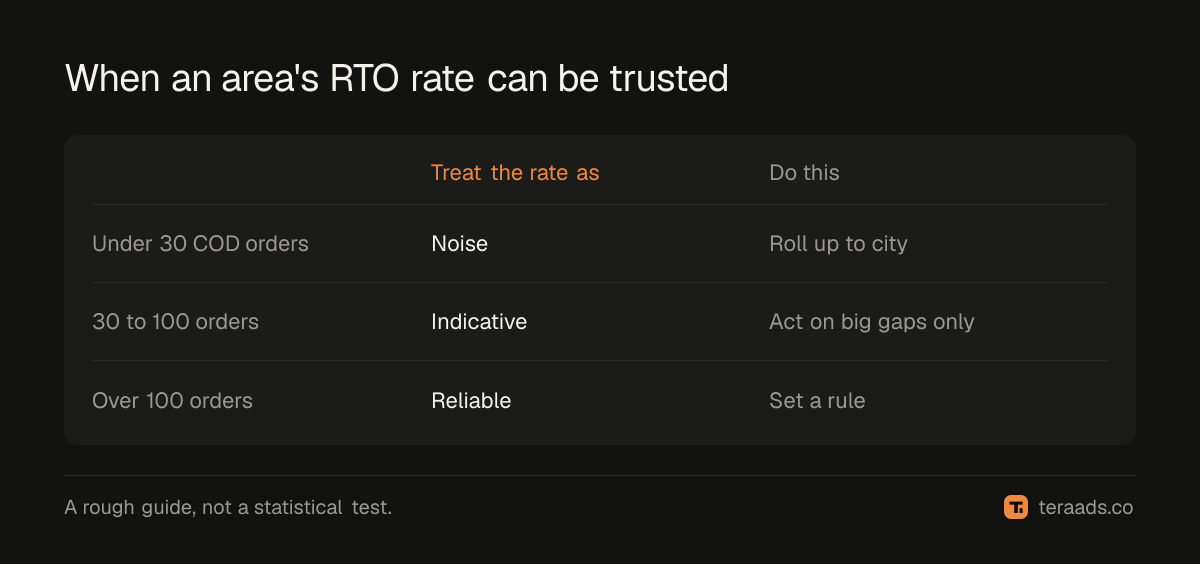
Small samples mislead. An area with 4 orders and 2 returns shows 50% RTO, but that could easily be chance.
| COD orders in the area | How to treat the RTO rate |
|---|---|
| Fewer than 30 | Too few to judge; roll up to city or district |
| 30 to 100 | Indicative; act only on large gaps from your average |
| More than 100 | Reliable enough to set a rule for that area |
Deciding what to do with each area
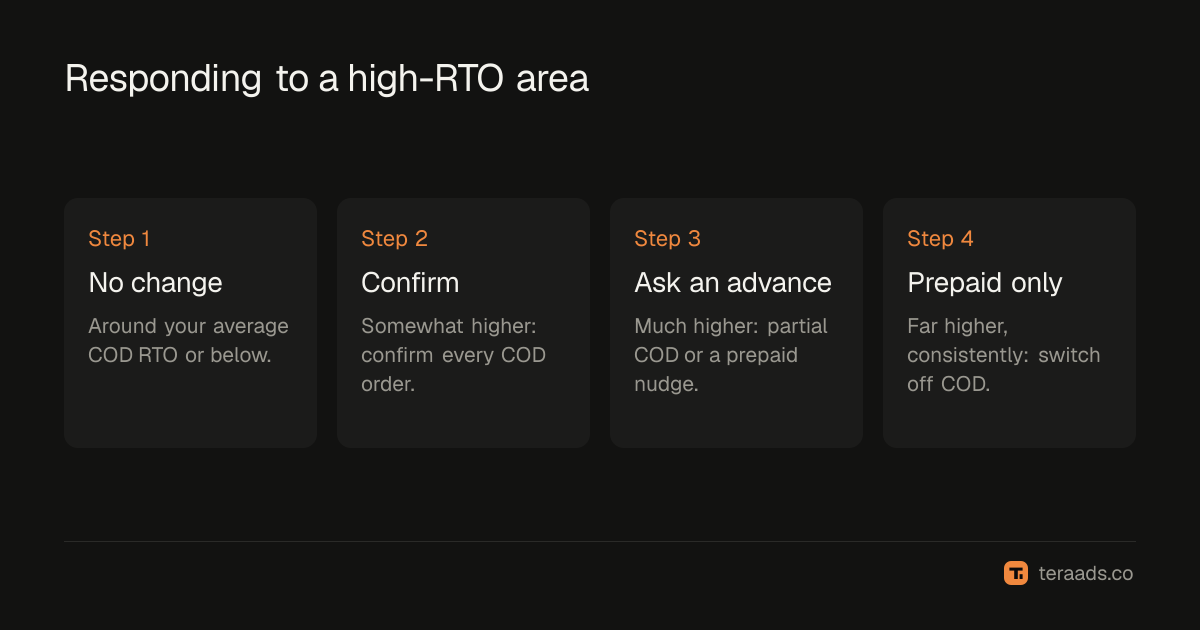
Compare each area's COD RTO rate with your own average COD rate, then act in steps:
| Area's COD RTO compared with your average | Action |
|---|---|
| Around average or below | No change |
| Somewhat higher | Confirm every COD order before dispatch |
| Much higher | Ask for an advance (partial COD) or offer a prepaid incentive |
| Far higher, consistently | Switch off COD for that area; prepaid only |
Order confirmation and partial COD keep most of the sales while cutting returns. Switching off COD is the last step, for areas where nothing else has worked.
Don't forget the courier
Sometimes the area isn't the problem; the courier serving it is. Split the same analysis by courier. If one courier's RTO in a region is far above another's on similar orders, route that region's orders to the better courier before restricting buyers. Shipping platforms that work with several couriers make this easy to test.
Turning the analysis into rules
Most Shopify COD and checkout apps let you allow or block COD by pin code, and some let you set partial COD or a COD fee by pin code. Keep the rule list short and review it monthly:
- Add an area when it crosses your threshold with enough orders.
- Remove it when its RTO falls back, for example after a courier change.
- Keep a note of why each area was added, so you can explain and revisit it.
Compare your areas with the wider RTO benchmarks, and combine pin code rules with the other fixes in the RTO reduction guide.
Beyond pin codes: other places RTO concentrates
The same method works on any grouping. Once you have the export, repeat it for:
- Campaigns and ad sets. Broad prospecting often brings more impulse COD orders than retargeting. RTO by campaign shows which ads bring buyers who don't accept.
- Products. Some products return more because of sizing, expectations or price. Fix product pages before restricting buyers.
- Order value bands. Shipway's FY25 data found mid-value orders returning slightly more often than cheaper or dearer ones; check your own bands.
- Days to first attempt. If one warehouse or courier is slow, RTO rises everywhere it ships.
Each grouping points to a different fix: ad changes, product page changes, pricing, or logistics. Pin code rules are only one of them, and usually not the first to try.
Tera Ads shows profit after returns from your Shopify orders, RTO from Shiprocket and ad spend from Meta Ads and Google Ads, with each RTO counted in the month the order was placed. It is free for one business.
Frequently asked questions
How do I find my high-RTO pin codes?
Export shipments with pin code, payment mode and final status from your shipping platform, keep COD orders at least three weeks old, and calculate RTO for each pin code or city with enough orders.
Should I disable COD for high-RTO pin codes?
Only as a last step. Try order confirmation and partial COD first; they keep more sales. Switch off COD where returns stay far above average even after those.
How many orders do I need before judging a pin code?
As a rough guide, at least 30 COD orders to get an indication and more than 100 to set a firm rule. Roll smaller pin codes up to city or district.
Can a courier change fix high RTO in an area?
Often. Compare couriers on similar orders in the same region. If one delivers much better, route orders to it before restricting buyers.
How often should I update pin code rules?
Monthly. Courier performance, seasons and your buyer mix change, so last quarter's rules may block good orders today.