COD Order Confirmation: Cut RTO Before You Ship
Confirming cash-on-delivery orders before dispatch stops fake and impulse orders cheaply. When to confirm, how, what to say, and what to do with no reply.
On this page
COD order confirmation means checking with the buyer, before you ship, that they placed the order and will accept it. A quick call, SMS or WhatsApp message catches fake orders, wrong numbers, bad addresses and buyers who have already changed their mind, before you pay for shipping both ways. Confirm every COD order within a few hours, hold the ones nobody confirms, and cancel those that stay silent.
Key takeaways
- Every unconfirmed COD order you ship risks two shipping legs and a lost sale if it comes back.
- Confirm within a few hours of the order, while the buyer still remembers it.
- Use the cheapest channel that works: an automated message first, a call for orders that don't reply.
- Offer a prepaid switch in the same message; some buyers take it.
- Measure RTO for confirmed and unconfirmed orders separately to prove the effect.
Why confirmation works
COD removes risk for the buyer but moves it to you. Anyone can place a COD order with any address and number, and nothing is lost if they refuse at the door. Shipway's FY25 data puts COD orders at about 26% RTO against under 2% for prepaid (Shipway's FY25 RTO findings). Some of those returns are buyers who were never going to accept: fake orders, pranks, duplicate orders, wrong numbers. Confirmation finds them while they cost almost nothing.
It also catches fixable problems: a missing flat number, a wrong pin code, a buyer travelling next week who would rather receive it later.
What a confirmation costs and saves
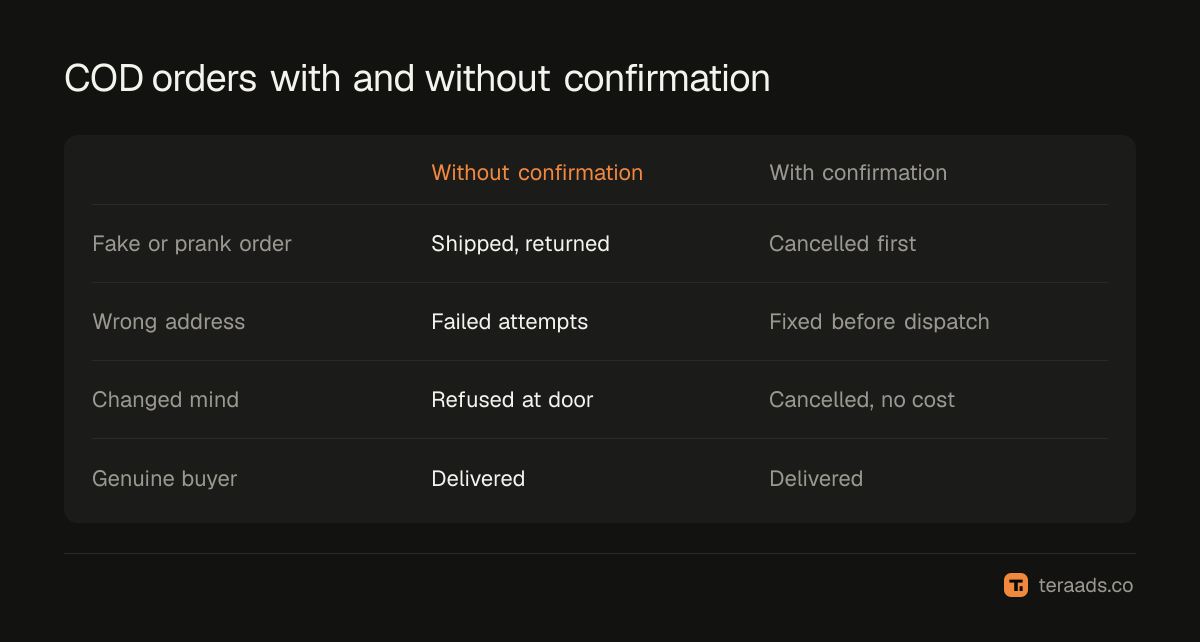
| Without confirmation | With confirmation | |
|---|---|---|
| Fake or prank orders | Shipped, then returned | Cancelled before dispatch |
| Wrong address or number | Failed attempts, likely RTO | Corrected before dispatch |
| Changed mind | Refused at the door | Cancelled, no shipping cost |
| Cost per order | Nothing upfront | A message, or a call for non-replies |
| Effect on dispatch | Same day | Slight delay for unconfirmed orders |
How to confirm, step by step
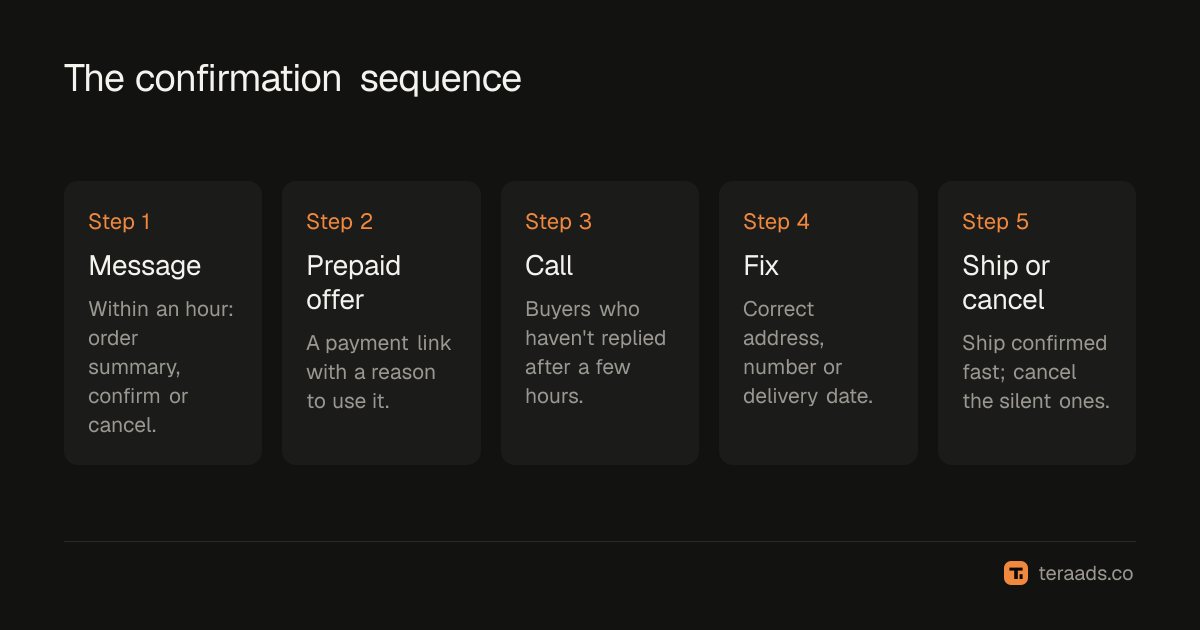
- Send a confirmation message within an hour. An automated SMS or WhatsApp message with the order summary and two buttons or replies: confirm or cancel.
- Offer a prepaid switch. Include a payment link with a small reason to use it, such as faster dispatch or a small discount.
- Call the non-replies. After a few hours, call buyers who haven't answered. A short, friendly call works best.
- Fix what you find. Update addresses, phone numbers and delivery dates before the label is printed.
- Hold, then cancel the silent ones. Keep unconfirmed orders on hold for a set time, such as 24 to 48 hours, then cancel them.
- Ship confirmed orders first. Fast dispatch after confirmation keeps delivery quick, which also lowers RTO.
What to say
A good confirmation message is short and specific:
Hi Priya, thanks for your order of the silver hoop earrings (₹1,299, cash on delivery). Please reply 1 to confirm or 2 to cancel. Pay online now for dispatch today: [link]
For calls, confirm three things: that they placed the order, the delivery address and landmark, and that they'll have the cash ready. Don't pressure buyers; a buyer who cancels on the call has saved you money.
Which orders to confirm
Confirm every COD order if you can. If volume makes that hard, prioritise:
- First-time buyers, who have no history with you.
- High-value orders, where a return costs more.
- Pin codes and regions with high RTO, from your own data; RTO benchmarks show how much zone and city matter.
- Orders with signs of trouble: incomplete addresses, repeated orders from the same number, odd names.
- Orders from campaigns with high RTO, often broad prospecting that attracts impulse buyers.
Measuring the effect
Track for a month:
- Confirmation rate: share of COD orders confirmed.
- Cancellation rate at confirmation: orders stopped before dispatch.
- RTO rate for confirmed orders against your earlier COD RTO rate.
- Prepaid switches: buyers who paid online after the message.
If confirmed orders return much less often than your past COD orders, the process is paying for itself. The COD vs prepaid guide shows how to value each avoided return, and the RTO reduction guide covers what to combine confirmation with.
Common mistakes
- Confirming too late. A message the next day reaches a buyer who has moved on.
- Shipping unconfirmed orders anyway. If silent orders ship on the same schedule, confirmation saves little.
- Robotic messages. Generic texts get ignored; include the product and amount.
- No follow-up call. Many buyers ignore messages but answer a call.
Automating confirmation without losing the human touch
At low volume, a team member can message and call every COD buyer. As orders grow, automate the first step and keep people for the follow-up:
- Trigger on order creation. Your store or a COD app sends the confirmation message as soon as a COD order is placed.
- Read replies automatically. Confirmed orders move to the dispatch queue; cancellations close the order.
- Queue non-replies for a call. After a few hours, unconfirmed orders appear on a call list sorted by order value and risk.
- Tag outcomes. Record "confirmed by message", "confirmed by call", "cancelled" and "no response" on each order, so you can measure RTO for each group.
This keeps the cost per order low while making sure risky orders get a real conversation. Over time, the tags show which buyers and regions need a call and which are safe to ship after a message alone, so you can focus effort where returns are most likely, using your own data and pin code analysis.
Tera Ads shows profit after returns from your Shopify orders, RTO from Shiprocket and ad spend from Meta Ads and Google Ads, with each RTO counted in the month the order was placed. It is free for one business.
Frequently asked questions
Does COD confirmation reduce sales?
It cancels some orders, but mostly ones that would have come back anyway. The orders you lose at confirmation would usually have cost you two shipping legs and packaging.
Should I confirm by call or WhatsApp?
Start with an automated message because it's cheap and fast, then call buyers who don't reply. Many brands find the combination works better than either alone.
How long should I hold an unconfirmed order?
Long enough for a message and a call, commonly 24 to 48 hours. Holding longer slows delivery, which also raises RTO.
Can I ask for a small advance instead?
Yes. Partial COD asks the buyer to pay a small amount online and the rest on delivery. A buyer who has paid something is much less likely to refuse.
Is it worth confirming orders from repeat customers?
Less so. Repeat customers who have accepted COD deliveries before are lower risk. Focus confirmation effort on first-time buyers and risky orders.