Free Ads Dashboards for Shopify Brands: What Each Option Shows
Free ways to see Meta Ads, Google Ads and Shopify results together: built-in reports, Looker Studio, Google Sheets and free tools, and what each one misses.
On this page
You can see Meta Ads, Google Ads and Shopify results together for free in four ways: each platform's own reports, a Google Sheets dashboard, Looker Studio, or a free tool such as Tera Ads. The built-in reports are free but separate and overlap. Sheets and Looker Studio are flexible but take setup and upkeep. A free dedicated tool is quickest, if it includes the numbers you need, especially profit after returns.
Key takeaways
- Platform reports are free but each claims its own sales, so totals overlap.
- Google Sheets costs nothing but takes 30–60 minutes a week to refresh.
- Looker Studio is free and connects natively to Google Ads, GA4 and Sheets; Meta usually needs a paid connector.
- Free dedicated tools are fastest; check whether they include returns and every campaign.
- For COD brands, the key test is whether profit includes RTO.
The options
| Option | Cost | Setup | Weekly upkeep | Profit after returns |
|---|---|---|---|---|
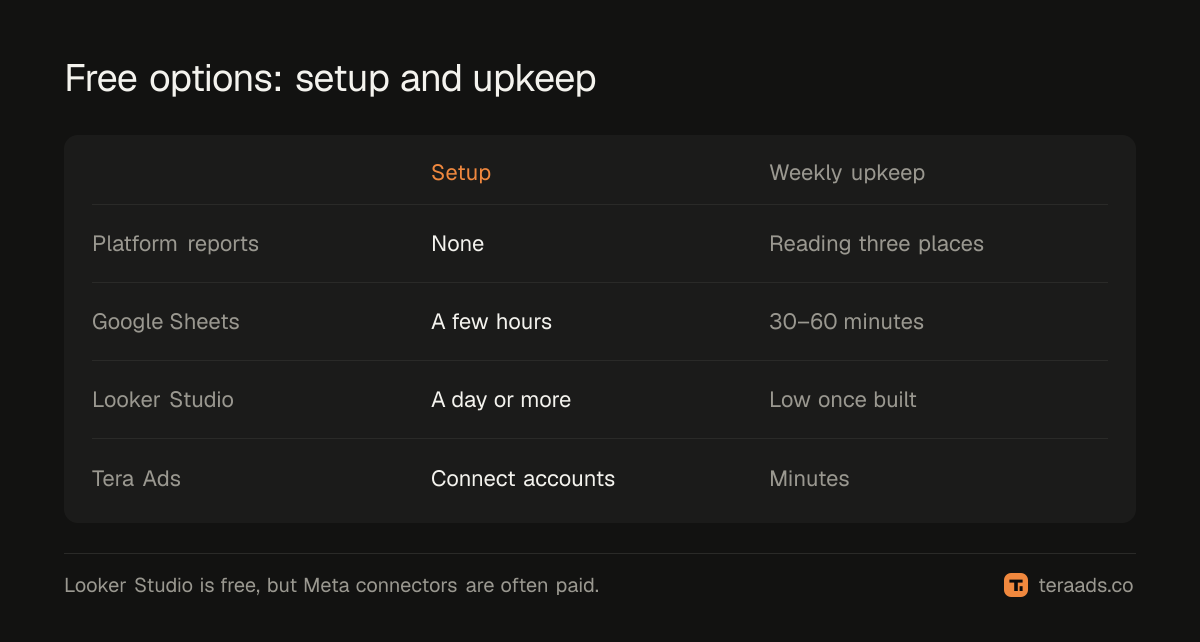
| Platform reports (Ads Manager, Google Ads, Shopify) | Free | None | Reading three places | No |
| Google Sheets | Free | A few hours | 30–60 minutes | Yes, if you build it |
| Looker Studio | Free; Meta connectors often paid | A day or more | Low once built | Only if your data includes it |
| Tera Ads | Free for one business | Connect accounts | Minutes | Yes, RTO from Shiprocket |
Platform reports
Ads Manager, Google Ads and Shopify Analytics are free and detailed. The problem is that they're separate and each platform credits its own ads, so Meta and Google together often claim more sales than your store made; why Meta and Shopify disagree explains why. They're essential for in-platform work, such as comparing ads, but not for knowing whether ads made money overall.
Google Sheets
A sheet can calculate anything: MER, real ROAS on kept orders, RTO by campaign. It's free and fully under your control. The cost is time: weekly exports, pasting and checking, and the risk of broken formulas. The Google Sheets dashboard guide has a ready structure.
Looker Studio
Google's free reporting tool builds charts and tables from data sources. It connects natively to Google Ads, GA4 and Google Sheets. Meta Ads and Shopify usually need partner connectors, many of them paid, or a Google Sheet in the middle. It's good for shareable, visual reports once the data is clean; the calculations, such as returns, still have to come from somewhere.
Free dedicated tools
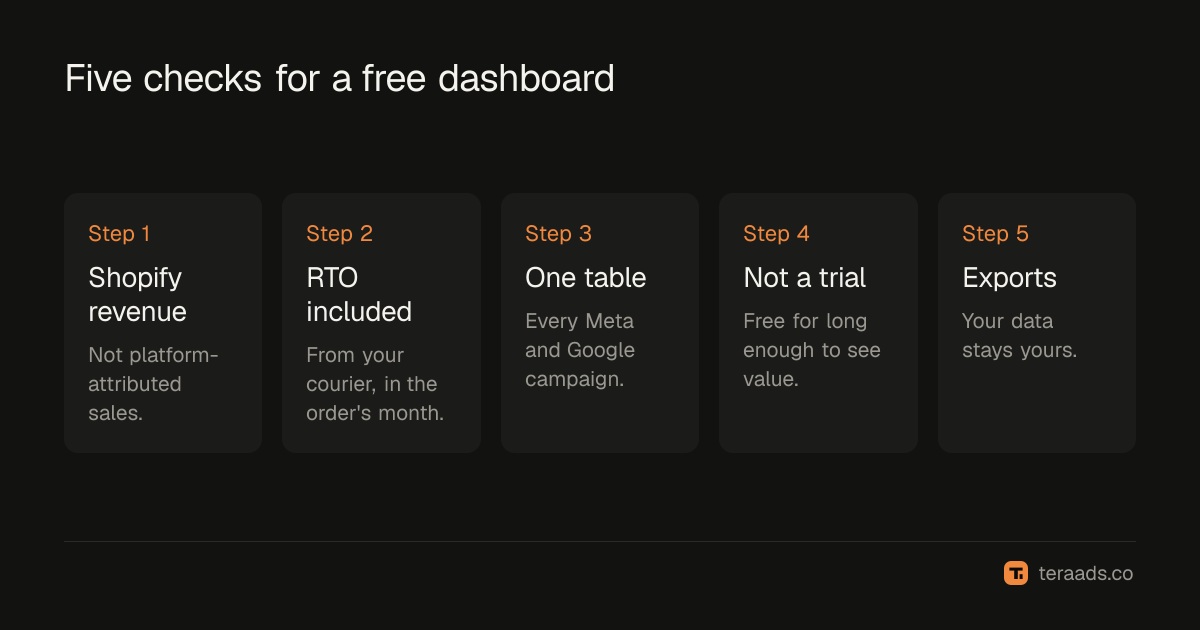
Several tools offer free plans. Before choosing one, check:
- Revenue comes from Shopify, not platform-attributed sales.
- Returns and RTO are included, ideally from your courier, counted in the order's month.
- Every campaign from Meta and Google is in one table.
- The free plan isn't a short trial that expires before you see value.
- You can export your data.
Tera Ads is free for one business: Shopify sales, Meta Ads and Google Ads spend, and profit after RTO from Shiprocket on one screen, with every campaign in one table and winners and money-wasters marked. It also includes deep dives into wasted Google search terms, disapproved Shopping products and Meta audience overlap.
Which to choose
- Just starting, a few campaigns: platform reports plus a simple weekly sheet.
- Comfortable with spreadsheets, want control: Google Sheets, maybe with Looker Studio on top.
- Want answers without upkeep: a free dedicated tool that includes returns.
- Need custom analysis too: a tool for weekly numbers and a sheet for one-off questions.
Spreadsheet vs dashboard helps decide when the weekly sheet has become too costly. If you're weighing paid tools as well, the best profit analytics for Indian Shopify brands compares them.
A simple free setup
For a brand spending up to a few lakh rupees a month on Meta and Google, a practical free routine looks like this:
- Daily: ten minutes in Ads Manager and Google Ads for obvious problems, such as disapproved ads or a campaign spending far faster than usual.
- Weekly: total ad spend against Shopify revenue (MER), new customers and each campaign's results, in one place.
- Monthly: profit after returns for the last settled month, by campaign, and budget decisions. For COD brands, use orders at least three weeks old so returns have settled.
The weekly and monthly views are where a combined dashboard earns its place. The daily checks stay in the ad platforms, where you can act immediately.
Making any free option trustworthy
A dashboard is only as good as the data behind it. Three habits make any of these options reliable. First, tag every ad with UTMs so Shopify can record campaigns; the UTM guide has a naming scheme. Without them, much of your revenue appears as direct or unknown. Second, keep campaign names consistent and descriptive, so the same campaign is recognisable in Ads Manager, Google Ads and your reports. Third, reconcile once a month: total spend should match the platforms and revenue should match Shopify for the same dates. If a number doesn't match, fix the cause before deciding anything on it.
Decide in advance which number settles arguments. When Ads Manager says a campaign is profitable and your dashboard says it isn't, the view based on Shopify orders after returns should win, because that's the money that reached your bank.
When free stops being enough
Free options work well until the weekly upkeep starts costing more than the tool would. Watch for three signs: someone spends more than an hour a week stitching exports together, budget decisions wait for the numbers, or nobody trusts the totals because they never quite match. At that point, compare the cost of a paid or free dedicated tool with the hours the manual setup consumes each month.
Common mistakes
Adding platform numbers together. They overlap; use Shopify for revenue.
Ignoring returns. A free dashboard without RTO overstates profit for COD brands.
Paying for connectors without checking. Looker Studio is free; some connectors are not.
Choosing a trial thinking it's free. Check whether the free plan lasts.
Never reconciling. Check any dashboard against Shopify for a settled month.
Frequently asked questions
Is there a free dashboard for Meta Ads and Google Ads together?
Yes. Options include a Google Sheets dashboard, Looker Studio with connectors, or a free tool such as Tera Ads, which also adds Shopify sales and profit after returns.
Is Looker Studio free for ads reporting?
Looker Studio is free and connects natively to Google Ads, GA4 and Sheets. Meta Ads usually needs a partner connector, which is often paid.
Can I see Shopify profit in a free dashboard?
Yes, if the tool or sheet includes product costs, shipping, fees and returns. Platform reports alone don't show profit after returns.
What's the best free ads dashboard for Indian brands?
One that uses Shopify orders as revenue and includes RTO from your courier. Tera Ads is free for one business and does both.
How much time does a free spreadsheet dashboard take?
Usually 30–60 minutes a week to export, paste and check, more as campaigns grow.