Google Ads 'Limited by Budget': When to Raise It and When Not To
The Limited by budget status means Google could show your ads more if you spent more. When raising the budget makes money, when it doesn't, and what to fix first.
On this page
"Limited by budget" means your Google Ads campaign could get more impressions and clicks at its current settings if its daily budget were higher. It's an opportunity signal, not an error. Raise the budget only if the campaign is profitable on kept orders and extra spend is likely to stay profitable. If it isn't, fix targeting, bids or the feed first, and remember that Maximize conversions and Maximize conversion value campaigns are designed to spend their whole budget anyway.
Key takeaways
- The status means budget, not bids or quality, is stopping more traffic at current settings.
- Google shows a recommended budget: its estimate of the lowest budget that loses no impressions to budget.
- Raise budgets only on campaigns that make money after RTO, in steps, judging each step on Shopify orders.
- For unprofitable limited campaigns, tighten targeting or raise efficiency targets instead.
- Campaigns can be limited for other reasons, such as bid strategy, policy or learning; check which status you have.
What the status means
According to Google's help page, the status appears when your budget isn't enough to cover all the traffic available for your current keywords, targeting and bids, so Google shows your ads less often to avoid spending the budget too quickly. Hovering over the status shows a recommended budget. Google describes the recommended average daily budget as the estimated lowest amount at which you wouldn't lose impressions to budget, and says it may suggest a more conservative figure when that amount would be very high.
The same page notes that Maximize conversions and Maximize conversion value strategies are designed to spend the full budget, so they're "limited by budget" by design.
Other "limited" statuses
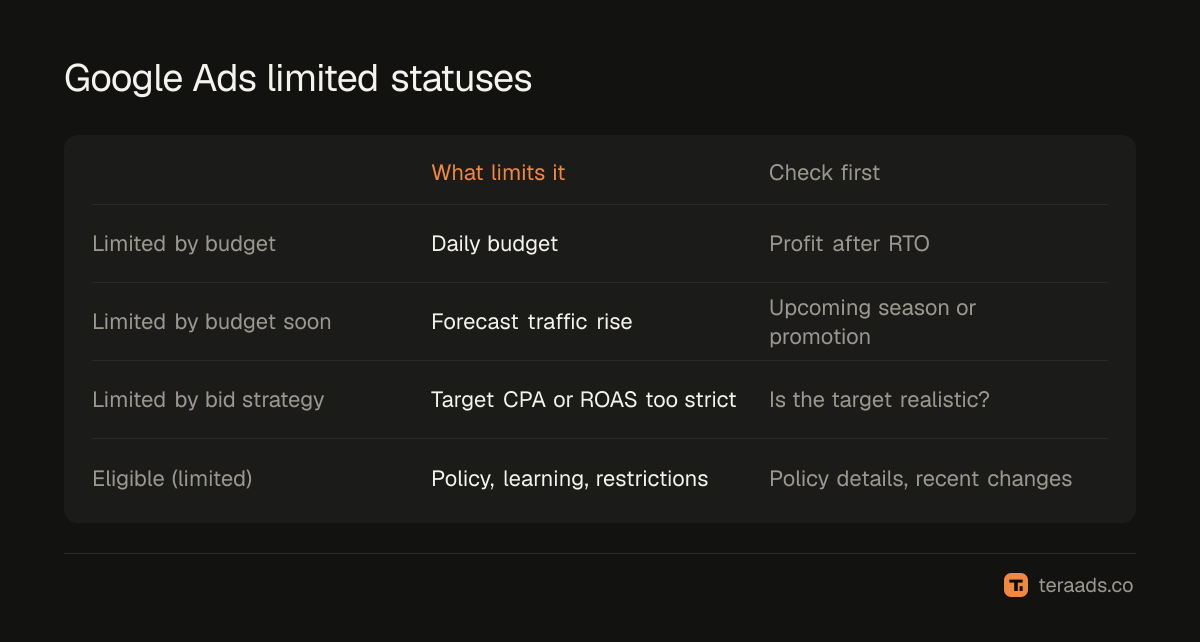
| Status | What's limiting it | First thing to check |
|---|---|---|
| Limited by budget | Daily budget | Is the campaign profitable after RTO? |
| Limited by budget soon | Forecast traffic increase | Upcoming season or promotion |
| Limited by bid strategy | Target CPA too low or target ROAS too high | Whether the target is realistic |
| Eligible (limited) | Policy, learning or other restrictions | Policy details, recent big changes |
A campaign limited by its targets won't spend more just because you raise the budget. A Shopping or Performance Max campaign that spends only a fraction of its budget usually has a feed, policy or demand problem rather than a budget problem.
Deciding what to do, step by step
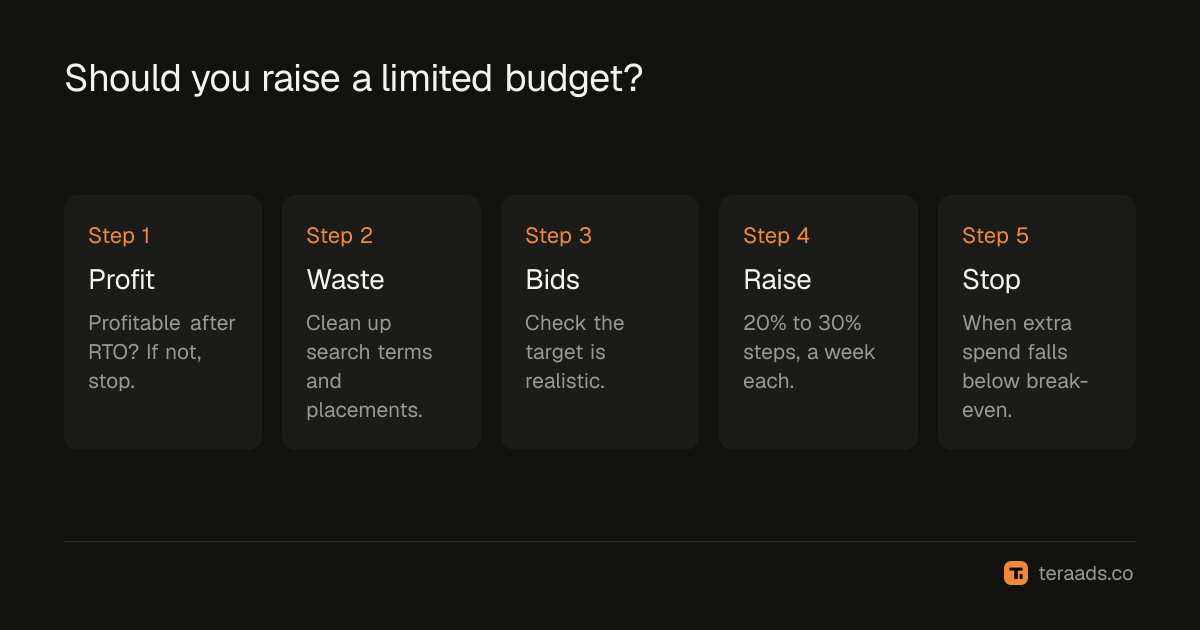
- Check profit after RTO. Compare the campaign's spend with its Shopify orders, by UTM, after refusals. If it doesn't make money, don't feed it more.
- Check search terms or placements. Wasted spend on irrelevant searches inflates the budget a campaign "needs"; wasted search terms shows how to find it.
- Check the bid strategy. If you use target ROAS, a slightly higher target can make a limited campaign more selective; target ROAS bidding explains how.
- Raise the budget in steps on profitable campaigns, such as 20% to 30% at a time.
- Judge each step on Shopify orders, not Google's reported conversions, over at least a week.
- Stop raising when the extra spend's return falls below break-even. Scaling ad spend profitably covers marginal returns.
How much Google can spend
Google can spend more than your daily budget on some days, up to twice the average daily budget for most campaigns, and balances it across the month: Google's help page says the monthly limit is the daily budget multiplied by 30.4. Plan cash on the monthly figure, not on a single day's spend.
Using the budget simulator
Google Ads offers a simulator that estimates how many impressions, clicks or conversions a different budget might bring. Treat it as a ceiling estimate. It reports Google's conversions, which include orders that may be refused or credited to other channels too. Use it to see whether there's room to grow, then measure the real result in Shopify.
A worked example
Two campaigns in the same account show "Limited by budget", each on ₹2,000 a day.
Campaign 1, Shopping for best sellers. Last month it spent about ₹60,000 and brought 150 Shopify orders by UTM. After 18% RTO, 123 were kept, so each kept order cost about ₹490. Break-even is ₹600 per kept order. There's room to grow: raise the budget to ₹2,500, wait a week, and check the cost per kept order again. If it stays under ₹600 at the higher spend, raise again.
Campaign 2, non-brand Search. Same spend, but 90 orders, 70 kept, about ₹860 per kept order. It's losing money on every order. The search terms report shows a quarter of the spend went to searches the brand doesn't serve, such as wholesale and repair queries. The status says Google would spend more, but more spend here would lose more. Fix the search terms and negatives first, and review again once the cost per kept order is below break-even.
The status was identical. The decisions were opposite. That's why the status alone is never a reason to raise a budget: it only says Google has more inventory to sell you, not whether buying it pays.
Common mistakes
Raising budgets on campaigns that lose money. "Limited" doesn't mean "profitable".
Fixing budget when the problem is targets. Campaigns limited by bid strategy won't spend more.
Big jumps. Large changes can unsettle smart bidding and make results hard to read.
Judging on Google's conversions. Use Shopify orders after RTO.
Ignoring under-spending campaigns. A campaign spending a fraction of its budget has a different problem.
Tera Ads shows Google Ads and Meta Ads spend beside your Shopify orders, with profit after RTO from Shiprocket for every campaign, so you know which limited campaigns deserve more budget. It is free for one business.
Frequently asked questions
What does "Limited by budget" mean in Google Ads?
Your campaign could show more often at its current settings if its daily budget were higher.
Should I always raise the budget when a campaign is limited?
No. Raise it only if the campaign is profitable after RTO and extra spend is likely to stay profitable.
What is the recommended budget in Google Ads?
Google's estimate of the lowest daily budget at which the campaign wouldn't lose impressions to budget.
Why does my Maximize conversions campaign always say limited by budget?
Google designs Maximize conversions and Maximize conversion value to spend the full budget, so they're limited by design.
Can Google spend more than my daily budget?
On some days, up to twice the average daily budget for most campaigns, balanced so monthly spend stays within the daily budget times 30.4.