Shopify Analytics vs Dedicated Ads Tools: What Shopify Covers
Shopify Analytics is the truth for store sales but doesn't show ad spend, profit after returns or campaign ROAS. What it covers, what it misses, and the fix.
On this page
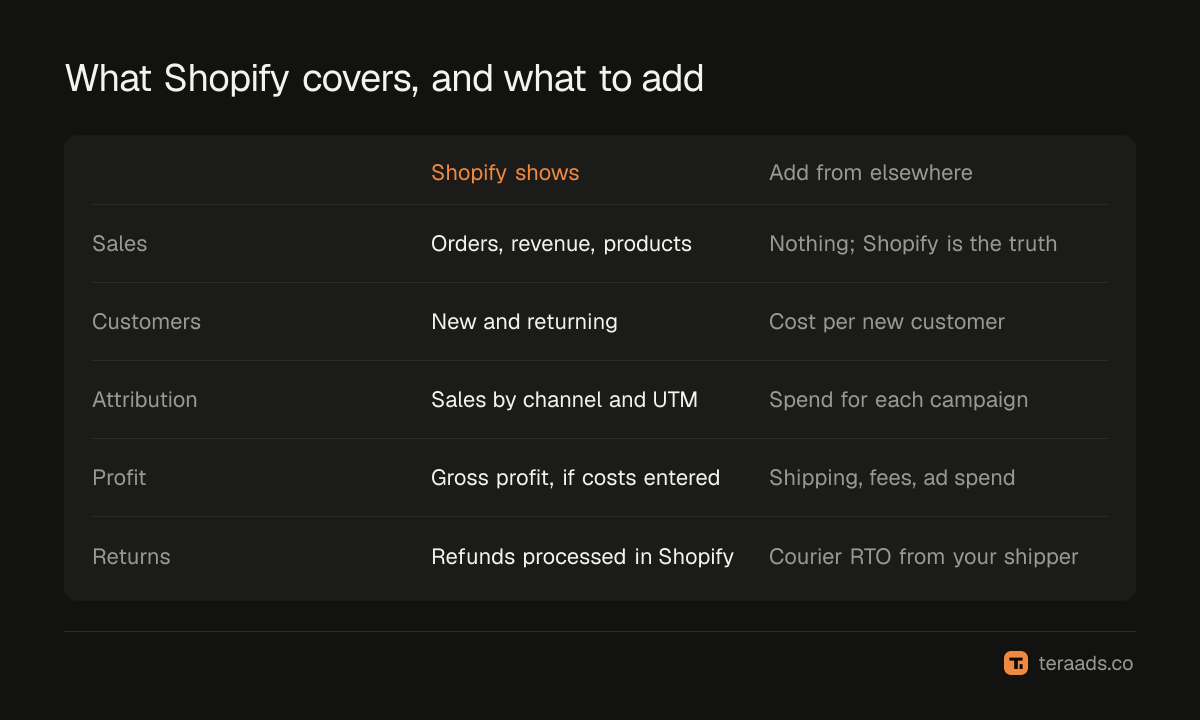
Shopify Analytics is the most reliable source for what your store sold: orders, revenue, customers and products, with attribution by channel. It doesn't hold your ad spend, so it can't show ROAS or profit per campaign, and it doesn't subtract shipping, fees or courier returns by default. Use Shopify as the truth for sales, and add ad spend and returns from a sheet or a dedicated tool to see whether ads make money.
Key takeaways
- Shopify is the truth for orders and revenue; ad platforms aren't.
- It attributes orders to channels and campaigns using UTMs, with five attribution models.
- It doesn't know your ad spend, so it can't calculate ROAS, MER or cost per customer on its own.
- Gross profit needs product costs entered; shipping, fees and RTO aren't included by default.
- A dedicated tool or sheet adds spend and returns to Shopify's sales.
What Shopify Analytics covers well
| Area | What Shopify shows |
|---|---|
| Sales | Orders, gross and net sales, returns processed in Shopify, by day, product and channel |
| Customers | New and returning customers, customer cohorts |
| Products | Best sellers, sell-through, product performance |
| Sessions | Visits, conversion rate, devices and locations |
| Marketing | Sessions and sales by channel and UTM campaign, with five attribution models |
| Profit | Gross profit, when cost per item is entered |
Because these numbers come from real orders, they're the base every other analysis should start from. Shopify's attribution reports explains the marketing side.
What it doesn't cover
- Ad spend. Spend lives in Meta Ads Manager and Google Ads, so Shopify can't calculate ROAS, MER or cost per new customer.
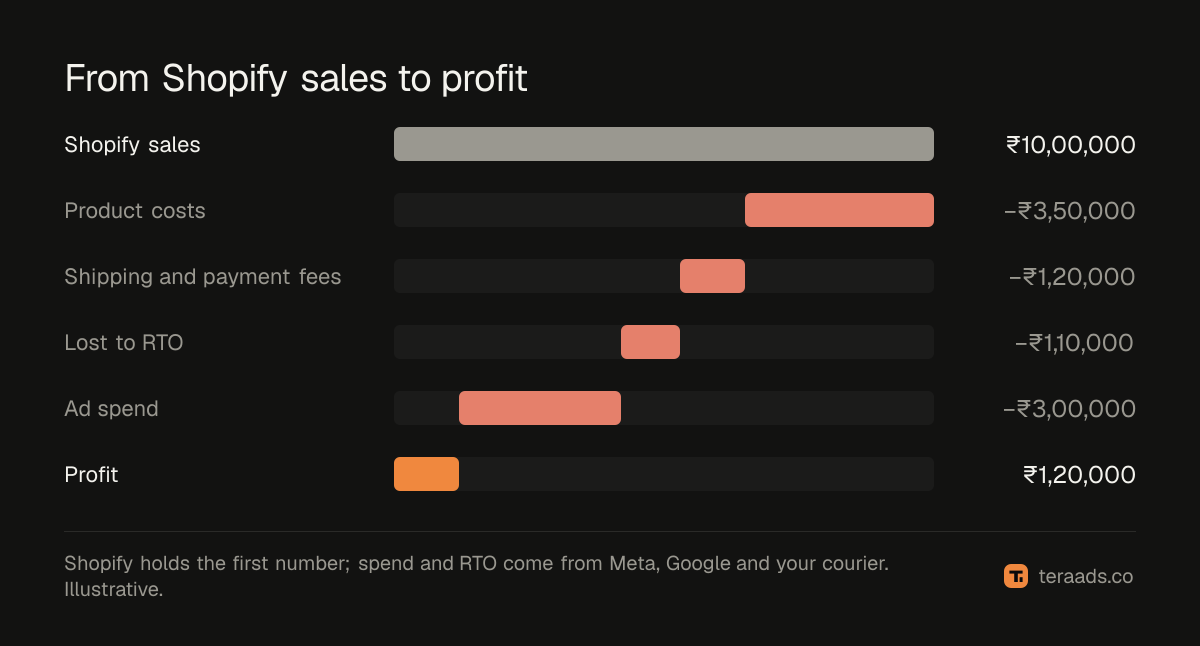
- Profit after all costs. Shipping, payment fees, packaging and ad spend aren't subtracted by default.
- Courier returns. Refused COD orders recorded by your shipping platform don't automatically reduce Shopify's sales in the month the order was placed.
- Campaign-level comparison across platforms. You can see sales by UTM campaign, but not spend beside it.
- Ad diagnostics. Search terms, audience overlap and creative fatigue live in the ad platforms.
Shopify vs dedicated tools
| Need | Shopify Analytics | Spreadsheet | Dedicated ads tool |
|---|---|---|---|
| Store sales truth | Yes | From Shopify exports | From Shopify |
| Ad spend beside sales | No | Yes, from exports | Yes |
| ROAS and MER | No | Yes, with formulas | Yes |
| Profit after RTO | No | Yes, if built | Depends on the tool |
| Upkeep | None | Weekly | Low |
Is Shopify Analytics enough?
It's enough if you only need to know what sold. It's not enough to decide ad budgets, because the key questions combine Shopify's sales with costs Shopify doesn't hold: Is this campaign profitable after returns? Is MER rising or falling as spend grows? Which products should get the ad budget?
Most brands fill the gap with a spreadsheet first; the Google Sheets dashboard guide shows how. When the weekly refresh becomes a burden, a dedicated tool takes over. The comparison of profit analytics options covers free and paid choices.
Getting the most from Shopify first
Whatever you add, Shopify's data gets better with a few habits:
- Enter cost per item for every product, so gross profit is meaningful.
- Tag every ad with UTMs, so campaign attribution works; see the UTM guide.
- Process returns and cancellations in Shopify promptly, so net sales stay accurate.
- Use consistent product types and tags, so reports group products sensibly.
Reports worth knowing in Shopify
A few built-in reports answer common questions without any extra tool:
- Sales over time and by channel show whether revenue is rising and where it comes from.
- First-time and returning customer sales show how dependent you are on new customers, which ads usually bring.
- Sales by product shows best sellers and, with cost per item entered, gross profit by product.
- Sessions by location and device help spot regions or devices with weak conversion.
- Marketing reports by UTM campaign show which campaigns brought orders, under the attribution model you choose.
Report names and availability vary by plan and change over time, so look in Analytics for the closest equivalents.
When Shopify and your tool disagree
Any tool that adds spend and returns should still show the same total sales as Shopify for the same period and definition. When it doesn't, the cause is usually a definition: gross or net sales, order date or payment date, whether shipping and taxes are included, and how refunds and cancellations are treated. Time zones matter too, so check both use your store's time zone. Settle these once and write them down. After that, any remaining difference is worth investigating, because it usually points to missing data, such as orders from a sales channel the tool doesn't connect to.
A monthly routine
Once a month, take the last settled month and answer four questions using Shopify plus your spend data. What were total sales and total ad spend, and what was MER? How many new customers did ads bring, and at what blended cost? What was profit after product costs, shipping, fees and returns? Which campaigns and products made money, and which didn't? If you can answer all four in under half an hour, your setup is working. If it takes an afternoon, it's time to simplify.
Common mistakes
Using ad platform revenue instead of Shopify's. Platforms overlap and overcount.
Judging profit from gross profit. Shipping, fees, returns and ad spend still have to come off.
Ignoring courier outcomes. For COD brands, refusals change which months and campaigns made money.
No UTMs. Without them, Shopify's channel reports are mostly direct and unknown.
Expecting Shopify to show ROAS. It doesn't have your spend.
Tera Ads starts from your Shopify orders and adds Meta Ads and Google Ads spend and RTO from Shiprocket, so profit after returns is shown for every campaign. It is free for one business.
Frequently asked questions
Is Shopify Analytics enough for ads reporting?
It's the truth for sales, but it doesn't hold ad spend, so it can't show ROAS or profit by campaign on its own.
Does Shopify show ROAS?
No. ROAS needs ad spend, which lives in Meta Ads Manager and Google Ads. Combine Shopify sales with spend in a sheet or a tool.
Can Shopify show profit?
It shows gross profit when you enter cost per item. Shipping, payment fees, returns and ad spend aren't subtracted by default.
Why use Shopify instead of Meta for revenue?
Shopify records real orders once. Meta and Google each credit their own ads and can claim the same order.
What do dedicated ads tools add to Shopify?
Ad spend beside sales, ROAS and MER, every campaign in one view and, in some tools, profit after courier returns.