Shopify's Attribution Reports: How to Read Them and Pick a Model
Shopify credits orders to channels using five attribution models. Where to find the reports, how the models differ, and how to use them beside Meta and Google.
On this page
Shopify's marketing reports credit orders to channels and campaigns using UTMs and referrers, with five attribution models: last non-direct click (the default), last click, first click, any click and linear. Because Shopify sees the actual orders, its reports are an independent check on Meta and Google, which each credit their own ads. Tag every ad with UTMs, compare first click with last non-direct click, and use the reports to judge channels, not single ads.
Key takeaways
- Shopify attributes orders using UTM parameters and referrers it records on each visit.
- Five models are available; last non-direct click is the default.
- Shopify's numbers are independent of the ad platforms and can't be double counted across channels.
- Accuracy depends on UTMs: untagged ad clicks show up as direct, referral or unknown.
- Compare models: a channel strong on first click but weak on last click starts journeys that others close.
Where to find the reports
Shopify shows marketing performance in Analytics and in the Marketing section of the admin. Reports break down sessions, orders and sales by channel, and by campaign where UTMs are present. You can switch the attribution model in the marketing reports to see how credit moves between channels. Menu names change from time to time; look for marketing or attribution reports in Analytics.
The five models
| Model | How it credits an order | What it tends to show |
|---|---|---|
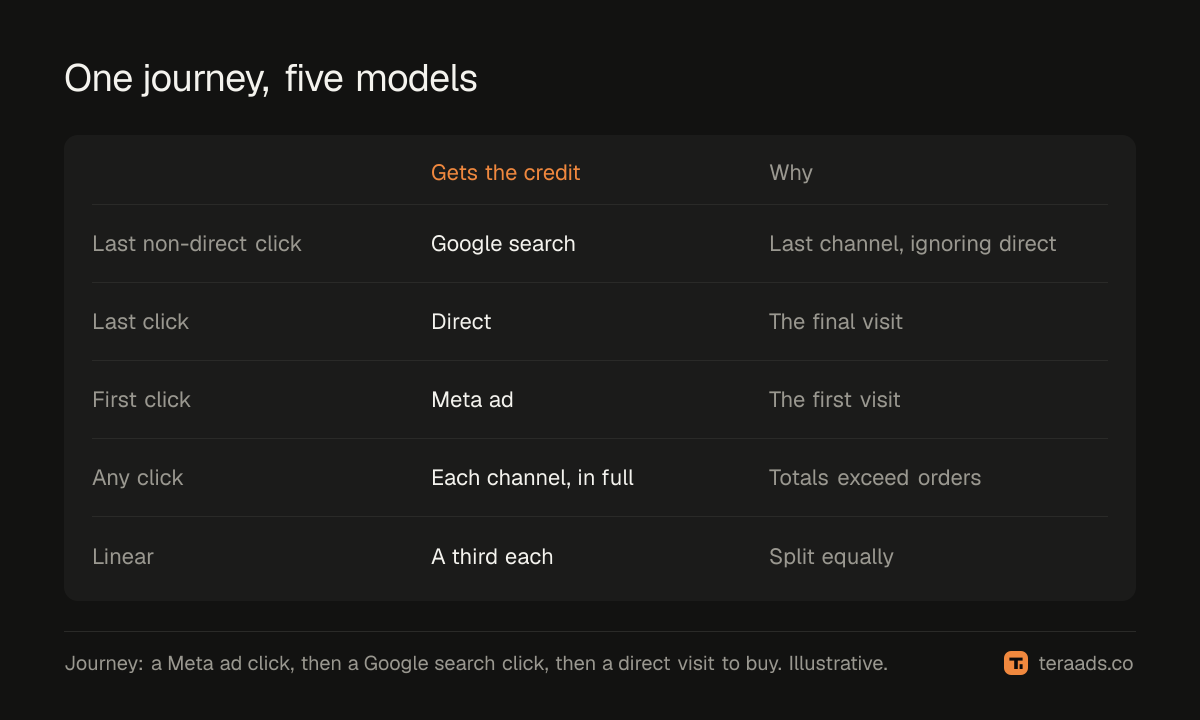
| Last non-direct click (default) | The last channel before purchase, ignoring direct visits | The channel that brought the buyer back most recently |
| Last click | The very last touchpoint, including direct | Lots of direct; useful for comparison only |
| First click | The first recorded touchpoint | Channels that introduce new customers |
| Any click | Every clicked channel in the journey gets credit | All channels involved; totals exceed orders |
| Linear | Credit split equally across touchpoints | A balanced view of contribution |
The default ignores direct visits because a buyer who typed your address usually came because of something earlier. If every touchpoint was direct, the order stays direct.
Using the reports, step by step
- Tag every ad with UTMs. Without them, ad clicks fall into direct, referral or unknown. The UTM guide has a naming scheme.
- Pick a settled period. Use the last full month, so recent orders aren't missing.
- Read the default model first. Note orders and sales for Meta, Google, organic search, email and direct.
- Switch to first click. Note which channels gain and which lose.
- Compare with the platforms. Put Shopify's Meta and Google sales beside Ads Manager and Google Ads for the same period.
- Decide at channel level. Use the gaps to understand roles, not to judge single ads.
Comparing Shopify with Meta and Google
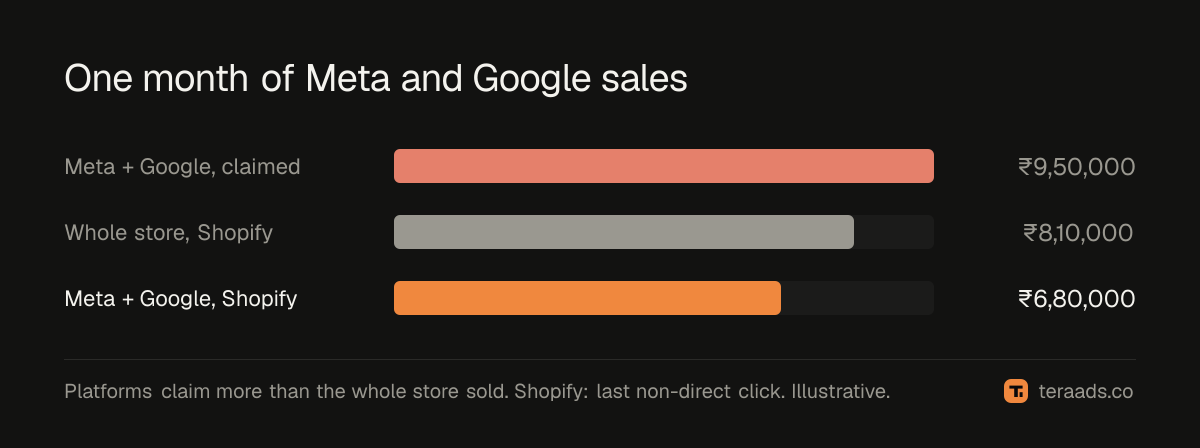
Meta and Google each credit their own ads, using their own windows, and both may claim the same order. Shopify credits each order once per model, using what it saw. So for one month you might see:
| Source | Meta sales | Google sales | Total |
|---|---|---|---|
| Ads Manager and Google Ads | ₹6,40,000 | ₹3,10,000 | ₹9,50,000 |
| Shopify, last non-direct click | ₹4,20,000 | ₹2,60,000 | ₹6,80,000 |
| Shopify total store sales | — | — | ₹8,10,000 |
The platforms together claim more than the whole store sold. Shopify's figures add up. The difference is the overlap and view-through credit that each platform takes. Why Meta and Shopify disagree explains the causes; GA4 vs Shopify covers the analytics side.
What the reports can't do
- See views. Shopify only knows about visits, so ads that influenced people without a click get no credit.
- Track across devices perfectly. A buyer who clicks on a phone and buys on a laptop may look like two people.
- See refusals. Attributed sales are orders placed; refused COD orders need to be subtracted separately; true ROAS after RTO and COD shows how.
- Prove cause. Attribution describes journeys. Tests show what ads actually add.
Fixing direct and unknown orders
A large share of direct or unknown orders usually has fixable causes:
- Untagged ads. Add UTMs to every Meta and Google ad. Meta's URL parameters field can add them to each ad, with dynamic values for campaign and ad names.
- Untagged emails and WhatsApp messages. Links in messages often arrive without a referrer, so they look direct unless tagged.
- In-app browsers. Instagram's and Facebook's in-app browsers can drop referrers; UTMs survive.
- Link shorteners and redirects that strip parameters. Test each link before using it.
- Creator and bio links. Give each creator a tagged link or a discount code.
Track the share of direct and unknown orders monthly. It should fall as tagging improves, and a sudden rise usually means a change broke your tagging.
Reading two models side by side
Suppose last month's report shows Meta prospecting with ₹1.2 lakh of sales under last non-direct click and ₹2.9 lakh under first click, while email shows ₹1.8 lakh under last non-direct click and ₹0.3 lakh under first click. The story is clear: prospecting brings people in, and email brings them back to buy. Cutting prospecting because its last-click sales look small would starve email of the people it converts a few weeks later. Comparing the two models takes five minutes and prevents that mistake. First-click vs last-click attribution explores the same pattern across tools.
Common mistakes
No UTMs on ads. The single biggest source of "direct" and "unknown" orders.
Reading only the default model. First click shows which channels bring new customers.
Judging single ads in Shopify. Sample sizes are small; use it for channels and campaigns.
Adding platform numbers together. They overlap; Shopify's don't.
Forgetting returns. Attributed sales include orders that are later refused.
Tera Ads uses Shopify orders as the truth for sales, with Meta Ads and Google Ads spend and profit after returns for every campaign on one screen. It is free for one business.
Frequently asked questions
What attribution model does Shopify use?
Last non-direct click by default. You can also choose last click, first click, any click or linear in the marketing reports.
Why does Shopify show different sales from Meta Ads?
Meta credits its own ads, including views and orders other channels also claim. Shopify credits each order using the visits it recorded.
How do I see sales by campaign in Shopify?
Tag your ads with UTM parameters. Shopify then reports sessions, orders and sales by campaign in its marketing reports.
Why are so many Shopify orders marked direct?
Usually untagged links, app browsers that drop referrers, or buyers who typed your address after seeing an ad.
Should I trust Shopify's attribution over Meta's?
For totals and cross-channel comparisons, Shopify is more reliable because it can't double count. Use platform data to compare ads within each platform.