Advantage+ Sales Campaigns (Formerly Advantage+ Shopping): A Guide
Meta's Advantage+ Shopping became Advantage+ Sales in 2025. How it works now, when it beats manual campaigns, the settings that matter and how to judge it.
On this page
Advantage+ Sales campaigns are Meta's automated sales campaigns: you supply creatives, a budget and a conversion goal, and Meta decides audiences, placements and budget split. They replaced Advantage+ Shopping campaigns in 2025, and new sales campaigns now start with Advantage+ settings switched on. They often work well for Shopify brands with enough purchases, but they also love existing customers and retargeting, so judge them on new customers and profit after returns.
Key takeaways
- Advantage+ Shopping was renamed Advantage+ Sales in early 2025; sales campaigns now default to Advantage+ settings.
- A campaign stays "Advantage+" when budget, audience and placements are all left to Meta.
- Automation needs data: the campaign learns best with plenty of purchases a week.
- Watch how much spend goes to existing customers; it can flatter results.
- Feed it many distinct creatives, and judge it on kept orders from Shopify, not Ads Manager alone.
What changed in 2025
Meta renamed Advantage+ Shopping campaigns to Advantage+ Sales and folded them into the normal sales campaign setup, removing the old choice between "Advantage+" and "manual" at creation (Jon Loomer on the change). A new sales campaign starts with Advantage+ settings on; switching individual controls off turns it into a manual campaign.
Meta's developer changes describe the same idea from the other side: a campaign qualifies as Advantage+ when its budget, audience and placement automation are all enabled (PPC Land on the unified Advantage structure). Other changes reported since: multiple ad sets are allowed, and Advantage+ audience suggestions and exclusions are available. Check your own Ads Manager, because Meta rolls these out gradually and changes them often.
| Old Advantage+ Shopping | Advantage+ Sales (2025 onward) | |
|---|---|---|
| How you create it | Separate campaign type | Default setup for sales campaigns |
| Ad sets | One built-in ad set | Multiple ad sets allowed |
| Audience control | Very limited | Advantage+ audience with suggestions and exclusions |
| Budget | Campaign level | Campaign level (Advantage+ budget) to keep Advantage+ status |
| Turning it manual | Not possible | Switch off any automation lever |
How it works
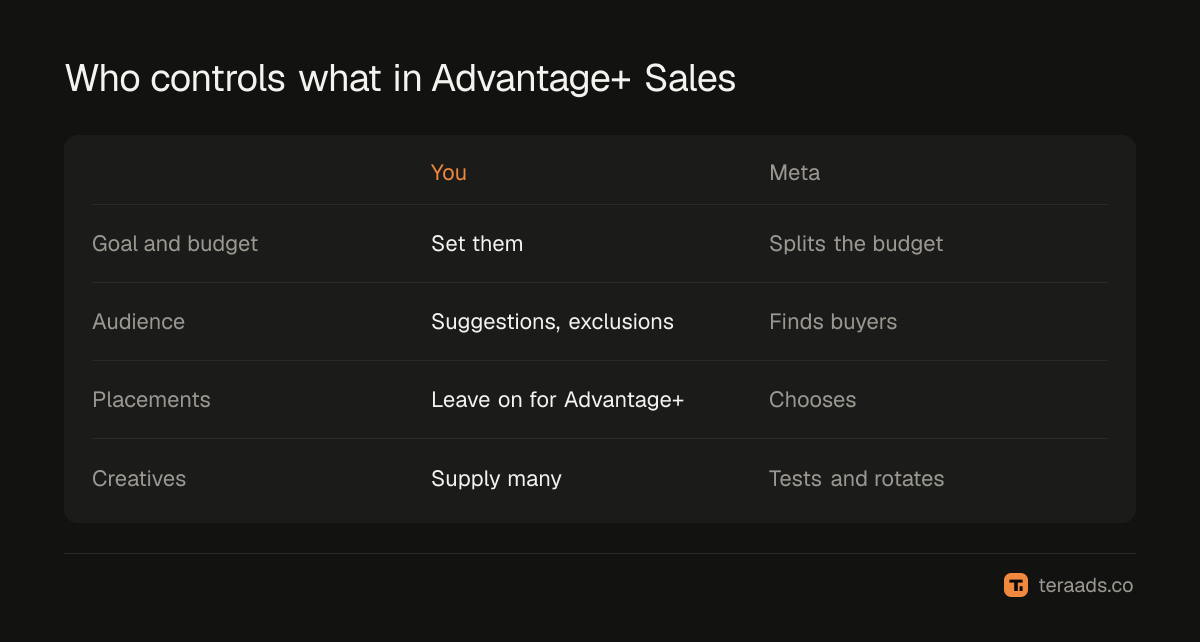
You give Meta a conversion goal (usually purchase), a campaign budget, and a pool of creatives. Meta then:
- finds the audience, using your pixel and Conversions API data, starting broad;
- chooses placements across Facebook, Instagram, Messenger and the Audience Network;
- moves budget between ad sets and ads toward what's converting;
- tests creatives against each other continuously.
The less you constrain it, the more room it has to optimise. The trade-off is less control and less insight into why it does what it does.
When Advantage+ Sales works well
- Enough purchase volume. Like any Meta campaign, it needs conversions to learn; see the learning phase guide. Accounts with a handful of purchases a week often do better with simpler manual setups until volume grows.
- Good tracking. Pixel plus Conversions API with purchase values. Poor signals mean poor optimisation.
- Plenty of creative. The campaign tests and rotates ads itself, so it needs many distinct concepts, not small variations.
- A broad market. Products with wide appeal give the algorithm room to find buyers.
Settings that matter
Existing customers
Advantage+ campaigns can spend heavily on people who already bought from you or visited recently, because they convert easily. That makes results look strong while finding few new customers. Define your existing customers (from your customer list and site visitors) so Meta can report on them, and use the existing customer budget cap where your account offers it. Reports on its availability have changed over time, so check what Ads Manager shows.
Creative volume and variety
Supply several distinct angles: product-led, problem-led, customer videos, offers. Refresh on a rhythm rather than all at once; the creative fatigue guide covers how.
Budget structure
Advantage+ status depends on a campaign-level budget, which is the old CBO idea under a new name. The trade-offs between campaign and ad set budgets are in CBO vs ABO.
How to judge it
Ads Manager will often show an Advantage+ campaign with excellent ROAS. Before scaling, check:
- New vs existing customer split. How much spend and revenue came from people who were already customers?
- Kept orders. Compare with UTM-tagged Shopify orders, after cancellations and RTO. COD-heavy brands often see a big gap.
- Total business impact. When you scale it, does total Shopify revenue rise, or does it just take credit from other campaigns? Watch MER, as in MER vs ROAS.
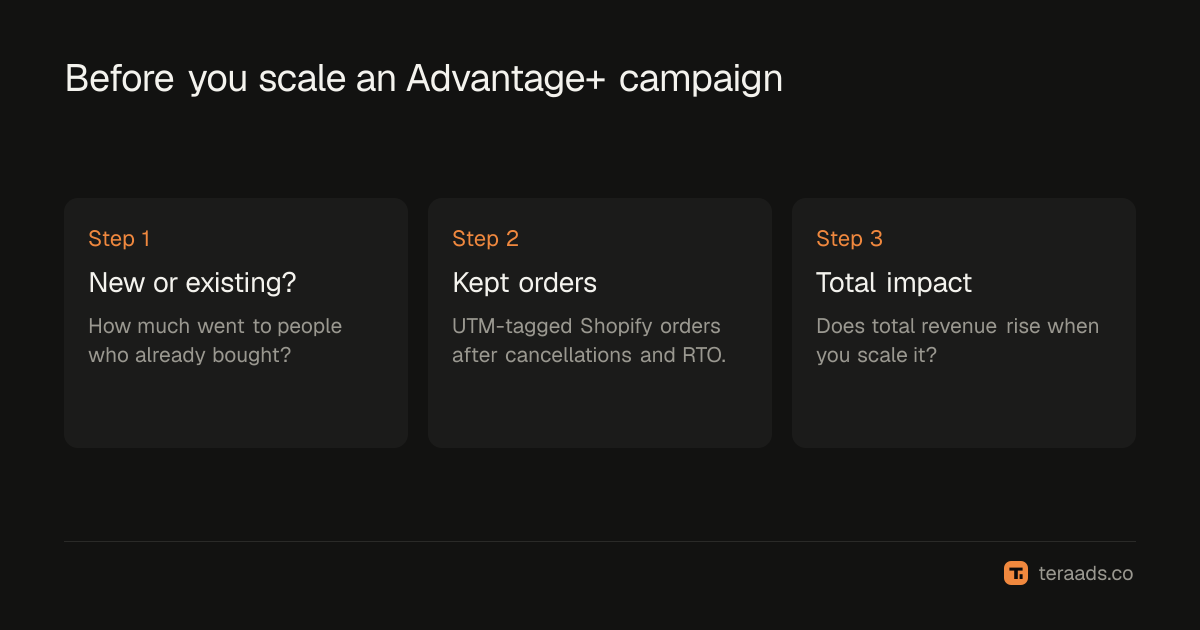
A campaign that wins on all three is worth scaling. One that only wins in Ads Manager is mostly harvesting demand you already had.
Advantage+ Sales next to your other campaigns
Few accounts should run only one Advantage+ campaign. A common structure keeps an Advantage+ Sales campaign as the main engine, a small testing campaign for new creative concepts and offers, and, where volume allows, a separate retargeting setup with its budget sized to the audience. New creatives that prove themselves in testing move into the Advantage+ campaign.
Watch for overlap. Two automated campaigns chasing the same buyers bid against each other and blur reporting. If you run more than one, give each a clear job, such as different products or different countries, and check that total results improve when you add one. The audience overlap guide explains how overlap raises costs.
Finally, give changes time. Advantage+ campaigns reallocate spend constantly, so daily swings are normal. Judge them weekly, on kept orders and new customers, and avoid frequent edits that restart learning.
Tera Ads shows every Meta Ads and Google Ads campaign in one table with profit worked out from your Shopify orders after returns, and its Meta deep dive covers funnel, audience overlap and creatives that still work. It is free for one business.
Frequently asked questions
What happened to Advantage+ Shopping campaigns?
Meta renamed them Advantage+ Sales campaigns in early 2025 and made Advantage+ settings the default for new sales campaigns.
Are Advantage+ campaigns better than manual campaigns?
Often for accounts with good tracking, enough purchases and plenty of creative. Small accounts or very niche products sometimes do better with simpler manual structures. Test with comparable budgets and judge on kept orders.
Why is my Advantage+ campaign ROAS so high?
It may be spending a lot on existing customers and recent visitors who were likely to buy anyway. Check the split between new and existing customers.
How many creatives should an Advantage+ campaign have?
Enough distinct concepts for Meta to test, commonly several at once, refreshed regularly. Variety of angle matters more than the raw count.
Can I exclude existing customers?
You can define existing customers and, where available, cap the budget spent on them. Options have changed over time, so check the current settings in Ads Manager.