True ROAS After Refunds and Returns: What Ads Manager Leaves In
Meta and Google count a sale when it's placed, so refunds and returns never leave their ROAS. How to work out true ROAS after returns, with a worked USD example.
On this page
True ROAS is the revenue you keep after cancellations, refunds and returns, divided by what you spent on ads. Meta Ads and Google Ads count a purchase when the order is placed, and a refund weeks later doesn't take it back out, so for any store with real return rates the ROAS in Ads Manager is too high. Work true ROAS out on orders older than your return window, and add the cost of return shipping and stock you can't resell.
Key takeaways
- Ads Manager ROAS counts placed orders. True ROAS counts the orders customers kept.
- Refunds cost more than the lost sale: return shipping, handling, stock you can't resell and payment fees you don't get back.
- Count each refund against the month the order was placed, not the month it was processed.
- Judge a month only once its orders are older than your return window plus a couple of weeks.
- Use the ratio of true ROAS to platform ROAS to set a realistic floor in Ads Manager.
Why platform ROAS keeps refunded sales
When someone buys, your store sends Meta a purchase event with a value and a currency; Meta requires both for the Purchase event (Meta pixel reference). Google Ads records the conversion value your tag sends, which can be different for every order (About conversion values). Both platforms then report that revenue against the ads they credit.
A refund three weeks later doesn't change that by default. Google Ads does let you retract or restate a conversion by uploading conversion adjustments. They can be made within 54 days, and within 7 days if you want automated bidding to use them (How to adjust your conversions). Most Shopify stores never upload them, so the refunded order stays in reported revenue and in the ROAS.
Shopify's own sales report has a timing quirk too. Returns show as a negative amount on the date they were processed, while sales show on the day they were made (Shopify sales report). A November order refunded in December lowers December's sales, which makes November look better than it was.
There's a separate distortion: Meta and Google can both claim the same order. That's attribution, covered in why Meta Ads and Shopify never agree. This guide is about refunds, which inflate ROAS even when attribution is perfect.
The true ROAS formula
True ROAS = (attributed revenue − cancellations − refunds on those orders) ÷ ad spend for the same period
Three rules keep it honest:
- Use revenue before tax. Sales tax and VAT aren't yours. Sales tax and VAT in ROAS shows how to take them out.
- Match refunds to the order month. A refund belongs to the month the order was placed, whenever it's processed.
- Use the same definition everywhere. Compare true ROAS with true ROAS, never with another channel's platform ROAS.
For budget decisions, go one step further and use profit instead of revenue, because returns also cost shipping, labor and stock. That's POAS, profit on ad spend.
A worked example in US dollars
The numbers are illustrative, for one month of one Meta campaign:
- Ad spend: $25,000
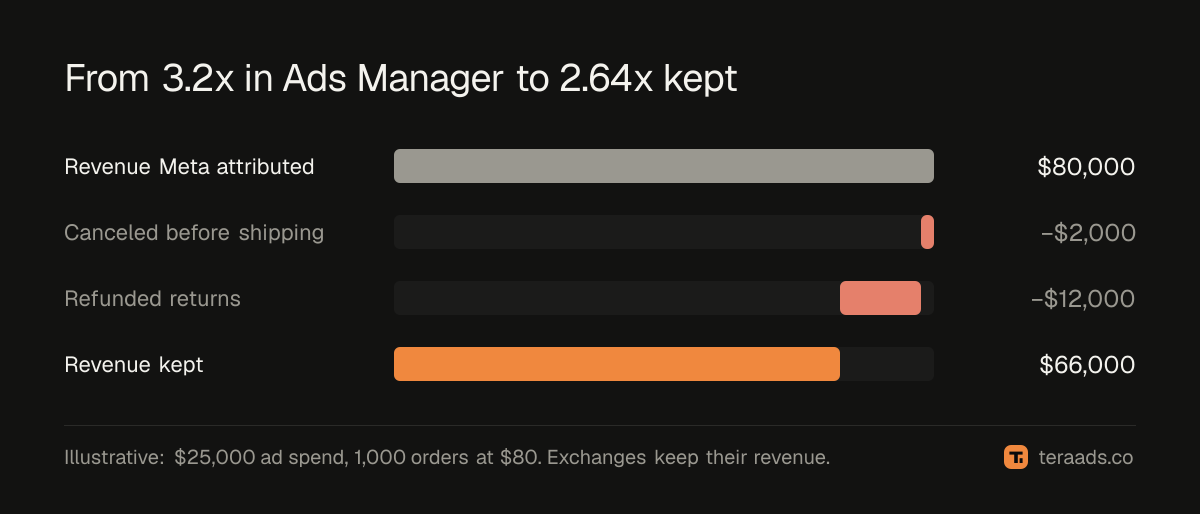
- Purchases Meta attributed: 1,000 at an average of $80 before tax, so $80,000
- Platform ROAS: 3.2x
- Canceled before shipping: 25 orders (2.5%)
- Returned for a refund: 150 orders (15%)
- Exchanged for another size or color: 50 orders (5%)
Work it through:
- Canceled: 25 × $80 = $2,000.
- Refunded: 150 × $80 = $12,000.
- Exchanges keep their revenue, so they stay in.
- Revenue kept: $80,000 − $2,000 − $12,000 = $66,000.
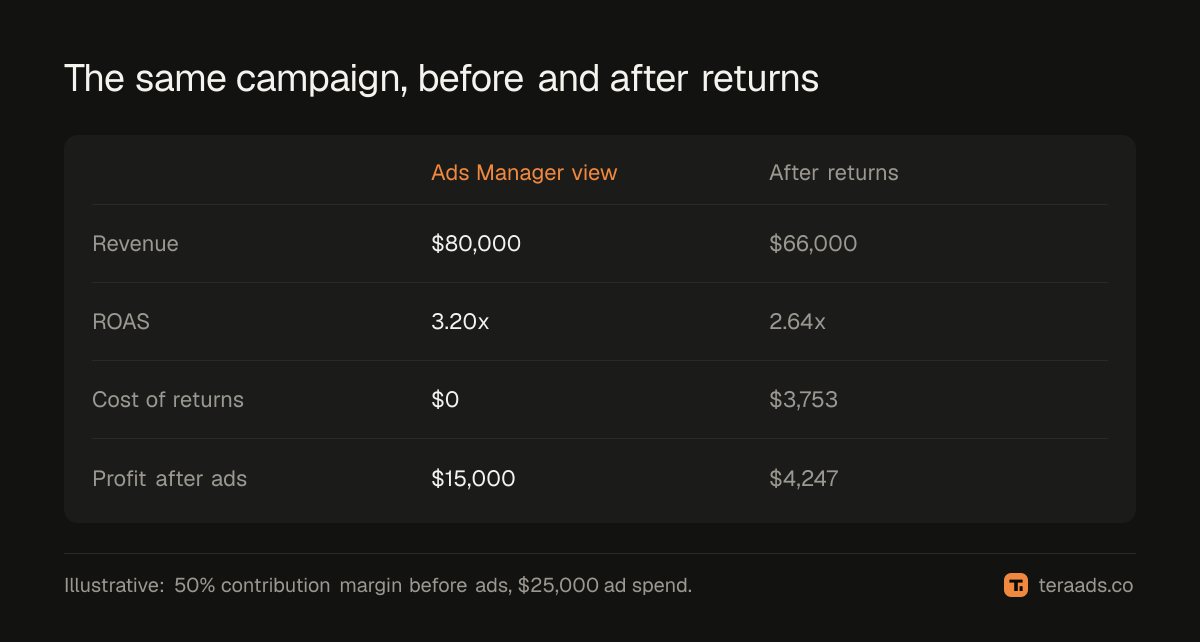
True ROAS = $66,000 ÷ $25,000 = 2.64x, against 3.2x in Ads Manager. In all, 17.5% of the reported revenue didn't stay.
Now the costs ROAS doesn't see. The brand paid to ship every refunded order, pays for return labels on refunds and exchanges, ships a replacement for each exchange, and can't resell one in ten refunded items. It also gets no processing fee back: Shopify says that when an order was paid through Shopify Payments, you don't get any credit card fees refunded (Shopify Help Center). On the Basic plan in the US the online card rate is 2.9% + 30¢ (Shopify pricing), which is $2.62 on an $80 order.
| Cost of returns | Calculation | Amount |
|---|---|---|
| Original shipping on refunded orders | 150 × $7 | $1,050 |
| Return labels | 200 refunds and exchanges × $8 | $1,600 |
| Shipping replacements | 50 exchanges × $7 | $350 |
| Stock that can't be resold | 15 items × $24 product cost | $360 |
| Payment fees not returned | 150 refunds × $2.62 | $393 |
| Total | $3,753 |
Say the campaign's orders carry a 50% contribution margin before ads, after product cost, outbound shipping, fees and packaging. On Ads Manager's numbers it looks like $80,000 × 50% − $25,000 = $15,000 profit. On kept orders it's $66,000 × 50% = $33,000, minus $3,753 of return costs, minus $25,000 of ads = $4,247. The campaign still makes money, but less than a third of what the dashboard implies.
Exchanges, store credit and partial refunds
Not every return is a refund, and each kind changes the numbers differently:
- Exchanges keep the revenue but cost a return label and a second shipment. Count them as kept orders and add the shipping to costs.
- Store credit keeps the cash for now, but you still owe the customer goods. Count the order as kept for ROAS, and track how much credit is outstanding.
- Partial refunds for damage, late delivery or a price adjustment reduce revenue by the amount refunded.
- Refunds without a return, when you let the customer keep a low-value item, lose the revenue and the product but save the return label.
Returns vs RTO covers the other kind of return, parcels that never reach the buyer, which matters most in cash-on-delivery markets.
When returns settle
You can't calculate true ROAS for last week, because last week's refunds haven't happened yet. A month's number settles once its orders are older than your return window, plus time for delivery, the trip back and processing.
Your window sets the pace. Shopify's return rules let you choose 14, 30 or 90 days, no limit, or a custom number of days (Shopify return rules). Some markets set a legal floor for online orders. In the EU, shoppers can cancel within 14 days of delivery without giving a reason (Your Europe). In the UK, they have 14 days after receiving the item to cancel and another 14 days to send it back, and you must refund within 14 days of getting it back (GOV.UK).
| Your return window | When a month's true ROAS settles |
|---|---|
| 14 days | About 4 weeks after the month ends |
| 30 days | About 6 weeks after the month ends |
| 60 days | About 11 weeks after the month ends |
| 90 days | About 15 weeks after the month ends |
Until then, show the month as provisional and estimate refunds from the last settled month's rate. Holiday orders settle latest, because gifts come back in January.
Turning true ROAS into a target in Ads Manager
Your team still works in Ads Manager, so translate. In the example, true ROAS is 2.64 ÷ 3.2 = 0.825 of platform ROAS. If you need a true ROAS of 2.2x to break even, your floor in Ads Manager is 2.2 ÷ 0.825, about 2.67x. The break-even ROAS guide shows how to get the 2.2x.
Recalculate the ratio every month, and separately for product lines with very different return rates. A campaign selling a high-return product needs a higher floor than one selling a product that rarely comes back. For the account as a whole, track MER on kept revenue too: net sales after refunds divided by total ad spend.
Common mistakes
- Judging last week's orders. Their refunds haven't arrived. Mark recent months as provisional.
- One flat refund rate for every campaign. It hides the campaigns that bring in the orders that come back.
- Booking refunds in the month they're processed. One month looks better, the next worse, and both are wrong.
- Forgetting the costs. Return labels, original shipping, unsellable stock and kept fees are real money.
- Counting exchanges as refunds. An exchange keeps the revenue; only its shipping is lost.
Tera Ads works out profit for the whole store from Shopify sales, product cost (from the margin you set, 70% by default), Meta Ads and Google Ads spend, shipping, payment fees, returns and refunds. Returns are counted in the month the order was placed, and a month settles after about 45 days. Separately, it shows every Meta Ads and Google Ads campaign in one table with the ROAS each platform reports and the money-wasters marked. It's free for one business, with no card needed.
Frequently asked questions
Does Meta take refunds out of ROAS?
Not by default. Meta reports the purchase value your store sent when the order was placed. A later refund in Shopify doesn't change the purchase Meta already recorded.
Can Google Ads remove refunded orders?
Yes, if you upload conversion adjustments that retract or restate the conversion. Google allows adjustments within 54 days, and within 7 days if you want automated bidding to use them.
What is a good true ROAS?
Any true ROAS above your break-even, which depends on your contribution margin. At a 45% margin before ads, break-even is about 2.2x; a lower margin needs a higher number.
How is true ROAS different from POAS?
True ROAS still uses revenue, just the revenue you kept. POAS uses profit after product cost, shipping, fees and the cost of returns, so it's the better number for deciding budgets.
Should exchanges count as returns?
Count them as kept revenue, because the customer still paid. Add the return label and the second shipment to your costs.
How long should I wait before calculating true ROAS for a month?
Until the month's orders are older than your return window plus about two weeks. With a 30-day window, that's roughly six weeks after the month ends.