Shopify COGS Setup: Cost per Item, Landed Cost and Your Margin
How to record product cost in Shopify, include freight, duty and packaging, and use it to get contribution margin and break-even ROAS right, with a worked example.
On this page
To set up COGS in Shopify, enter a cost per item on every product and variant, using the full landed cost of one unit: what you paid the supplier plus inbound freight, import duty and the packaging that ships with it. Keep per-order costs such as outbound shipping and payment fees out of it. Shopify then reports gross profit on every sale, and you get the margin you need for contribution margin and break-even ROAS.
Key takeaways
- Shopify's cost per item field sits in each product's price section; products with variants need a cost on every variant.
- Shopify reports profit only for items that had a cost recorded when they sold, and changes aren't applied to past orders.
- Landed cost per unit = supplier price + share of inbound freight + import duty + per-unit packaging.
- In our worked example, leaving freight, duty and packaging out understates break-even ROAS by 0.29, so campaigns that lose money look fine.
- Review costs whenever a supplier, freight rate or duty changes, and at least once a quarter.
Why product cost matters for ads
Every profit number you use for ads starts with product cost. Contribution margin is what an order leaves after product cost and the costs of shipping and collecting it, and break-even ROAS is 1 divided by that margin. If product cost is understated, margin is overstated, break-even ROAS looks lower than it is, and campaigns that lose money look profitable. Contribution margin for D2C brands explains the levels in full.
Shopify can only report what you give it. Its profit reports help page is clear that profit is reported only for products and variants that had cost recorded at the time they were sold. A blank cost per item means that product's sales simply drop out of the profit reports.
What goes into cost per item
Shopify's help page says that for products you resell, cost is what you paid the manufacturer, excluding taxes, shipping or other costs, and that for products you make, it's your labor and materials. That gives a clean supplier cost, but it leaves out money you spend on every unit before it reaches a customer.
Our recommendation is to enter the landed cost instead: the full cost of one unit sitting in your warehouse, ready to ship. Shopify's profit reports then show a margin you can act on. Keep a note of the breakdown so you know what's inside the number.
| Cost line | Per unit | Goes in cost per item? |
|---|---|---|
| Supplier price | $12.00 | Yes |
| Inbound freight, per unit | $1.50 | Yes |
| Import duty paid on the shipment | $1.00 | Yes |
| Packaging that ships with each unit | $1.50 | Yes |
| Landed cost | $16.00 | Enter this |
| Outbound shipping to the customer | $6.00 | No, a per-order cost |
| Payment processing fee | $2.00 | No, a per-order cost |
| Expected returns and refunds | $2.00 | No, a per-order cost |
Packaging needs one judgment call. A product box or insert that ships with every unit belongs in cost per item. An outer mailer used once per order, however many items are in it, belongs with shipping, because it's paid per order, not per unit.
How to set it up, step by step
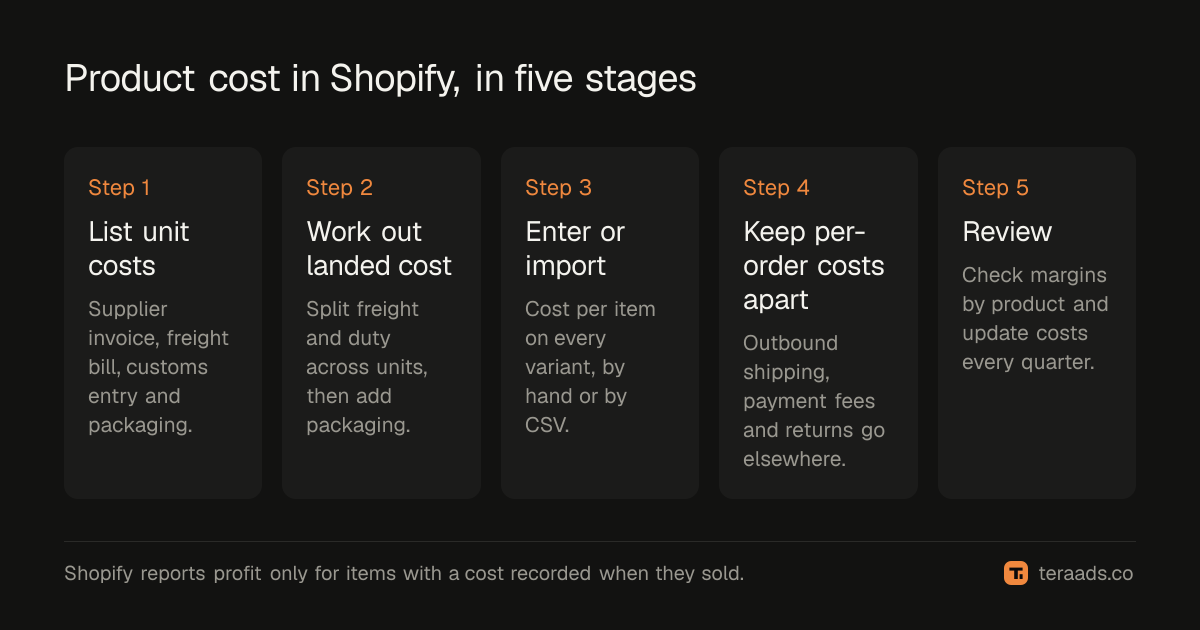
- List every cost that comes with one unit. Pull the supplier invoice, the freight bill and the customs entry for your last shipment, plus your packaging supplier's price list.
- Work out landed cost per unit. Split freight and duty across the shipment's units, by units for similar products or by value or weight for mixed ones, then add supplier price and per-unit packaging.
- Enter cost per item on each product and variant. In the Shopify admin, open Products, choose the product and enter the amount under Cost per item in the price section, then save; repeat on every variant.
- Load many products at once with a CSV. Export your products, fill the Cost per item column with numbers only, and import with care, because blank columns can overwrite existing values.
- Record per-order costs separately. Keep outbound shipping, payment fees and returns in your profit sheet or tool, not in cost per item.
- Check margins and set a review date. Run Shopify's gross profit by product report, look for odd margins, and put a quarterly cost review in your calendar.
Step details
Entering cost by hand
Shopify's help page gives the path: in the admin, go to Products, click a product's name, then in the price section enter the amount for Cost per item and save. If a product has variants, each variant needs its own cost. Different sizes and materials often do cost different amounts, so don't copy one variant's cost to all of them without checking.
Loading costs with a CSV
For more than a handful of products, use the product CSV. Shopify's CSV help page describes the Cost per item column as how much it costs you to make or acquire the product or variant, and asks for numbers without a currency symbol in its price columns, so enter costs the same way. Two cautions from the same page: if you choose to overwrite products with matching handles, the CSV's values replace the existing ones, and a blank value in a column you include overwrites the existing value with a blank. Export first, edit only the cost column, and keep the original file as a backup.
Allocating freight and duty
Freight and duty arrive as one bill per shipment, so split them. If a container holds 2,000 similar units and freight was $3,000, that's $1.50 a unit. For mixed shipments, split by each product's share of the shipment's value, or by weight if freight was charged by weight. Duty is usually charged as a percentage of declared value, so splitting it by value is the closest match.
When costs change
Shopify's help page calls cost per item static data: the profit reports reflect the cost recorded at the time each item sold, and a new cost doesn't rewrite past orders. That's useful, because last year's margin stays as it was. It also means a supplier price rise shows up only from the day you enter it. Update costs the day a new invoice arrives, not at month end.
The worked example: what landed cost does to break-even ROAS
Take the $50 product from the table. With supplier price only, cost per item is $12. With landed cost, it's $16. Outbound shipping, payment fees and an allowance for returns add $10 per order either way.
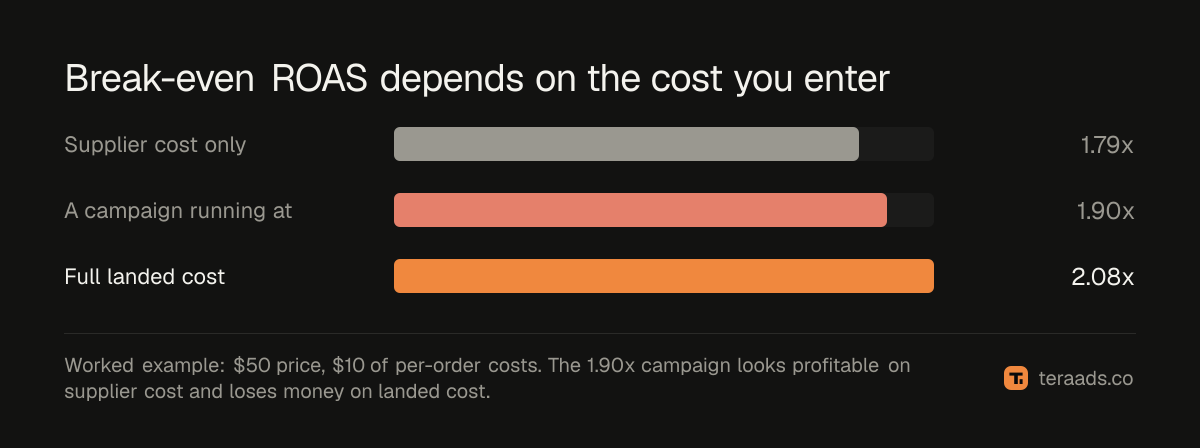
- Supplier price only: $50 − $12 − $10 = $28 contribution before ads, a 56% margin. Break-even ROAS is 1 ÷ 0.56 = 1.79×.
- Full landed cost: $50 − $16 − $10 = $24, a 48% margin. Break-even ROAS is 1 ÷ 0.48 = 2.08×.
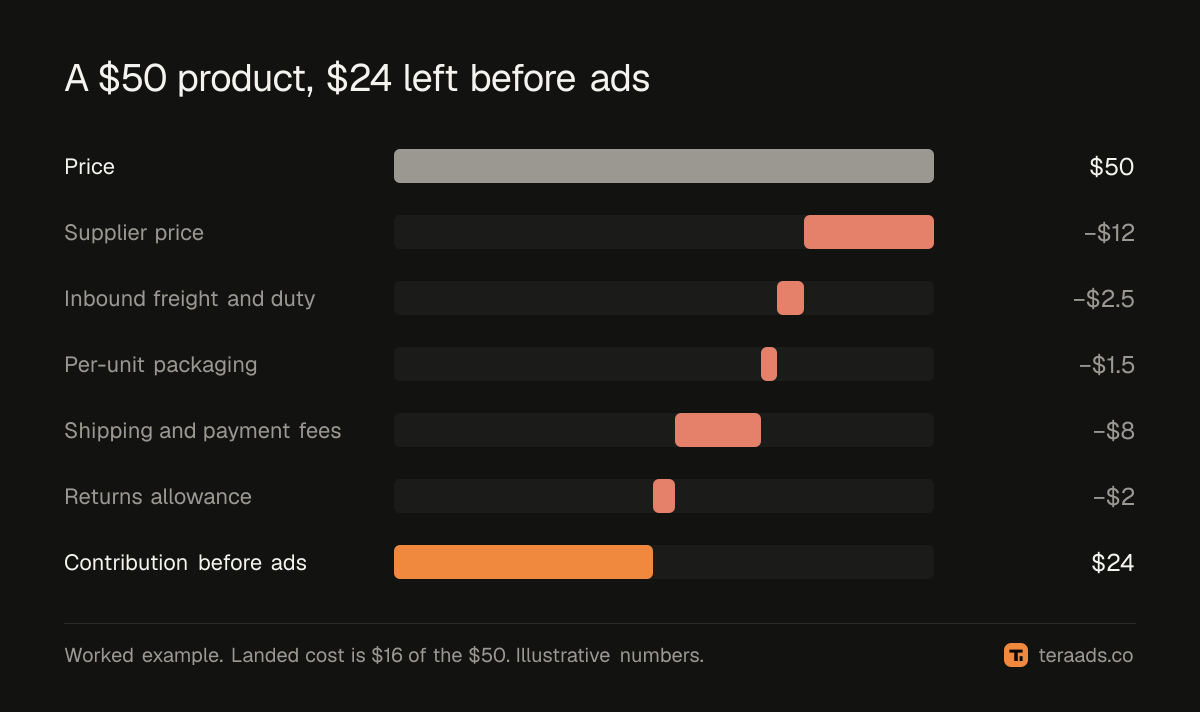
The difference is 0.29 of ROAS, about 16% higher. A campaign running at 1.9× would look profitable on the first number and lose money on the second. These are illustrative numbers; run your own and compare.
POAS, profit on ad spend, uses the same contribution number, so getting cost right fixes both.
Checking your numbers
Once costs are in, Shopify's profit reports show gross profit by product and by variant, profit margin by order and average profit margin by market. The help page gives the formula: margin is net sales minus cost, divided by net sales. Because discounts and refunds lower net sales, the report's margin can be lower than the margin shown on a product's page, which uses full price.
Look for three things:
- Products with no margin at all. They have no cost recorded.
- Margins far above the rest. Usually a missing freight or duty line.
- Variants with the same cost. Check whether they really cost the same.
To see which products pay for their ads once returns and ad spend are counted, contribution margin by product takes the next step.
Using your margin in other tools
Profit apps take product cost in different ways, so check each one's listing; our roundup of Shopify profit analytics apps compares the main ones. Tera Ads doesn't read cost per item. It works out product cost from one margin you set for the whole store, 70% unless you change it. After this exercise, set it to your blended landed margin: in Shopify's gross profit report for the last three months, take total gross profit divided by net sales. In the example above, a $16 landed cost on a $50 price is a 68% margin.
If you sell in several countries, freight and duty can differ by market. Selling internationally with Shopify Markets covers keeping one profit number across currencies. The Shopify profit tracking guide shows how product cost fits into daily profit.
Common mistakes
Leaving cost per item blank. Those sales disappear from Shopify's profit reports.
Using supplier price only. In the example above, freight, duty and packaging add a third to the unit cost.
Putting per-order costs in cost per item. Outbound shipping and payment fees are paid per order, so they distort multi-item orders.
One cost for every variant. Sizes and materials often cost different amounts.
Updating costs at year end. Changes aren't applied to past orders, so late updates leave months of wrong margins.
Frequently asked questions
Where do I enter COGS in Shopify?
In the Shopify admin, open Products, choose a product and enter the amount under Cost per item in the price section, then save. Products with variants need a cost on each variant.
Should cost per item include shipping?
Include inbound freight, the cost of getting stock to your warehouse, as part of landed cost. Leave outbound shipping to customers out, because it's paid per order. Shopify's own guidance is narrower: supplier price excluding taxes, shipping and other costs.
Does changing cost per item update past orders?
No. Shopify's help page says cost per item is static: profit reports use the cost recorded when each item sold.
Can I bulk update cost per item in Shopify?
Yes, with the product CSV. Fill the Cost per item column with numbers only and import carefully, because blank columns can overwrite existing values.
What is landed cost?
The full cost of one unit ready to ship from your warehouse: supplier price plus inbound freight, import duty and per-unit packaging.
Does Tera Ads use my Shopify cost per item?
No. Tera Ads works out product cost from one margin you set for the store, 70% unless you change it. Use your blended landed margin from Shopify's gross profit report.