Shopify Profit Margin: How to Calculate It and What Counts as Good
Gross, contribution and net margin for a Shopify store: how to calculate each, a worked example, how to work out the margin you need, and how to raise it.
On this page
A Shopify store's profit margin is the share of revenue left after costs, and it is worth tracking at three levels: gross margin after product cost, contribution margin after shipping, fees, returns and ads, and net margin after fixed costs too. There is no single good number, because categories and prices differ. A margin is good when contribution after ads covers your fixed costs and still leaves the profit you want.
Key takeaways
- Gross margin = (revenue − product cost) ÷ revenue. It is the margin Shopify can report from your cost per item.
- Contribution margin also takes out shipping, payment fees and returns. Take out ad spend too and you have the margin that pays the bills.
- Net margin takes out fixed costs such as salaries, software and rent. It is the bottom line.
- Work out the gross margin you need from the bottom up: profit target + fixed costs + ad spend + per-order costs.
- Price, product cost, order value, returns, discounts and ad cost per order are the levers that move margin.
Three margins, three questions
| Margin | Formula | Tells you |
|---|---|---|
| Gross margin | (Revenue − product cost) ÷ revenue | Whether the product is priced well against what it costs |
| Contribution margin before ads | (Revenue − product cost − shipping − fees − returns) ÷ revenue | What each sale leaves to pay for ads and overheads |
| Contribution margin after ads | (Contribution before ads − ad spend) ÷ revenue | Whether selling, including marketing, makes money |
| Net margin | (Contribution after ads − fixed costs) ÷ revenue | Whether the business makes money |
Revenue here means sales after discounts and refunds, without sales tax or VAT. Using gross sales with tax included makes every margin look better than it is.
Gross margin is the one most people quote, and the one most likely to mislead. A store can have a 65% gross margin and still lose money once shipping, returns and ads are paid. Contribution margin for D2C brands explains the layers in more detail.
A worked example
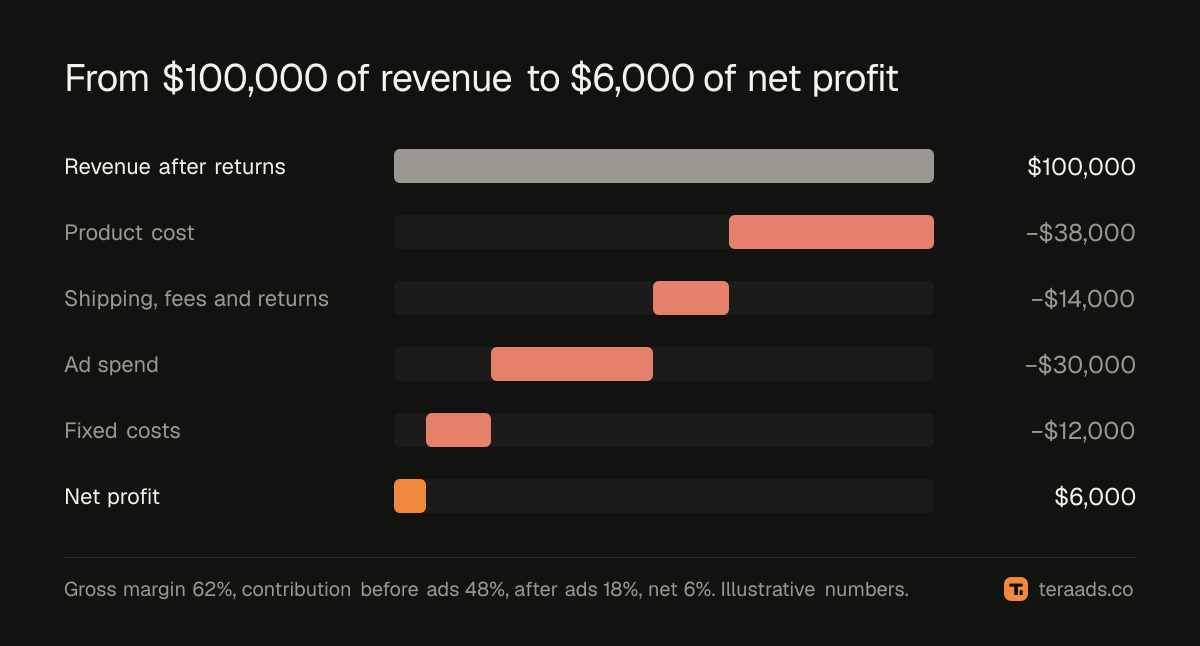
Here is an illustrative month for a Shopify store:
- Revenue after discounts and returns, without tax: $100,000.
- Product cost for the orders kept: $38,000.
- Shipping paid to carriers: $9,000. Payment fees: $3,000. Return shipping and unsellable returns: $2,000.
- Ad spend across Meta and Google: $30,000.
- Fixed costs, including salaries, software and rent: $12,000.
That gives:
- Gross margin: ($100,000 − $38,000) ÷ $100,000 = 62%.
- Contribution margin before ads: $48,000, or 48%.
- Contribution margin after ads: $18,000, or 18%.
- Net margin: $6,000, or 6%.
A 62% gross margin sounds comfortable. After everything else, the store keeps 6 cents of every dollar. That isn't necessarily bad for a store spending to grow, but it shows how little room there is if returns or ad costs rise.
How to calculate each margin for your store
Gross margin needs product costs. Enter a cost per item on every product and variant in Shopify, and its profit reports show gross profit for the orders sold. Shopify COGS setup covers what to include in that cost.
Contribution margin needs the costs Shopify doesn't know: what you pay carriers, payment fees, the cost of returns and ad spend from each platform. Put them beside Shopify's sales in a sheet or a profit dashboard. Shopify profit tracking compares the ways to do that.
Net margin adds fixed costs from your accounts. Monthly is often enough. A monthly P&L for D2C shows a layout that keeps returns and refunds in the right place.
Work all three for the same period, and only once most of the period's returns are in, or the margins will look better than they are.
What counts as a good margin
Rather than chasing a benchmark, work out the margin your own plan needs. Start from the net margin you want and add back each cost as a share of revenue:
| Cost as a share of revenue | Example |
|---|---|
| Net profit you want | 10% |
| Fixed costs | 12% |
| Ad spend | 25% |
| Shipping, payment fees and returns | 14% |
| Gross margin you need | 61% |
If your gross margin is below what the plan needs, something has to give: price, product cost, ad spend or the profit target. This is also why the same ad results can be fine for one store and ruinous for another. What is a good ROAS turns the margin into the ROAS your ads must reach.
How to raise your margin
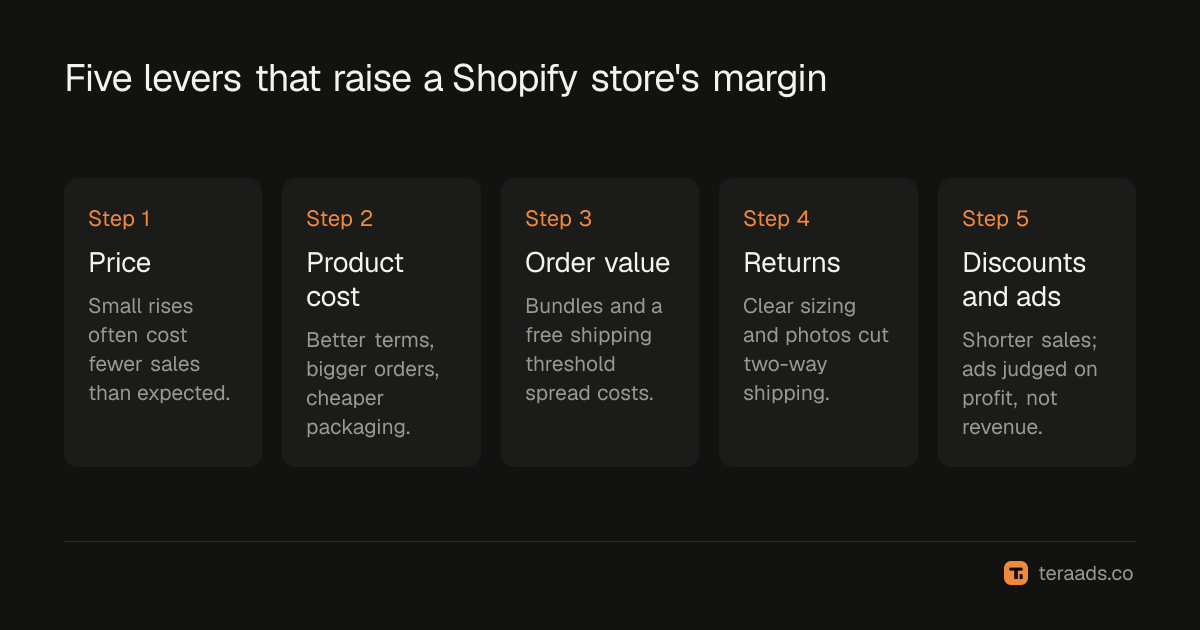
- Price. Small price rises often lose fewer sales than expected, and every dollar goes straight to margin. Test on a few products first.
- Product cost. Better supplier terms, larger orders or cheaper packaging lift gross margin on every sale.
- Order value. Bundles, add-ons and a free shipping threshold spread shipping and ad costs over more revenue. Free shipping thresholds shows how to set one that pays.
- Returns. Clearer sizing, better photos and honest descriptions cut returns, which cost shipping both ways. The cost of returns shows what each one costs.
- Discounts and ad cost per order. Shorter sales and ads judged on profit rather than revenue protect the margin you already have. The real cost of a discount shows the trade-off.
Tera Ads connects Shopify, Google Ads and Meta Ads, and shows every campaign from both platforms in one table with the ROAS each platform reports, beside your store's profit after product costs, ad spend, shipping, payment fees, returns and refunds. It is free for one business.
Frequently asked questions
What is a good profit margin for a Shopify store?
It depends on category, price and how fast the store is growing, so no single number fits. Work out the margin your plan needs: profit target plus fixed costs, ad spend and per-order costs, all as shares of revenue. A margin above that is good for you.
How do I calculate profit margin on Shopify?
Enter a cost per item on every product so Shopify can report gross profit. Then take out shipping, payment fees, returns and ad spend for contribution margin, and fixed costs for net margin. Divide each by revenue after discounts and refunds, without tax.
What is the difference between gross margin and contribution margin?
Gross margin takes out only product cost. Contribution margin also takes out the costs each order causes, such as shipping, payment fees and returns, and sometimes ad spend. Contribution margin is the one to use for ad decisions.
Does Shopify show my profit?
Shopify's profit reports show gross profit for products that have a cost per item recorded. Ad spend, the shipping you pay carriers and the cost of returns have to come from elsewhere to get to real profit.
Why is my gross margin high but my profit low?
Usually because shipping, payment fees, returns and ad spend take most of what gross margin leaves. A 62% gross margin can end as single-digit net margin once those and fixed costs are paid.
Should profit margin include ad spend?
Contribution margin after ads and net margin should. Gross margin and contribution margin before ads leave it out, which is useful for setting your break-even ROAS but not for judging whether the business makes money.