Meta Ads Automation With Approval: Let AI Change Ads, Keep Control
How to let an AI assistant pause Meta ads, change budgets and build campaigns without losing control: permission levels, rules from your margins, and undo.
On this page
Meta ads automation with approval means an AI assistant prepares each change, such as pausing an ad set or lowering a budget, and nothing reaches Meta until it is allowed. You decide the level for each connection: read only, ask you first, or make changes itself. Start with "ask me first", base every rule on your break-even cost per order, and make sure each change is logged and can be undone before you let anything run on its own.
Key takeaways
- Automate the boring, frequent changes: pausing losers, trimming budgets, copying winners as paused drafts.
- Write each rule from your margins, not from a platform average.
- Use three levels: read only, ask first, make changes. Move up only after a clean record.
- Anything new should start paused, and budget moves should have a size limit.
- Check that every change is logged with a way back before you trust any automation.
What to automate, and what to keep
Most changes in a Meta account are small and repetitive. An ad set has spent twice your break-even cost per order with no purchase. A campaign's cost per purchase has crept above what an order can afford. A winning campaign needs a copy to test a new audience. These are exactly the changes people put off, and the ones an assistant can prepare well, because each follows a rule you can write down.
Keep the judgment calls for yourself: launching a new offer, changing prices, moving a large share of budget between channels, and anything that touches the website. A useful test: if you'd want to explain the change to a colleague before making it, approve it yourself.
The rules themselves deserve care. Meta ads kill rules walks through setting them from your margins, and scaling ad spend profitably covers when to raise budgets and by how much.
The three permission levels
| Level | What the assistant does | Good for | Risk |
|---|---|---|---|
| Read only | Answers questions, changes nothing | The first weeks, any new account | None to your ads |
| Ask me first | Prepares a change; it runs only after you approve | Pauses and budget trims once rules are written | Low: you see every change |
| Make changes | Makes allowed changes itself and logs them | Routine changes with a long clean record | Higher: mistakes run until noticed |
In Tera Ads you set the level for each assistant connection, and each connection covers one business. Many owners keep their main assistant on "ask me first" for months. There's no prize for skipping a level.
How to set it up, step by step
- Write your rules from your margins. Work out your break-even cost per order from product cost, shipping, fees and returns, then write rules such as "pause any ad set that spends twice that with no purchase in 7 days".
- Connect your assistant read-only. Add Tera Ads Connect to Claude, ChatGPT, Cursor, VS Code or Claude Code from the Connect page and keep the connection read-only for the first week.
- Ask it to check the rules. "Which ad sets would my pause rule catch today?" Compare the answer with Ads Manager. Fix the rule if it catches something you'd keep.
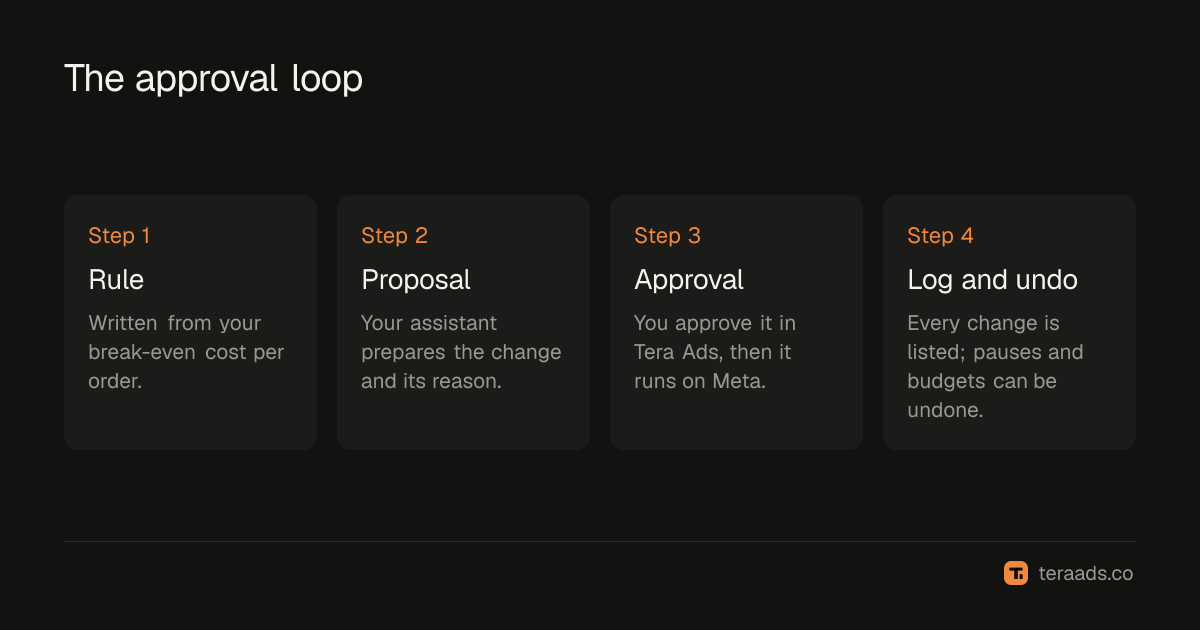
- Switch to ask-me-first. Let the assistant prepare the changes your rules call for. Approve each one in Tera Ads, then check Ads Manager shows it.
- Review the log weekly. Look at what changed, what you approved and what happened next. Undo anything that went wrong, and only then consider letting routine pauses run on their own.
The guardrails that matter
New things start paused. When an assistant builds a campaign, ad set or ad through Tera Ads, it is created paused, so nothing spends until it's turned on. You can review it in Ads Manager first.
Budget moves have a size limit. One approved budget change can at most triple a budget or cut it to a tenth. Bigger moves take several steps, which gives you a chance to look between them.
Every change is logged, with a way back. The Ads screen in Tera Ads lists every change made by you or your assistant. Pauses, restarts and budget changes each have an Undo that puts the old value back.
One connection, one business. A connection can read and change only the business it was given, even if you own several.
These limits apply whoever asks for the change. They don't make a bad rule good, which is why the rules come first.
Worked example: a pause rule for an example store
An example store sells a $60 product. After product cost, shipping, payment fees and its usual returns, $27 is left before ads, so its break-even cost per order is $27. Any order that costs more than that in ads loses money.
The owner writes one rule: pause an ad set that spends $54, twice the break-even cost, with no purchase reported in the last 7 days. On Monday the assistant, on ask-me-first, prepares two pauses. One ad set spent $61 with no purchase; the other spent $58 with one purchase reported on day 8, outside the window. The owner approves the first and declines the second, then tightens the rule to look at 8 days. The approved pause saves almost $9 a day at that ad set's recent spend.
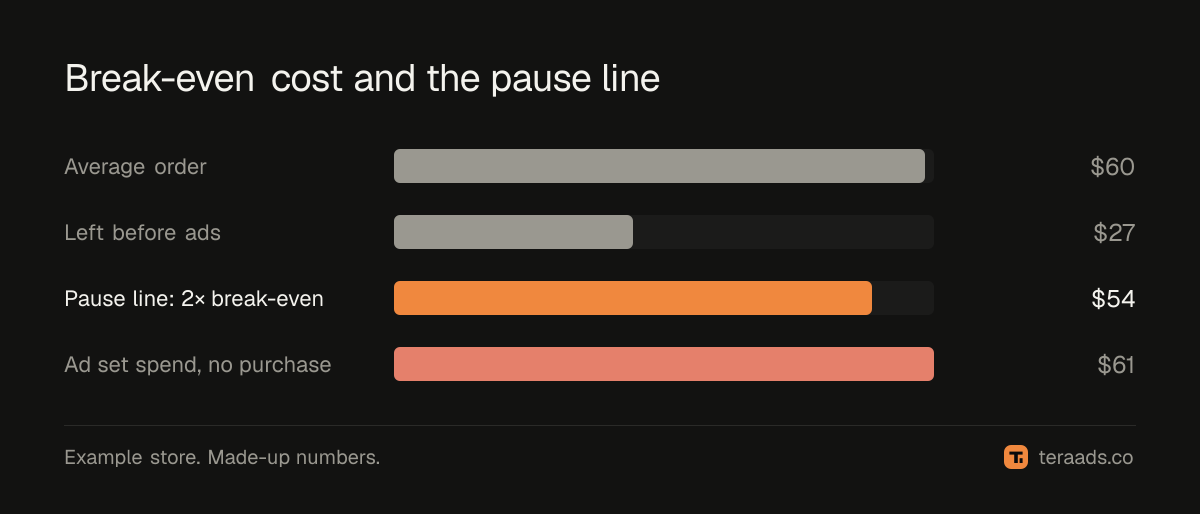
These are made-up numbers for the example, and the point isn't the size of the saving. It's that the rule was checked against real cases before it ran, and the one wrong call was caught by a person.
Common mistakes
Automating before writing rules. "Pause bad ads" isn't a rule. A number and a window are.
Rules from platform averages. A "good" cost per purchase for someone else's margins means nothing for yours. Start from break-even ROAS for your own store.
Short windows. Rules that act on one day of data pause ad sets in the middle of their learning. Use 7 days or more for pause rules.
Skipping the log. Approving changes without reviewing what happened afterwards means the rules never improve.
Granting change access on day one. Read-only first; ask-me-first next. The guide to safe AI access has a short policy you can copy.
Tera Ads lets an assistant connected through Tera Ads Connect pause or restart campaigns, ad sets and ads, change budgets and build paused campaigns, with the level you choose for each connection. It's free to start; see how it works or start free.
Frequently asked questions
Can AI manage my Meta ads for me?
It can prepare and make routine changes, such as pauses and budget trims, if you allow it. Keep launches, offers and large budget moves for yourself, and start with the assistant asking you before each change.
Is it safe to let ChatGPT or Claude change my ads?
It's as safe as the limits around it. Use a connection that can reach only one business, start read-only, make new items start paused, cap the size of budget changes and keep an undo for every change.
What should I automate first?
Pausing ad sets that spend well past your break-even cost per order with no purchase over 7 days or more. The rule is simple to check, and a wrong pause is easy to undo.
Will a new campaign spend money straight away?
Not through Tera Ads. Campaigns, ad sets and ads an assistant builds there start paused and spend nothing until they're turned on.
How do I undo a change?
Open Ads in Tera Ads. Its change log lists every change made by you or your assistant, and pauses, restarts and budget changes each have an Undo.
Can the assistant raise a budget a lot at once?
No. One budget change can at most triple a budget or cut it to a tenth. Larger moves take several approved steps.