Meta Automated Rules vs an AI Assistant: Which Should Change Your Ads?
Meta's automated rules act on fixed conditions; an AI assistant can weigh your store's profit first. What each does well, where each fails, and how to use both.
On this page
Meta's automated rules are best for fixed, always-on safety checks: when a condition you set is met, a rule turns something off or on, changes a budget or sends you a notification. An AI assistant is better when the right change depends on context a rule can't see, such as your store's profit after returns or what changed this week. Most brands are best served by both: a few simple rules as a safety net, and an assistant for the weekly review.
Key takeaways
- Automated rules act on Meta's own numbers, on conditions you write in advance.
- They run without asking, so a badly written rule acts on every match until you notice.
- An assistant can read your Shopify orders and returns before it suggests a change.
- Use rules for hard limits and notifications; use an assistant for judgment calls.
- Whichever acts, base thresholds on your break-even cost per order and keep a log.
How Meta's automated rules work
Automated rules live in Ads Manager. Each rule has three parts: what it applies to (campaigns, ad sets or ads), a condition built from metrics such as amount spent, cost per result or frequency over a time range, and an action. The actions include turning the item off or on, raising or lowering a budget, and sending you a notification without changing anything. Once saved, a rule keeps checking on the schedule you chose and acts by itself whenever its condition is met.
That makes rules good at one thing: applying the same check, the same way, every time. A rule never forgets, never gets tired and never skips a weekend. It also never wonders whether the condition still makes sense.
What rules can't see
A rule reads what Meta reports. It knows the purchases Meta attributes to your ads, under your attribution setting. It doesn't know which of those orders were refunded or came back undelivered, what each product costs you, or what you paid in shipping. A rule that pauses ad sets above a cost per purchase can't tell a costly ad set whose customers keep their orders from a cheap one whose orders come back.
Rules also lack context. "Cost per result above $30 over 3 days" fires the same way on a holiday weekend, after a price change or the day after you launched new creative. Each of those might call for patience, and a rule can't tell. Meta ads kill rules covers how to pick windows that avoid the worst of this.
What an AI assistant adds
An assistant connected to your ad account and your store works differently. You ask it to review, it looks up the numbers, and it proposes changes with its reasons. Connected through Tera Ads Connect, it reads Meta's live campaigns, ad sets and ads, and also your Shopify sales, estimated profit after returns for the store, and returns by month. It can say, for example, that store profit fell this month while Meta's ROAS held, and suggest which campaigns to look at first.
The trade-off is that an assistant acts when asked, not on a timer, and its suggestions need reading. That's why the useful setup is "ask me first": it prepares the change, you approve it, and it runs. The questions to ask your assistant are a good starting list for a weekly review.
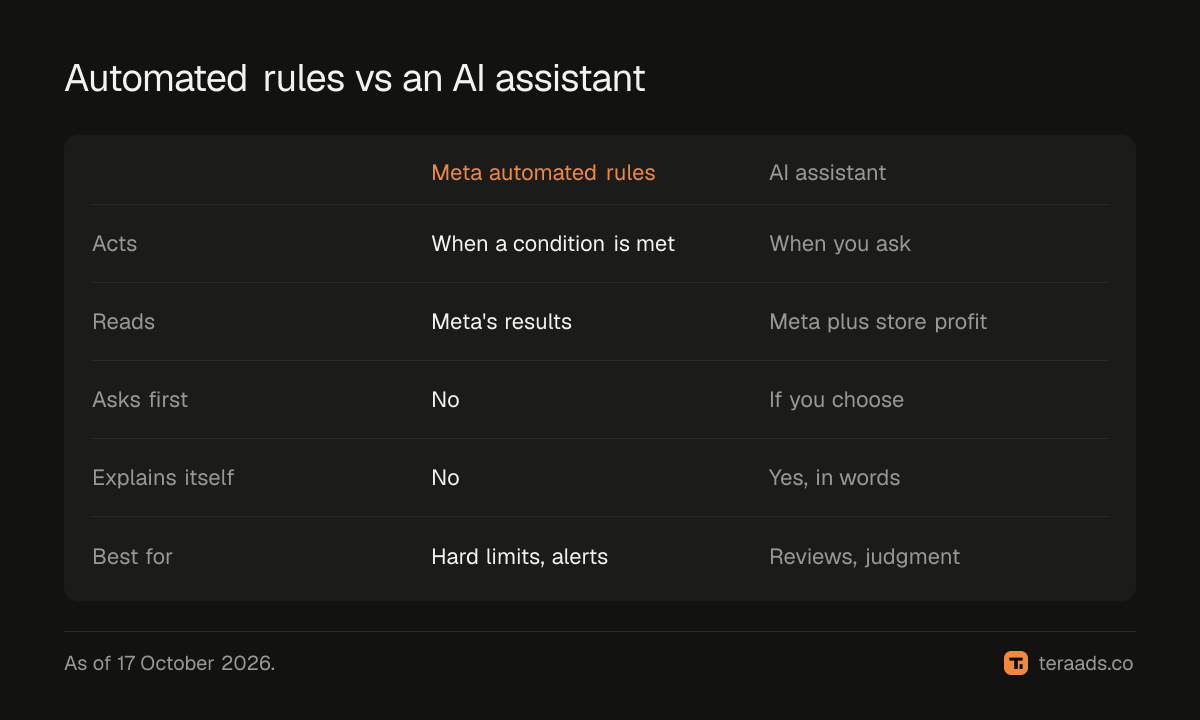
Side by side
| Meta automated rules | AI assistant with approval | |
|---|---|---|
| When it acts | Whenever its condition is met, on its schedule | When you ask, after you approve if you choose |
| What it reads | Meta's reported results | Meta's results plus, through Tera Ads, store sales and profit after returns |
| What it can do | Turn off or on, change budgets, notify | Pause or restart, change budgets, build paused campaigns, ad sets and ads |
| Explains itself | No; it shows that it fired | Yes; it gives its reasons in words |
| Main risk | A bad condition acts on every match | Approving a suggestion without reading it |
| Best for | Hard limits and alerts | Weekly reviews and judgment calls |
Using both together
A simple split works for most stores.
Rules for the safety net. Keep two or three: a notification when any ad set's daily spend passes a ceiling you'd never want to exceed, a notification when frequency climbs past a level where ads usually tire, and possibly one hard pause for an ad set that spends far past your break-even cost per order with no purchase. Prefer notifications to actions; they tell you without guessing for you.
An assistant for the review. Once a week, ask it for profit after returns against the week before, the campaigns that spent most, and which ad sets are above break-even cost. Let it prepare pauses and budget trims for you to approve. Through Tera Ads, anything new it builds starts paused, one budget change can at most triple a budget or cut it to a tenth, and pauses, restarts and budget changes can be undone.
One owner per decision. Don't let a rule and an assistant fight over the same budget. If a rule raises budgets on good days, don't also ask the assistant to manage that campaign's budget.
Worked example: the same week, two ways
An example store spends $700 a week on a prospecting campaign. Its break-even cost per order, after product cost, shipping, fees and usual returns, is $28. Meta reports 30 purchases this week: $23 each, comfortably under break-even.
A rule watching cost per purchase sees nothing wrong. An assistant asked "how did profit after returns move this week, and which campaign spent the most?" reports that store returns jumped: 9 of the week's orders came back, far above the usual 3. With roughly a third of the week's orders returned, $700 of spend bought about 21 kept orders, or $33 each, above break-even. It suggests trimming that campaign's budget by 20% while you look at why returns jumped, and you approve it.
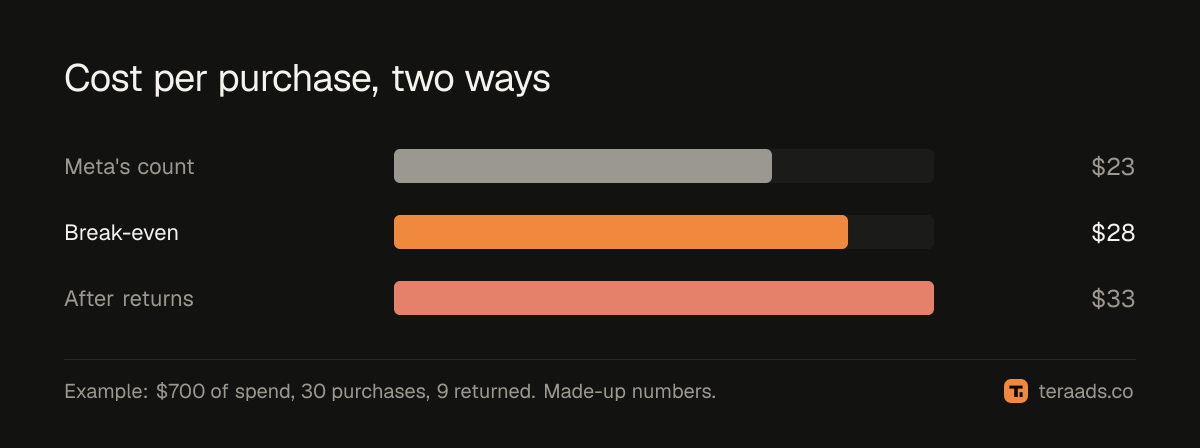
The numbers are made up, and in a real store returns are counted for the whole store rather than for one campaign. The difference in approach is real: the rule saw only Meta's count, and the assistant started from what the store kept.
Common mistakes
Rules that act on one day. Short windows catch noise. Use several days for any rule that pauses or cuts.
Too many rules. Ten overlapping rules are hard to reason about. Keep a few, and write down why each exists.
Approving without reading. An assistant's suggestion is only as good as your check of it. Read the reason before you approve.
Thresholds from someone else's numbers. Work out break-even ROAS for your own margins first.
No log review. Whether a rule or an assistant made the change, look back weekly at what happened next.
Tera Ads Connect puts your Shopify profit after returns and your live Meta ads into Claude, ChatGPT and other assistants, and lets them prepare changes for your OK. See how it works or start free.
Frequently asked questions
Are Meta's automated rules free?
Yes. Automated rules are part of Ads Manager at no extra cost; you pay only for the ad spend they manage.
Can automated rules see my Shopify profit?
No. They act on the results Meta reports, such as purchases Meta attributes to your ads. Refunds, returned orders and product costs live in your store.
Should I replace my rules with an AI assistant?
Usually not. Keep a few rules as hard limits and notifications, and use an assistant for reviews and changes that need judgment.
Can an AI assistant change my ads without asking?
Only if you allow it. With Tera Ads you choose per connection whether it makes changes itself, asks you first or only reads.
Which is safer for budget changes?
Both can be safe with limits. Rules apply the same change every time a condition matches; through Tera Ads, one budget change can at most triple a budget or cut it to a tenth, and it can be undone.