How to Connect Facebook Ads to ChatGPT With Live Data
Connect Facebook and Instagram ads to ChatGPT with a custom MCP server: which plans can, the steps in ChatGPT's Plugins page, and how to keep ad changes in check.
On this page
To connect Facebook ads to ChatGPT with live data, add a Meta Ads MCP server to ChatGPT as a custom connector and sign in to it. OpenAI's help page, as checked on 31 October 2026, says this is done from the Plugins page on ChatGPT's website, with full support on Business, Enterprise and Edu workspaces. Paste the server's address, set up OAuth sign-in, then type @ in a chat to use it.
Key takeaways
- Live data needs an MCP server: a connector ChatGPT calls while you chat, instead of a spreadsheet you uploaded last week.
- OpenAI lists full custom MCP support, including actions that change data, for Business, Enterprise and Edu; Pro users can connect with read and fetch permissions.
- In ChatGPT's current Plugins page you don't have to turn on developer mode first; you accept a risk warning for each server instead.
- Custom MCP servers connect on ChatGPT's website, not in the mobile apps.
- Decide what ChatGPT may change before you connect: read only, ask first or make changes.
What "live data" means in ChatGPT
Without a connector, ChatGPT only knows the Facebook ads data you paste or upload. That works, and ChatGPT for ad analysis shows how to do it well with exports, but the numbers are as old as the file and every new question means a new export.
With a connector, ChatGPT asks for the data itself. MCP, the Model Context Protocol, is the open standard that lets an assistant call tools in another service: "list campaigns", "get insights for the last 7 days", "pause this ad set". You ask in plain words, ChatGPT picks the tool, the server checks what you allowed, and the answer comes back from your live ad account. MCP connectors explained covers sign-in and permissions in more depth.
The server decides what ChatGPT can see. A server that only talks to Meta repeats what Ads Manager shows: purchases and purchase value that Meta attributes to your ads, including orders that later come back. A server that also reads your Shopify store can answer in sales you kept. Meta Ads MCP options compares the main servers side by side.
Which ChatGPT plans can connect
OpenAI's help page on connecting custom MCP servers in ChatGPT sets out who can add one. In a Business workspace, only admins and owners can create and publish a connection. In Enterprise and Edu, admins can also give that permission to selected members and choose who may use each app.
| ChatGPT plan | Custom MCP server | Tools that change data |
|---|---|---|
| Business | Yes, added by an admin or owner | Yes |
| Enterprise and Edu | Yes, by admins, owners and members they authorize | Yes, and admins can switch each action on or off |
| Pro | Yes, with read and fetch permissions | No |
| Plus and Free | Not listed on OpenAI's page | Not listed |
Two more limits from the same page. Custom MCP servers connect on ChatGPT's website only, not on mobile. And ChatGPT connects to remote servers, so a server running on your own laptop needs a tunnel; a hosted server such as Tera Ads doesn't.
If you're on Pro, expect reading rather than changes: you can ask about spend, results and creatives, but pausing an ad or moving a budget needs a plan with full MCP support, or you make the change yourself in Ads Manager.
Do you still need developer mode?
Many setup guides tell you to open Settings, then Apps, turn on developer mode under Advanced settings and create an app. OpenAI's page now says that in the current Plugins experience you add a custom MCP server directly from Plugins and don't need to turn on developer mode first. Instead, you review and accept a risk warning for each server you add.
The older route is still documented as legacy custom app setup: from settings, go to Apps, then Create, enter the server address, pick the authentication, scan the tools and create the app. If your workspace still shows that screen, the details you enter are the same. Account and workspace policies apply either way, so if you can't see the option, ask whoever administers your ChatGPT workspace.
How to connect Facebook ads to ChatGPT, step by step
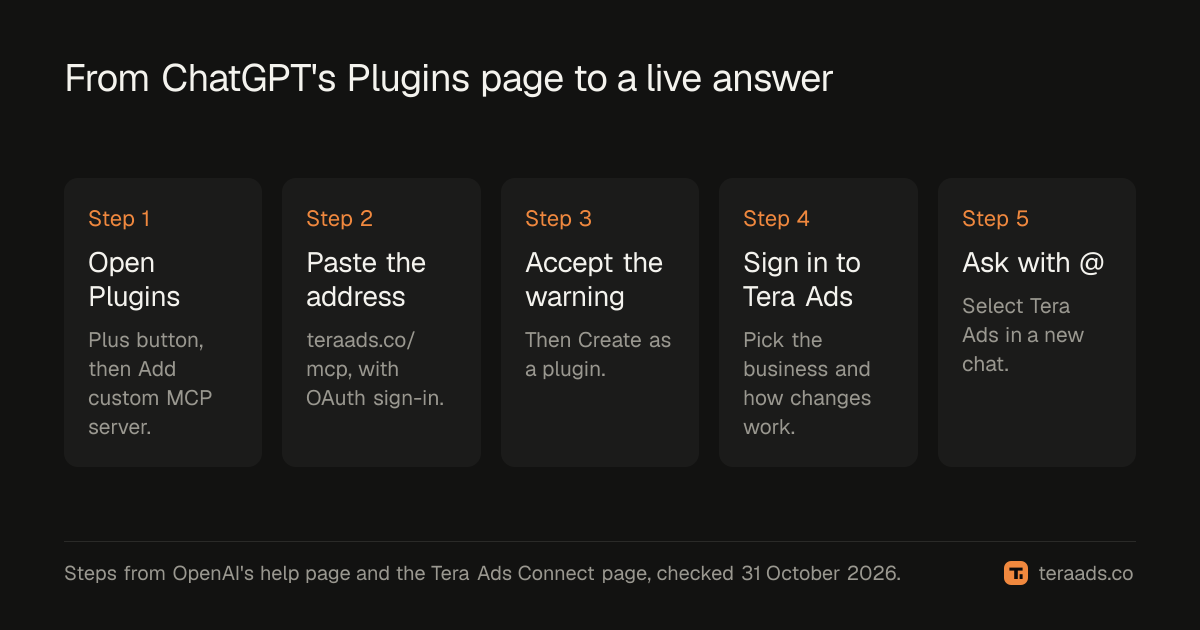
These steps use Tera Ads as the server, at https://teraads.co/mcp. Any hosted Meta Ads MCP server follows the same pattern with its own address and sign-in.
- Check your permissions. In a Business workspace, ask an admin or owner to do the setup, or confirm you hold one of those roles under Workspace settings, then Members.
- Open Plugins and add a server. In ChatGPT on the web, go to Plugins, select the plus button, then choose Add custom MCP server.
- Name it and paste the address. Call it Tera Ads, add a short description if you like, and under Connection enter https://teraads.co/mcp.
- Choose OAuth for authentication. Tera Ads uses OAuth 2.1 with PKCE and dynamic client registration, so ChatGPT registers itself and there's no client ID or secret to copy.
- Accept the warning and create it. Tick "I understand and want to continue", select Create as a plugin, and review the tools ChatGPT found: 29 for Tera Ads.
- Sign in to Tera Ads. When ChatGPT asks you to authorize, it opens Tera Ads in your browser. Sign in, pick the business to share and choose how changes work for this connection. ChatGPT never sees your password.
- Use it in a chat. Install the plugin, start a new conversation, type @ and select Tera Ads, then ask a first question you can check, such as yesterday's Meta spend by campaign.
In a Business workspace, an admin or owner publishes the plugin after testing it, and members then find it under Settings, then Plugins. The Connect page has the same steps for Claude, Cursor and Claude Code.
What ChatGPT can do through Tera Ads
Once connected, ChatGPT chooses tools by itself based on your question. You don't need to name them, but knowing the groups helps you ask better questions.
| Group | Tools | Ask, for example |
|---|---|---|
| Live Meta reads | list_campaigns, list_ad_sets, list_ads, get_ad_creative, get_insights | "Which ad sets spent the most this week, and at what cost per purchase?" |
| Store and profit | get_store_sales, get_profit, get_rto | "What was my estimated profit after returns over the last 30 days?" |
| Ads review | get_ads_review | "Which campaigns earn less than they cost once my usual returns are counted?" |
| Changes | pause, resume, set_budget, duplicate, create_campaign, create_ad_set, create_ad | "Pause the ad set with the highest cost per purchase." |
| Targeting | search_interests, search_behaviors, search_locations, estimate_audience | "How big is a US audience interested in minimalist jewelry?" |
| History and usage | list_recent_changes, get_change_status, get_usage | "What did my AI change this week, and how many calls do I have left?" |
The difference from a Meta-only server is the store. get_profit works out estimated profit after returns for the whole store from its own Shopify orders, with ad spend taken off. get_ads_review applies the store's usual return rate and your own costs to Meta's attributed sales to estimate how each spending campaign is doing; the guide on Meta campaigns that lose money after returns explains how to read it.
Keep changes under your control
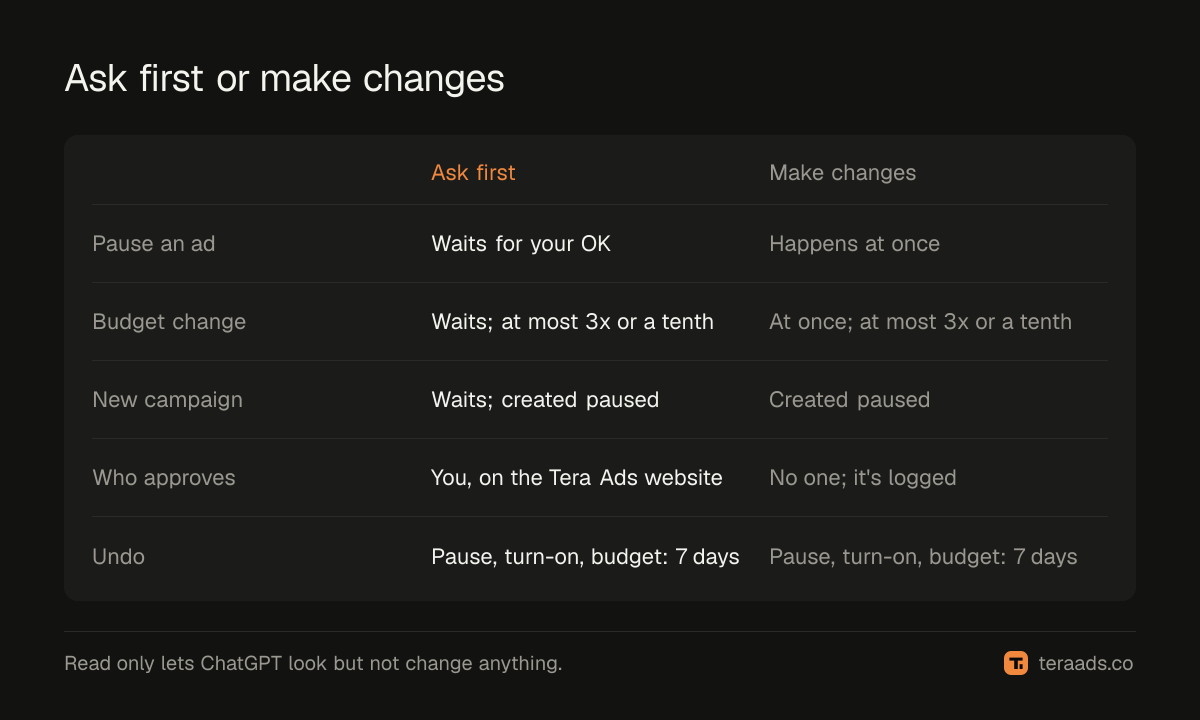
For each connection you choose one of three modes:
- Read only. ChatGPT can look at everything you shared but can't change anything.
- Ask first. A change ChatGPT requests waits for you. ChatGPT gets a link to share with you, you approve or decline it on the Tera Ads website, and ChatGPT can't approve it for you.
- Make changes. The change happens at once and is logged, so you can see what was done and when.
Some limits apply in every mode. New campaigns, ad sets and ads are created paused and spend nothing until someone turns them on. One budget change can at most triple a budget or cut it to a tenth. A pause, turn-on or budget change can be undone in Tera Ads for 7 days.
ChatGPT adds its own check on top. OpenAI's page says ChatGPT may ask you to confirm an action that writes or changes data, depending on the app's permissions and the action's context, and that some especially risky actions may be blocked instead.
Start with read only or ask first, and widen access once the answers check out. The guide to safe AI access has a short policy you can copy, and questions to ask AI about your ads has good first prompts.
Check the first answers
Before you rely on anything bigger, ask three or four questions you can check in Ads Manager in a minute: yesterday's spend, last week's purchases for your biggest campaign, the CPM trend for one ad set. Ask ChatGPT to state the date range, attribution setting and currency in every answer, so a mismatch is obvious.
Expect Meta's numbers and Shopify's to differ. Meta counts the purchases it attributes to your ads under your attribution setting; Shopify counts orders, and only Shopify knows which ones were refunded. Why Meta Ads and Shopify disagree explains the usual causes, so you can tell a real problem from a normal gap.
Common mistakes
Assuming every plan has it. OpenAI's page lists full custom MCP support for Business, Enterprise and Edu. Check your plan before you plan a workflow around it.
Following old developer mode steps. If the menu doesn't match an older guide, look for Plugins first; OpenAI has moved custom servers there.
Granting change access on day one. Reporting doesn't need permission to change budgets. Start with read only or ask first.
Reading Meta ROAS as profit. A campaign can look healthy in Ads Manager and still lose money once returns are counted. Ask for profit after returns, not just ROAS.
Burning the weekly allowance. A long analysis can use many calls. Ask for summaries before detail, and check what's left with get_usage, which doesn't use a call.
Tera Ads Connect gives ChatGPT live Meta reads, your Shopify sales and estimated profit after returns for the whole store, with changes only as far as you allow. It's free for 30 calls a week on one ad account, changes included, and Connect Pro is $15 a month plus tax for 3,000 calls and three ad accounts; see pricing.
Frequently asked questions
Can ChatGPT connect to Facebook Ads?
Yes, through a Meta Ads MCP server added as a custom connector. OpenAI lists full support for Business, Enterprise and Edu workspaces, and Pro users can connect custom servers with read and fetch permissions.
Do I need developer mode to add a custom MCP server?
Not in ChatGPT's current Plugins page, according to OpenAI's help page: you add the server from Plugins and accept a risk warning. Older guides and the legacy app setup still mention developer mode.
Does it work in the ChatGPT mobile app?
No. OpenAI's help page says custom MCP servers can be connected on the web only.
Can ChatGPT pause or change my Facebook ads?
Only if the server has change tools, your ChatGPT plan allows actions that change data, and you allow it. With Tera Ads you choose read only, ask first or make changes for each connection.
Is Tera Ads in ChatGPT's app directory?
Not yet. Add it as a custom MCP server with the address https://teraads.co/mcp, as in the steps above.
Will ChatGPT's numbers match Shopify?
Not exactly. Meta reports the sales it attributes to your ads, including orders later refunded. Shopify is the record of what customers kept.