Is Performance Max Profitable? How to Check PMax Profit for Shopify
Performance Max ROAS counts brand searches, returning customers and video views. Five checks to see what PMax really adds, and how to set its target from margin.
On this page
Performance Max is profitable for a Shopify store when the sales it adds, not the sales it reports, clear your break-even ROAS. Its reported ROAS includes people who searched for your brand, customers who would have come back anyway and YouTube views without a click. Take those out, check what's left against Shopify orders after returns, and set the target from your margin.
Key takeaways
- Performance Max reports revenue it touched, not revenue it added. Brand searches and returning customers inflate it most.
- Use brand exclusions and a separate brand Search campaign, so you can see PMax without your own brand in it.
- Look at new and returning customers, and at the channel report, before you trust the total.
- Set the ROAS target from your break-even ROAS, worked out from margin, shipping, fees and returns.
- Prove what it adds with an uplift experiment, then judge it on Shopify orders after returns.
Why Performance Max ROAS looks better than it is
Performance Max runs one budget across Search, Shopping, YouTube, Display, Discover, Gmail and Maps. Google gives it credit for every conversion it touched along the way, and its bidding goes where conversions are easiest to win. Some of the easiest are sales that would have happened anyway.
Four kinds of sales flatter the number:
- Brand searches. Someone who types your store's name was already coming. If PMax shows them an ad, it gets the credit.
- Returning customers. People on your email list, or who bought before, often buy again on their own. PMax can reach them and claim the order.
- Video views without a click. Google can count a sale after someone watched a YouTube ad and bought later without clicking. Some of those buyers saw the ad and some would have bought anyway.
- Returns and refunds. Google counts the order on the day it's placed. A refund two weeks later doesn't come out of the ROAS it reported.
None of this means PMax is bad. It means the ROAS on the campaign is the most flattering version of the truth. Performance Max for Shopify covers the setup; this guide covers how to tell whether it makes money.
Five checks before you trust PMax ROAS
| Where reported sales come from | Why it flatters ROAS | How to check it |
|---|---|---|
| Brand searches | People were already looking for you | Search terms report; brand exclusions and a brand Search campaign |
| Returning customers | Many would buy through email or direct | New and returning customer reporting; new customer goal |
| YouTube views without a click | Credit for watching, not for clicking | Channel performance report |
| Returns and refunds | Google counts the order, not what you keep | Shopify orders after returns |
| Revenue, not profit | Same ROAS on 20% and 70% margin products | Cost of goods in Merchant Center; margin-based asset groups |
1. Take out brand searches
Open the search terms report for Performance Max (Insights and reports, then "Search terms and landing pages for Performance Max"). Add up the conversion value from searches that contain your store's name. That share is the first thing to take out of PMax's ROAS.
To stop paying PMax for your own name, add a brand exclusion to the campaign. Google's help says brand exclusions are a better way to block brand traffic than negative keywords, because they also block misspellings and other scripts of the brand, including your own. In Performance Max they apply to Search, Shopping and YouTube search inventory, and a checkbox lets Shopping ads keep showing on those searches if you want them to.
Then run your brand in its own Search campaign with exact match keywords. Google prioritizes Search campaigns with an exact match keyword over Performance Max, so brand searches go to the cheap campaign built for them. Brand vs non-brand search explains why the two should be judged separately.
2. Separate new and returning customers
Performance Max reports new and returning customers as a segment. If most of its conversion value comes from returning customers, it is partly harvesting demand you already own.
The new customer acquisition goal changes how it bids. "Bid higher for new customers" adds a value you set to each new customer and keeps the campaign's reach; Google recommends it for most advertisers. "Only bid for new customers" stops bidding on existing customers, and Google suggests it mainly when you have a strict acquisition budget. Google identifies existing customers from your Customer Match lists, your conversion tags and its own detection, so upload a recent customer list from Shopify for the best match.
3. See where the spend goes
The channel performance report shows clicks, conversions and cost for Search, YouTube, Discover, Gmail, the Display Network, Search partners and Maps, with a breakdown of Shopping ads that use your product data. A store's best PMax campaigns usually earn most of their sales from Shopping on Search. If spend drifts to Display or YouTube with sales counted from views, look at those sales hardest.
4. Compare with Shopify orders after returns
For a settled month, put Google's conversion value next to Shopify orders that came from Google, then take out what was refunded or returned. The gap between the two is your real ROAS gap. True ROAS after refunds shows the calculation, and conversion tracking for Shopify covers the setup that keeps the two close.
5. Weigh products by margin, not revenue
A dollar of sales from a 70% margin product is worth far more than a dollar from a 20% margin product, but ROAS treats them the same. Two fixes help. Split asset groups by margin band, so budget can follow profit (asset groups shows how). And add the cost_of_goods_sold attribute to your Merchant Center products, through the feed or a supplemental feed: if your conversion tag sends item-level data, Google Ads then reports gross profit, which is revenue minus cost of goods. Shopify COGS setup covers where those costs come from.
Set the ROAS target from your margin
A ROAS target is only useful if it's the number at which you stop losing money. Work it out from your own costs, not from what the campaign usually gets.
Take a store with $60 orders, product costs at 40% of price, 3% payment fees, $6 shipping out, 10% of orders returned and $6 return shipping. An average order placed leaves about $24.18 after costs and returns, so the break-even ROAS is $60 ÷ $24.18 = 2.48x. Below that, every sale loses money once returns settle. Break-even ROAS has the formula.
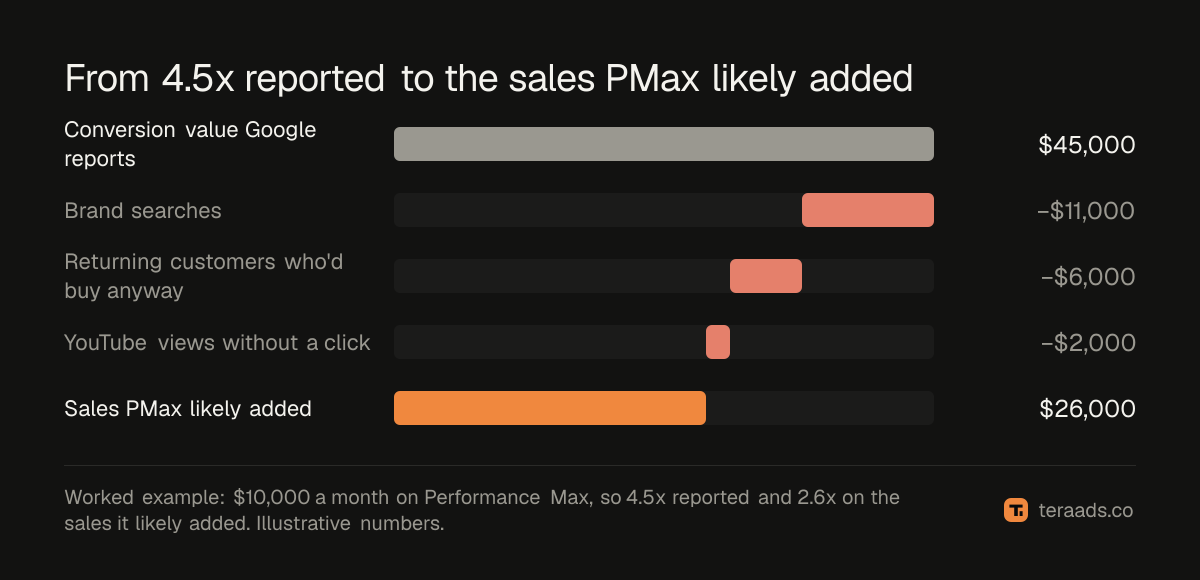
Now the worked example. This store spends $10,000 a month on Performance Max, and Google reports $45,000 in conversion value, a 4.5x ROAS. At face value that is 750 orders and about $8,100 profit after ads. Then the checks:
- $11,000 came from brand searches, leaving $34,000 (3.4x).
- $12,000 came from returning customers; say half would have bought anyway, so take out $6,000, leaving $28,000.
- $2,000 came from YouTube views without a click, leaving $26,000.
PMax likely added $26,000, a 2.6x ROAS. That's about 433 orders and roughly $480 profit after the $10,000 of ads. It still pays for itself, just, but it is nowhere near the $8,100 the dashboard implied, and raising the budget on the strength of 4.5x would likely push it below break-even.
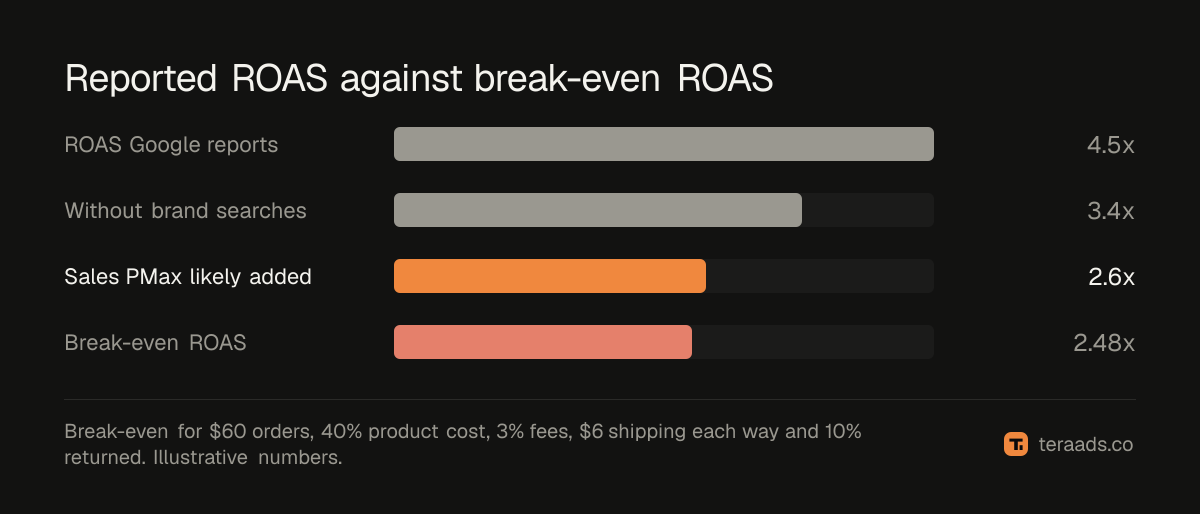
If you use target ROAS bidding, set it at or above break-even on the sales PMax adds, not on its reported ROAS. In this example, a 4.5x reported target and a 2.6x real result are the same campaign. POAS is the same idea expressed as profit over ad spend.
Prove what it adds
The checks above remove the obvious overlaps. To measure what PMax adds, test it.
Google Ads has uplift experiments for Performance Max. From Experiments in the Campaigns menu, pick an active PMax campaign; Google compares it against comparable campaigns and splits traffic 50/50 by default, then reports the extra conversions and value from running it alongside your other campaigns. Leave the campaign alone while the test runs.
If you can't run an experiment, a simpler test works for many stores: lower PMax spend sharply for two to three weeks in a quiet period and watch total Shopify orders and MER (store revenue over all ad spend). If orders barely move, much of what PMax reported was already yours. Incrementality testing covers both kinds of test.
A monthly Performance Max profit check
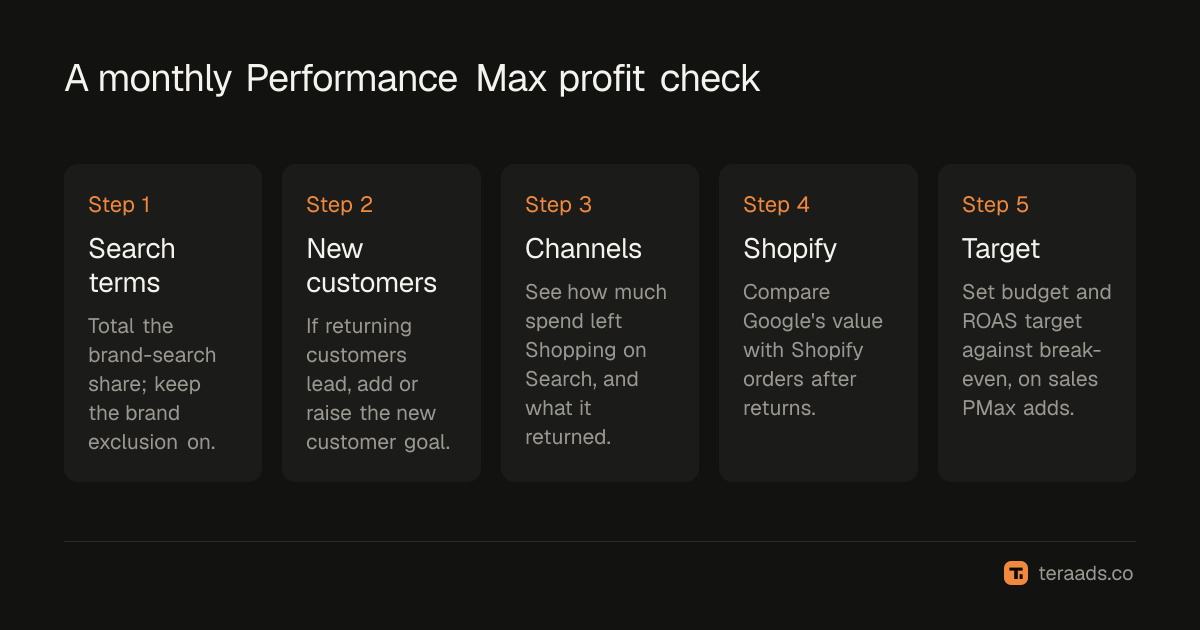
- Pull the search terms report. Total the brand-search share and check your brand exclusion is on.
- Check new and returning customers. If returning customers are most of the value, add or raise the new customer goal.
- Open the channel report. Note how much spend went outside Shopping on Search, and what it returned.
- Compare with Shopify. Put Google's conversion value next to Shopify orders from Google, after returns.
- Reset the target. Compare the sales PMax likely added with your break-even ROAS, then decide on budget.
Tera Ads connects Shopify, Google Ads and Meta Ads, and shows every campaign from both platforms in one table with the ROAS each platform reports, beside your store's profit after product costs, ad spend, shipping, payment fees, returns and refunds. It is free for one business.
Frequently asked questions
Is Performance Max profitable for Shopify stores?
It can be, and for many stores it is the main Google campaign. Whether it is profitable depends on the sales it adds rather than the sales it reports. Take out brand searches and returning customers, compare with Shopify orders after returns, and check the result against your break-even ROAS.
Should I exclude my brand from Performance Max?
Usually yes, if you run a separate brand Search campaign. A brand exclusion stops PMax claiming people who were already searching for you, and Google prioritizes an exact match brand Search campaign anyway. You can still let Shopping ads appear on brand searches with the exclusion's checkbox.
Does Performance Max ROAS include returns?
No. Google counts the conversion when the order is placed. Refunds and returns that happen later stay in the reported ROAS unless you adjust conversions yourself, so compare with Shopify orders after returns.
What ROAS target should I set for Performance Max?
At or above your break-even ROAS, worked out from margin, shipping, fees and returns. For a store with $60 orders and 40% product costs it can be around 2.5x. Set it against the sales PMax adds, not its reported ROAS.
How do I know if Performance Max sales are incremental?
Run a Performance Max uplift experiment in Google Ads, which splits traffic and reports the extra conversions. Without one, cut PMax spend for a few weeks and watch total Shopify orders and MER.
Can Google Ads report profit instead of revenue?
Partly. If you add the cost of goods sold attribute to your Merchant Center products and your conversion tag sends item-level data, Google Ads reports gross profit. It does not include shipping, payment fees or returns, so it is still higher than real profit.