Facebook Ads MCP Server: Run Facebook and Instagram Ads From Your AI
What a Facebook Ads MCP server is, what your AI can read and change in Facebook and Instagram ads, the options in 2026, and how to connect one safely.
On this page
A Facebook Ads MCP server connects your Meta ad account to an AI assistant such as Claude or ChatGPT, so you can ask about your Facebook and Instagram ads in plain words and, if you allow it, pause ads, change budgets or build new campaigns. Facebook and Instagram ads live in the same Meta ad account, so one server covers both. Meta runs its own server in open beta; hosted services add limits, undo and store data.
Key takeaways
- "Facebook Ads MCP", "Instagram ads MCP" and "Meta Ads MCP" describe the same thing: an MCP server for your Meta ad account.
- Your assistant can read campaigns, ad sets, ads, creatives and results, and can make changes when the server and your settings allow it.
- Meta's own ads MCP server costs nothing extra from Meta and is in open beta; Pipeboard and Tera Ads are hosted alternatives with free plans.
- Decide what the AI may do before you connect: read only, ask you first, or make changes within limits.
- An AI that only sees Meta repeats Meta's numbers; to judge profit it also needs your store's orders and returns.
What a Facebook Ads MCP server is
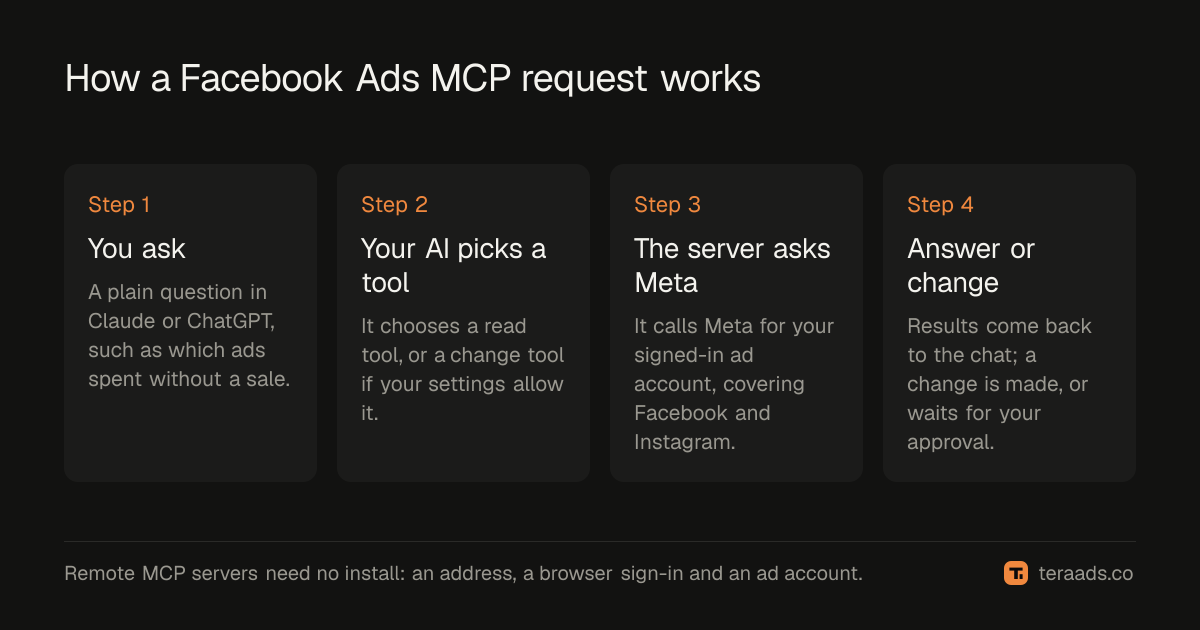
MCP, the Model Context Protocol, is an open standard that lets an AI assistant call tools in another service. An MCP server for Facebook ads offers tools such as "list campaigns", "get insights", "pause an ad" or "set a budget". When you ask "which ads spent money this week without a sale?", your assistant picks the right tool, the server asks Meta, and the answer comes back into the chat. MCP connectors explained covers sign-in, permissions and transports in more depth.
The name causes confusion. Facebook ads are Meta ads: the same ad account, Ads Manager and API serve Facebook, Instagram, Messenger and the Audience Network. There is no separate Instagram ads API for a server to use, so an "Instagram ads MCP" is a Meta ads MCP server viewed from the Instagram side. Placements are a setting on the ad set, which is why a single server can report on Reels, Stories and Feed together.
A remote MCP server, the kind most people use, is just a web address. You paste it into your assistant, sign in to the service in your browser, and pick the ad account. Nothing is installed on your computer, and the assistant never sees your Facebook password.
What your AI can do with Facebook and Instagram ads
What's possible depends on the server and on the access you grant. Most servers split their tools into reads, which change nothing, and changes, which touch live ads.
| You ask | What the assistant does | Kind of tool |
|---|---|---|
| "How did my campaigns do in the last 7 days?" | Pulls spend, results, cost per result and ROAS from Meta | Read |
| "Which ads spent over $50 this month without a purchase?" | Reads results at ad level and filters them | Read |
| "Show me the text and image of my best ad." | Reads the ad's creative | Read |
| "Pause those three ads." | Pauses them in Meta | Change |
| "Raise the budget of my best ad set by 20%." | Finds the ad set and sets a new budget | Change |
| "Build a paused campaign for this product in the US and Canada." | Searches locations and interests, then creates a campaign, ad set and ad | Change |
A question can take several tool calls. "Which campaigns should I scale?" might read campaigns, then insights, then ad sets, before the assistant answers. That matters on free plans, which count calls per week or per month.
The options in 2026
Three kinds of Facebook Ads MCP server are in common use. They all speak MCP, so the setup in your assistant looks the same; what differs is who runs the server, what it can see, and how it limits changes.
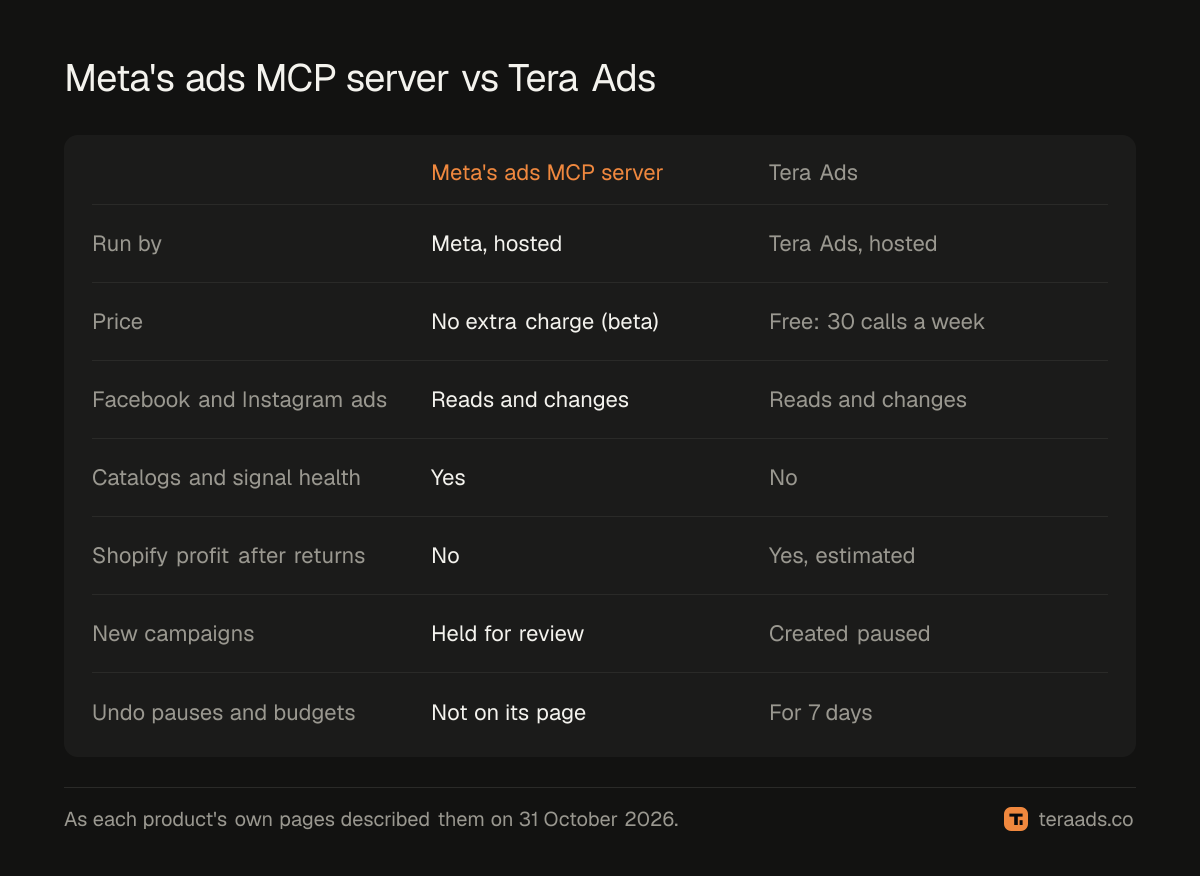
Meta's own ads MCP server. Meta announced its ads AI connectors as an open beta on 29 April 2026. Its tools cover reporting, creating and editing campaigns, ad sets and ads, product catalogs and signal health. A 16 July 2026 update added rules that let anyone with full control of a business portfolio govern what AI agents can do on an ad account, from budgets to catalog updates. Meta's ads MCP server page gives the address mcp.facebook.com/ads, names ChatGPT, Claude and Perplexity, says Meta charges nothing extra to connect, and says new campaigns are held for review before they go live. Access is rolling out gradually, so not every ad account can use it yet. It wins on depth: no third party sees more of Meta than Meta does.
Hosted third-party servers. Services such as Pipeboard and Tera Ads run the server for you. Pipeboard's pricing page lists a free plan of 30 AI tool executions a week on two ad account slots, and paid plans with unlimited executions; ad platforms such as Meta, Google Ads, TikTok and LinkedIn each use a slot. It wins on breadth across ad platforms. Tera Ads is narrower on platforms but reads your Shopify store as well as Meta.
Self-hosted open code. Pipeboard publishes its Meta Ads MCP code on GitHub under the Business Source License 1.1. You can run it yourself, but local installs need your own Meta developer app, and the README recommends its hosted server instead. This suits developers who want the code on their own machines and are happy to maintain it.
The Meta Ads MCP options guide compares Meta's server, Pipeboard and Tera Ads in more detail.
Read only, ask first, or make changes
A Facebook ads AI agent with full write access can spend real money in seconds. Before you connect any server, choose how much it may do:
- Read only. The assistant answers questions and suggests changes; you make them in Ads Manager. The right start for most brands.
- Ask first. The assistant can request a change, but it waits until you approve it outside the chat. The assistant can't approve its own request.
- Make changes. The assistant acts at once, within limits the server enforces.
Limits are what make the third option workable. Useful ones are a cap on how far one budget change can move, new campaigns created paused, a daily cap on changes, no delete tool, and a log of every change with a way to reverse it. Ask any server you're considering which of these it has. The guide to safe AI access has a short written policy you can copy, and the questions to ask AI about your ads give you plenty to try while access is still read only.
Worked example: a 14-day spend check
Here is a typical first job for a Facebook Ads MCP server. You ask: "Which ads spent money in the last 14 days without a single purchase?" The assistant reads ad-level results and returns four ads, with illustrative numbers:
- A Reels video for a gift set: $180 spent, 0 purchases.
- A Stories image for a new collection: $95 spent, 0 purchases.
- A carousel in Facebook Feed: $60 spent, 0 purchases.
- A static image retargeting ad: $25 spent, 0 purchases.
That's $360 with nothing to show for it. The first two have clearly had enough budget to prove themselves; the last two might just need more time. You reply "pause the first two". With read-only access, the assistant tells you where to pause them; with ask first, it files the request for you to approve; with make changes, it pauses them and confirms.
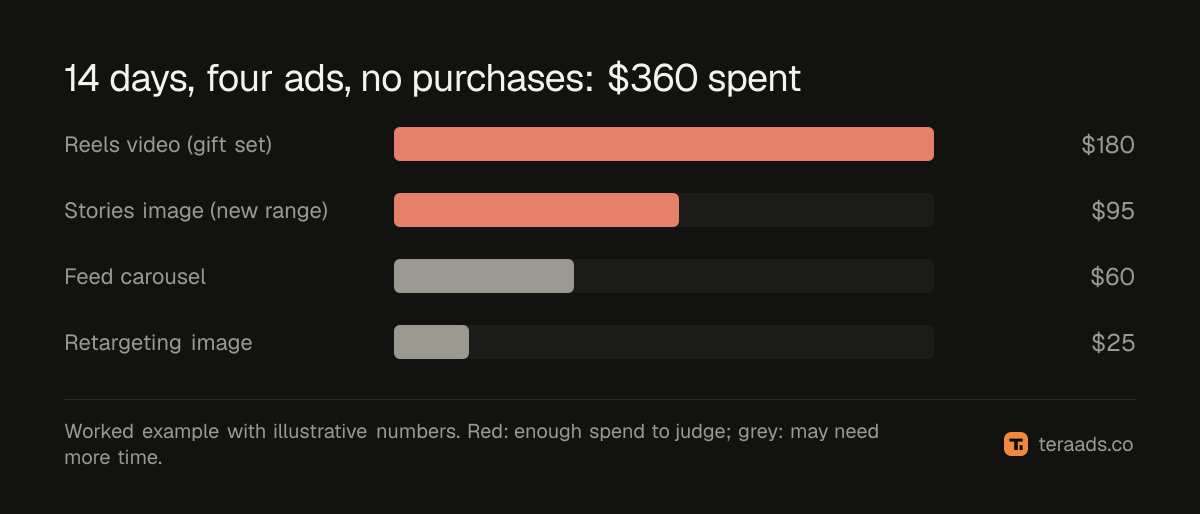
These numbers are illustrative, not a benchmark. Where you draw the line depends on your price and margin; break-even ROAS shows how to find the spend at which an ad should have sold something. The 30-minute wasted spend audit covers the same check by hand.
How to connect a Facebook Ads MCP server
The steps are close to identical for every remote server. Using a server address such as https://teraads.co/mcp:
- Claude. Open Customize, then Connectors, choose Add custom connector, paste the address and sign in. Then switch the connector on from + in a chat. Using Claude with Meta Ads walks through it with screenshots of each choice.
- ChatGPT. OpenAI's guide to connecting an MCP server to ChatGPT adds it from ChatGPT's plugins page: choose Add custom MCP server, enter the URL including /mcp, and set up sign-in. It notes that account and workspace policies apply, so a workspace admin may need to allow it.
- Claude Code. Run
claude mcp add --transport http tera-ads https://teraads.co/mcp, then type /mcp and sign in. - Cursor, VS Code, Codex and Gemini CLI. Add the address to the tool's MCP settings and sign in when it opens your browser.
- First question. Start with a read: "What did I spend on Facebook and Instagram in the last 7 days, and what did Meta report back?"
Common mistakes
Granting change access on day one. Start read only or ask first, and widen access after a week of answers you've checked.
Treating Meta's ROAS as profit. Meta reports purchases it attributes to your ads. Returns, refunds, product cost and fees aren't in that number, which is why Meta and Shopify disagree about sales.
Running out of calls mid-analysis. A long chat can use dozens of tool calls. On a free plan, ask focused questions.
Following instructions inside ad text. Campaign names and ad copy reach the assistant as data. A good server tells the assistant to ignore instructions hidden there; ask first is the backstop.
Connecting the wrong ad account. Check the account name in the first answer before you ask for any change.
Where Tera Ads fits
Tera Ads runs a hosted MCP server at https://teraads.co/mcp, listed in the MCP Registry as co.teraads/connect. It uses Streamable HTTP and OAuth 2.1 sign-in with PKCE on teraads.co, and works with Claude, ChatGPT, Cursor, VS Code, Claude Code, Codex and Gemini CLI. Its 29 tools read live Meta campaigns, ad sets, ads, creatives, insights and targeting, and add your Shopify store: get_profit estimates profit after returns, and get_ads_review judges each campaign that spent against the break-even ROAS your store needs once its usual returns are counted, with one next step. If you allow it, your AI can pause, resume, set budgets, and create or duplicate campaigns, ad sets and ads, which always start paused. For each connection you choose read only, ask first or make changes; one budget change can at most triple a budget or cut it to a tenth, and a pause, turn-on or budget change can be undone for 7 days. The free plan gives 30 calls a week on one Meta ad account, changes included, and Connect Pro is $15 a month. Setup files, a Claude Code plugin and six skills are in the public GitHub repo; the server itself is not open source. The Connect page has the steps for each assistant.
Frequently asked questions
Is a Facebook Ads MCP server the same as a Meta Ads MCP server?
Yes. Facebook ads are run through Meta's ad accounts and API, so a server for one is a server for the other. The name you search for doesn't change what the server can do.
Can an MCP server manage Instagram ads?
Yes. Instagram ads sit in the same Meta ad account as Facebook ads, and placements are an ad set setting, so a Meta ads MCP server reads and changes them the same way.
Is Meta's ads MCP server free?
Meta's page says it charges nothing extra to connect while the connectors are in open beta, though your AI assistant's own subscription still applies. Access is rolling out gradually.
Can a Facebook ads AI agent spend my money?
It can if you give it change access. Start read only or ask first, and pick a server that caps budget changes, creates new campaigns paused and logs every change.
Does a Facebook Ads MCP server know my Shopify sales?
Not if it only talks to Meta. Meta reports the purchases it attributes to ads. A server that also reads your store, such as Tera Ads, can bring in orders, returns and profit.
Do I need to code to use one?
No. A remote MCP server is an address you paste into Claude, ChatGPT or another assistant, followed by a sign-in in your browser. Self-hosting open code is the only route that needs technical setup.