Why Your Google Ads Aren't Profitable: 7 Checks for Shopify Stores
Google Ads can report a strong ROAS and still lose money. Seven checks, from double-counted conversions and brand searches to returns and margins, to find the leak.
On this page
Google Ads usually looks more profitable than it is for a few reasons: conversions are counted twice, brand searches take credit for people already coming, returns stay in the reported value, and the ROAS target was never set from margin. Check those first, then wasted search terms, low-margin products and feed problems. A 4x ROAS in Google Ads can sit below break-even once those are taken out.
Key takeaways
- Check conversion tracking first: two primary purchase actions for the same order double the reported value.
- Brand searches and Performance Max on your own name inflate ROAS with sales you would have had anyway.
- Google counts the order when it's placed. Refunds stay in the ROAS it reports.
- Set target ROAS from your break-even ROAS, not from what the campaign usually gets.
- Wasted search terms, low-margin products and weak feeds quietly raise the cost of every profitable sale.
How a 4x ROAS ends up below break-even
An illustrative month: a Shopify store spends $10,000 on Google Ads and the Conv. value / cost column shows 4.0x, or $40,000 of conversion value. Then the checks:
- A second purchase tag, added when the store installed an app, was also set as primary. It double-counted $6,000 of orders. Real value: $34,000, or 3.4x.
- $9,000 came from people searching the store's own name, most of whom would have bought anyway. What the campaigns added: about $25,000, or 2.5x.
- 10% of orders were returned. What the store kept: $22,500, or 2.25x.
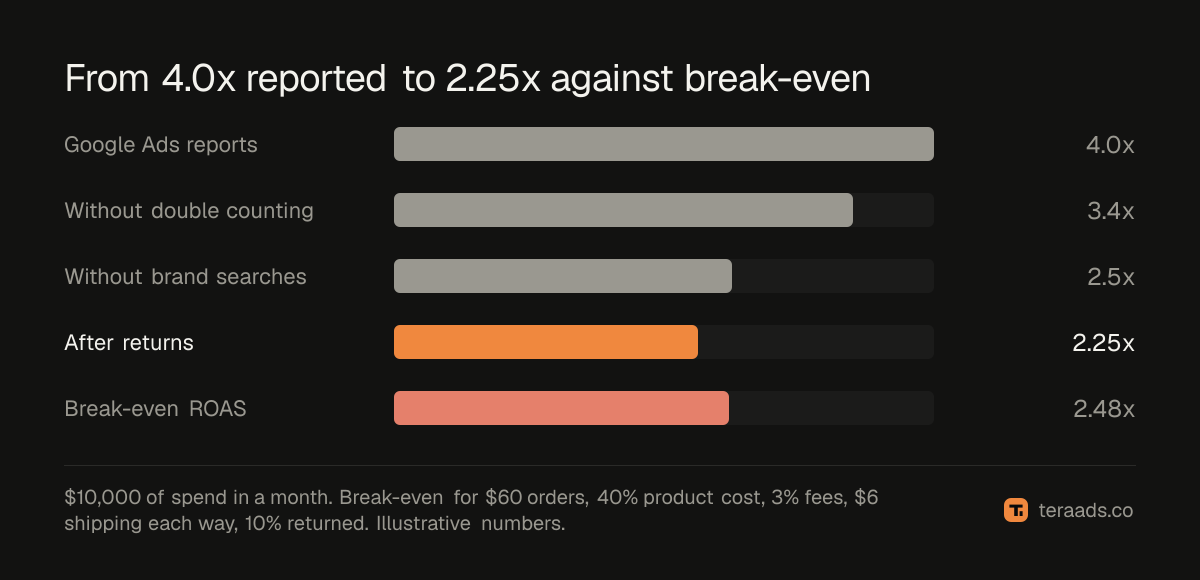
The store's break-even ROAS, worked out from $60 orders with 40% product cost, $6 shipping each way, 3% fees and 10% returns, is 2.48x. At 2.25x on the sales Google added, the account loses money, while the dashboard shows 4x.
Seven checks
| Symptom | Check | Fix |
|---|---|---|
| Google reports more sales than Shopify has | Primary conversion actions and tags | Keep one primary purchase action |
| ROAS great, total orders flat when spend rises | Share of value from brand searches | Brand exclusions; a separate brand campaign |
| Profit drops weeks after a good month | Refunds by order month | Judge on ROAS after returns |
| Target ROAS chosen by feel | Break-even ROAS from margin | Set the target from margin |
| Spend on searches that never buy | Search terms report | Negative keywords, tighter match types |
| Best sellers are low-margin items | Margin by product | Split asset groups or campaigns by margin |
| Products get few impressions or clicks | Feed titles, prices, disapprovals | Fix the feed before raising bids |
1. Conversions are counted twice
Google Ads uses primary conversion actions for bidding and for the Conversions column. If two primary actions record the same purchase, such as a tag from a Shopify app and another added by hand, or a Google Ads tag and an imported GA4 purchase, every order can count twice. Compare Google's purchase count with Shopify orders from Google for a week. If Google's is far higher, open Goals, then Conversions, and keep a single primary purchase action. Google Ads conversion tracking for Shopify covers the setup.
2. Brand searches take the credit
People who type your store's name were already looking for you. Search and Performance Max campaigns that bid on your brand claim those sales at a very high ROAS, which lifts the account average. Measure brand separately, and add brand exclusions to Performance Max. Brand vs non-brand search and is Performance Max profitable show how.
3. Returns and refunds stay in the reported value
Google records conversion value when the order is placed. Refunds weeks later stay in the ROAS it reports unless you adjust conversions. Compare Google's value with Shopify orders from Google after returns. True ROAS after refunds has the method.
4. The target ROAS was never set from margin
A target ROAS chosen because "4x sounds right" can be too low for a thin-margin store or too high for a rich one. Work out break-even ROAS from contribution margin, then set the target above it by the profit you want. Target ROAS bidding covers how to change targets without starving campaigns.
5. Search terms waste the budget
Broad and phrase match can show ads on searches that never buy: wrong products, free versions, jobs, how-to questions. Open the search terms report monthly, add negatives for the waste and move the converters into exact match. Wasted search terms and a negative keywords list give a starting point.
6. Budget goes to low-margin products
Shopping and Performance Max chase conversion value, not profit, so cheap or low-margin products that sell easily can take most of the budget. Split asset groups or campaigns by margin band so spend can follow profit. Performance Max asset groups shows how.
7. The feed holds products back
Weak titles, missing attributes, uncompetitive prices and disapproved products limit what Shopping can show, so the budget goes to fewer, less relevant products. Fix the feed in Merchant Center before raising bids. Shopping titles and disapproved products cover the common problems.
A monthly Google Ads profit check
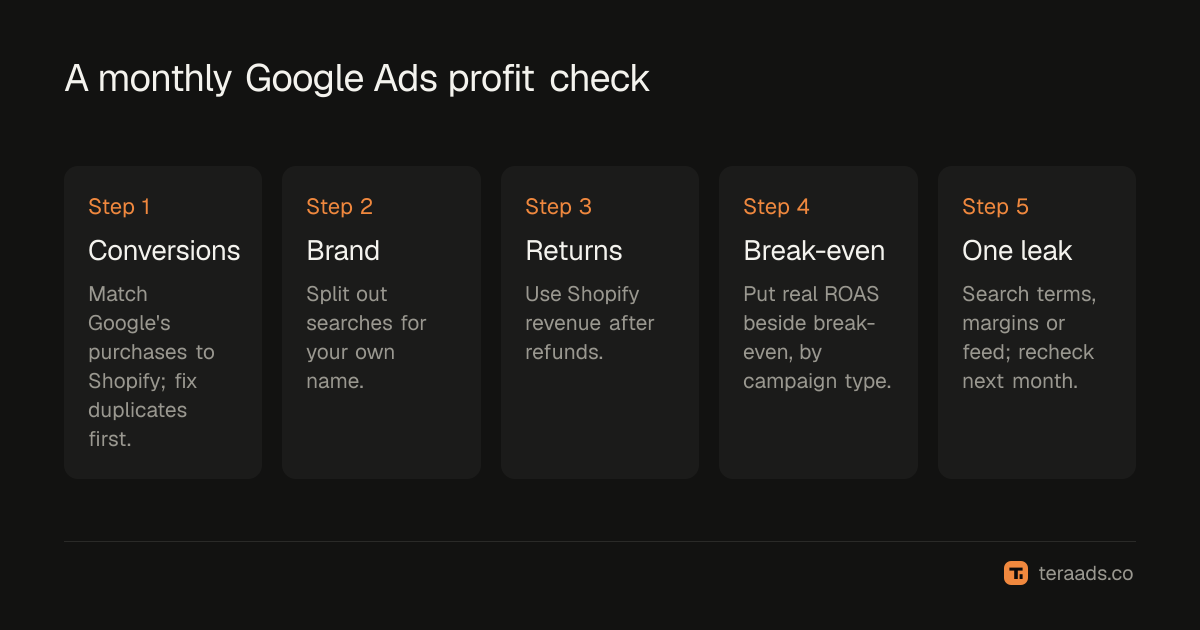
- Match conversions to Shopify. Compare Google's purchase count with Shopify orders from Google; fix duplicates first.
- Split out brand. Total the value from searches for your store's name, and judge the rest on its own.
- Take out returns. Use Shopify revenue after refunds for a month whose returns are mostly in.
- Compare with break-even. Put the real ROAS beside your break-even ROAS, by campaign type.
- Fix one leak at a time. Search terms, margins or feed, then check again next month.
Tera Ads connects Shopify, Google Ads and Meta Ads, and shows every campaign from both platforms in one table with the ROAS each platform reports, beside your store's profit after product costs, ad spend, shipping, payment fees, returns and refunds. It is free for one business.
Frequently asked questions
Why does Google Ads show a good ROAS but I'm not making money?
Usually because the reported value includes double-counted conversions, brand searches from people already coming, or orders later refunded, and because ROAS ignores product cost and shipping. Compare Shopify ROAS after returns with your break-even ROAS.
How do I know if my Google Ads conversions are counted twice?
Compare the purchases Google Ads reports with Shopify orders from Google for the same week. If Google's count is much higher, check Goals, then Conversions, for more than one primary purchase action.
Should I turn off brand search campaigns?
Not automatically. A brand campaign can protect your name from competitors bidding on it, and it is cheap. Judge it separately from the rest of the account so its high ROAS doesn't hide weak campaigns.
Is Google Shopping profitable for small Shopify stores?
It can be, especially for products people search for by type. Profit depends on margin, feed quality and how much of the reported value is brand searches or repeat customers. Check it against break-even on Shopify orders after returns.
What ROAS do I need on Google Ads?
Above your break-even ROAS: 1 divided by your contribution margin after product cost, shipping, payment fees and returns. With a 40% margin that is 2.5x, measured on sales Google added, after returns.
Does Google Ads take returns out of ROAS?
Not by itself. Google records the conversion value when the order is placed. Unless you upload adjustments, refunds stay in the ROAS it reports.