How to Run Facebook Ads for a Shopify Store: A Profit-First Setup
How to run Facebook and Instagram ads for a Shopify store, step by step: break-even first, tracking, one simple campaign, creative, budget and the first four weeks.
On this page
To run Facebook ads for a Shopify store, work out the most you can pay for a sale, connect Shopify to Meta with the Facebook & Instagram app, check that purchases are tracked once, then launch one sales campaign with several creatives and enough budget to learn. Leave it alone for the first week, judge it on Shopify orders after returns, and raise budget in steps only while each sale costs less than your break-even. Most stores that lose money on Meta skip the first and last steps.
Key takeaways
- Before any ad, work out break-even cost per sale from your margin after product cost, shipping, fees and returns.
- Use Meta's Facebook & Instagram app for Shopify, with data sharing at the highest level so the Conversions API is on.
- Start with one sales campaign, broad targeting and three to six different creatives, not many small ad sets.
- Budget for about 50 purchases a week per ad set, so Meta's learning phase can finish.
- Judge on Shopify orders after returns against break-even, weekly, and scale in steps of about 20%.
The setup, step by step
- Work out break-even. Take product cost, shipping, payment fees and returns out of an average order. What is left is the most a sale can cost in ads.
- Connect Shopify to Meta. Install Meta's Facebook & Instagram app in Shopify and connect your business portfolio, ad account, pixel and product catalog.
- Turn on full data sharing. In the app's data sharing settings choose the highest level, shown as Maximum in recent versions, which adds the Conversions API.
- Check purchase tracking. Place a test order and confirm in Events Manager that one Purchase event arrives, with the right value and currency.
- Launch one sales campaign. Optimize for purchases, keep targeting broad and Advantage+ settings on, and let Meta choose placements.
- Add three to six creatives. Use different hooks and formats: a short video, customer content, a product photo with a clear offer, and a catalog ad.
- Set a budget that can learn. Aim for about 50 purchases a week per ad set, at the cost per sale you expect.
- Judge weekly and scale in steps. Compare cost per Shopify order after returns with break-even, then raise budget by about 20% at a time while it holds.
Step 1: know the most a sale can cost
An illustrative store sells $60 orders. Products cost 40% of the price, payment fees are 3%, shipping costs $6 each way and 10% of orders come back. Each order placed leaves $24.18 after those costs. That is the store's break-even cost per sale, and $60 ÷ $24.18 = 2.48x is its break-even ROAS.
Write both numbers down before launching. Every later decision, from budget to which ads to pause, comes back to them. What is a good ROAS has the formula and a table by margin, and Shopify profit margin shows how to find the margin itself.
Steps 2 to 4: tracking that counts each sale once
Meta's Facebook & Instagram sales channel app connects Shopify to your Meta business portfolio. It installs the pixel, syncs your products into a catalog for catalog ads, and, at the highest data sharing level, sends purchases from Shopify's servers through the Conversions API as well as from the browser. The server copy fills gaps left by ad blockers and privacy settings, which gives Meta better data to learn from.
Then check. Open Events Manager, use Test events, and place a real or test order. You want one Purchase event with the order's value and currency. Two purchases for one order, often from a second pixel added by a theme or another app, will double Meta's reported sales and mislead the delivery system. The Conversions API on Shopify covers deduplication and Event Match Quality.
Steps 5 to 7: one campaign, several creatives, enough budget
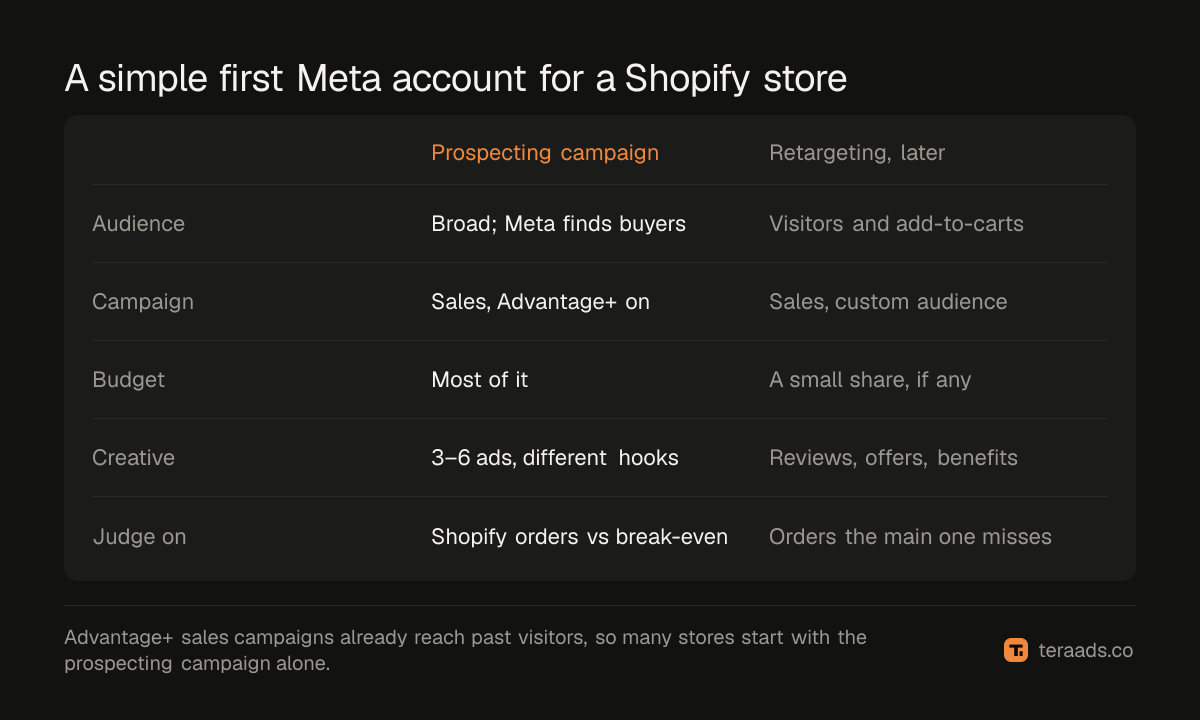
Small stores often start with many ad sets: one per interest, one per age group, one per product. Each gets a sliver of the budget, none gets enough purchases to finish learning, and the ad sets compete with each other in the same auction. One sales campaign with broad targeting usually learns faster.
New sales campaigns start with Advantage+ settings on, which lets Meta choose audiences, placements and how to split the budget across ads. Advantage+ Sales campaigns explains the settings that still matter, such as limiting how much goes to existing customers. Meta Ads account structure covers when a second campaign is worth adding.
Creative does most of the targeting now. Give Meta three to six ads that are genuinely different: a problem the product solves, a customer showing it, a clear offer, the product range in a catalog ad. Several versions of one idea teach Meta little. UGC ads and a Meta ads testing framework show how to plan them.
For budget, the learning phase needs about 50 purchases in seven days per ad set. If you expect $25 per sale, that is around $1,250 a week. How much to spend on Facebook ads works out the floor and the ceiling for your numbers, and how much Facebook ads cost shows what drives the cost per sale.
Step 8: the first four weeks
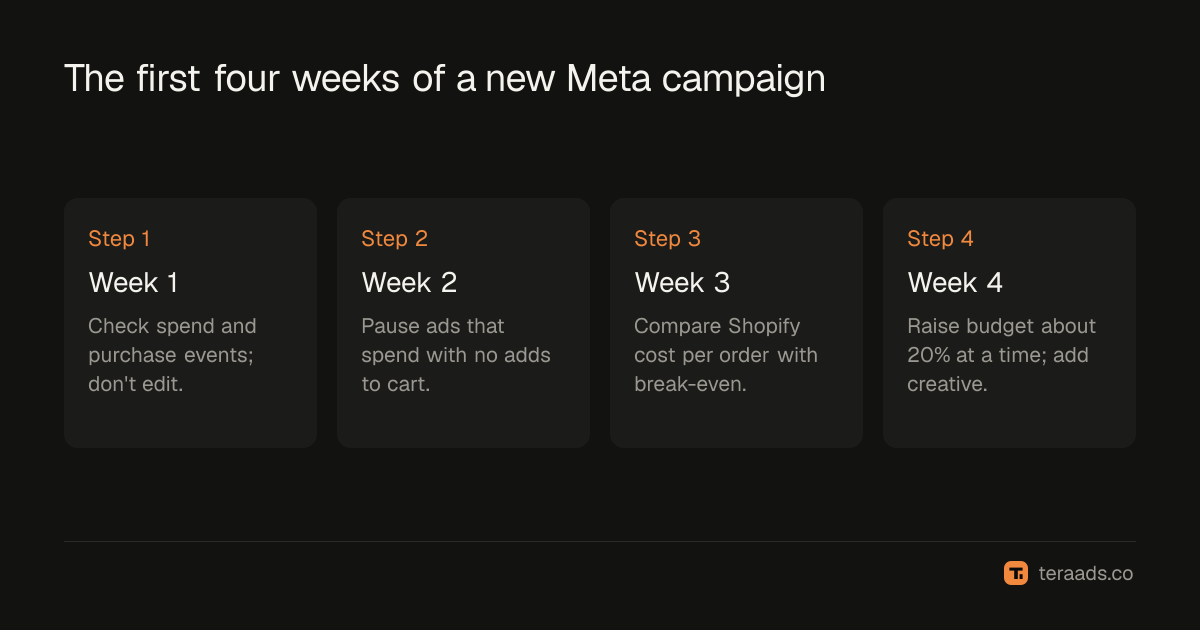
In the first week, resist editing. Significant changes to budget, targeting or creative can restart learning, and the first days are noisy. Check only that spend, clicks and purchase events are flowing.
From the second week, pause ads that have spent a meaningful amount without adds to cart. Meta ads kill rules suggests thresholds tied to your break-even, so you don't cut winners too early.
By week three, compare cost per order with break-even using Shopify orders, not just Ads Manager. Meta credits purchases inside its attribution window and doesn't take out refunds, so its numbers usually look better than what you keep. Why Meta Ads and Shopify never agree explains the gap.
In week four, if cost per order is comfortably below break-even, raise the budget by about 20% every few days and add fresh creative. If it is above, fix the weakest link before spending more: creative, landing page or offer.
Common first-month mistakes
| Mistake | Why it hurts | Do this instead |
|---|---|---|
| No break-even number | Profitable and losing ads look the same | Work out break-even cost per sale first |
| Two pixels or duplicate purchases | Meta optimizes on doubled sales | Keep one Purchase event per order |
| Many tiny ad sets | None leaves learning | One campaign, broad targeting, more budget each |
| Editing daily | Restarts learning, raises costs | Leave changes for weekly reviews |
| Judging on Ads Manager ROAS | Refunds and other channels inflate it | Judge on Shopify orders after returns |
| Doubling budget overnight | Costs jump as delivery resets | Raise in steps of about 20% |
Tera Ads connects Shopify, Google Ads and Meta Ads, and shows every campaign from both platforms in one table with the ROAS each platform reports, beside your store's profit after product costs, ad spend, shipping, payment fees, returns and refunds. It is free for one business.
Frequently asked questions
How do I connect my Shopify store to Facebook ads?
Install Meta's Facebook & Instagram app from the Shopify App Store, then connect your business portfolio, ad account, pixel and catalog. Set data sharing to the highest level so purchases also go through the Conversions API.
How much should I spend on Facebook ads as a beginner?
Enough for about 50 purchases a week in one ad set, at the cost per sale you expect, so Meta can finish learning. If that is too much, run fewer ad sets rather than less budget spread across many.
Should I target interests or go broad on Facebook ads for Shopify?
For most stores with purchase tracking working, broad targeting with strong, varied creative learns faster than narrow interests. Use interests or lookalikes to test, not as the default structure.
How long should I run a Facebook ad before judging it?
Give a new campaign at least a week before editing, and two to three weeks before judging profit, so the learning phase can finish and returns start to show. Pause clear losers earlier only if they spend without adds to cart.
Do I need a separate retargeting campaign?
Not at the start. Advantage+ sales campaigns already reach people who visited your store. Add a small retargeting campaign later if you can measure that it brings orders the main campaign doesn't.
Why are my Facebook ads getting clicks but no sales?
The problem is usually after the click: page speed, price, shipping costs, stock or checkout. Check that the landing page matches the ad, then check that purchase events are reaching Meta.