Google Ads vs Meta Ads for Shopify: Which Should You Spend On?
Google captures people already searching; Meta creates demand from people who weren't. How to choose, split a budget and compare the two on profit, not ROAS.
On this page
Google Ads usually suits a Shopify store when people already search for what it sells; Meta Ads suits it when people need to see the product before they know they want it. Google captures existing demand through Search and Shopping. Meta creates new demand in Facebook and Instagram feeds. Most stores that grow use both, and the right split comes from the extra orders each adds per dollar, not from the ROAS each one reports.
Key takeaways
- Google reaches people who are searching; Meta reaches people who are scrolling. One captures demand, the other creates it.
- Searchable, need-driven products often start best on Google. New, visual or impulse products often start best on Meta.
- There is no correct budget split. Start where demand exists, then move money toward whichever adds more orders per dollar.
- Both platforms claim some of the same sales. Judge them on total Shopify orders after returns and MER, not on reported ROAS.
- Meta often creates the demand that later shows up as Google brand searches, so cutting one can hurt the other.
The difference in one table
| Google Ads | Meta Ads | |
|---|---|---|
| Where ads appear | Google Search, Shopping, YouTube, Display, Gmail, Discover, Maps | Facebook, Instagram, Messenger and partner apps |
| What shows an ad | A search, or Google's signals for Performance Max | Your audience settings and Meta's delivery system |
| How you usually pay | Per click on Search and Shopping | Per thousand impressions |
| What you need | A clean product feed in Merchant Center, and keywords | A steady supply of creative: images, video, copy |
| Strongest at | Catching people already looking | Showing products to people who weren't looking |
| Reported ROAS is flattered by | Brand searches from people already coming | Sales counted after views, and existing customers |
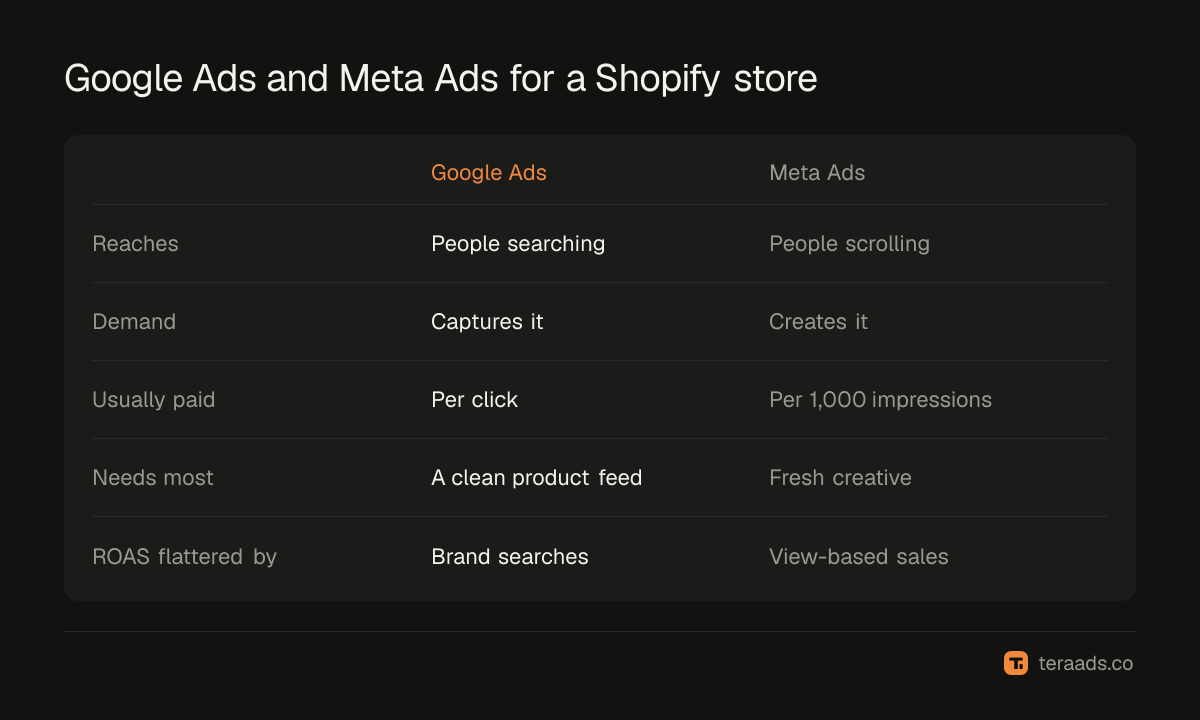
The short version: Google is a net under existing demand, and Meta is a way to make new demand. That one difference explains most of the rest.
When Google Ads is the better first step
Google works best when people already type what you sell into a search box.
- Searchable products. If shoppers search for the thing by type ("women's waterproof hiking boots", "standing desk 48 inch"), Shopping ads put your product, price and picture in front of them at the moment they are comparing.
- Replacement and need-driven buys. Filters, refills, spare parts and gifts for a date are bought with intent. Search catches that intent.
- A brand people already know. If people search your name, a small brand campaign protects those sales from competitors bidding on it. Brand vs non-brand search explains how to judge it separately.
To check demand before spending, look up your main product terms in Google's Keyword Planner, which shows rough monthly searches. Shopping ads need your products in Google Merchant Center; Shopify's Google & YouTube app can sync them. Feed quality matters more than bids: Shopping titles and feed attributes cover what to fix first. Performance Max for Shopify covers the main campaign type.
When Meta Ads is the better first step
Meta works best when the product has to be seen to be wanted.
- New or unusual products. Nobody searches for something they don't know exists. Meta can show it to people likely to care.
- Visual and impulse buys. Fashion, jewelry, home decor, beauty and gifts sell on how they look and feel, which suits feeds and short video.
- A new brand. With no brand searches yet, Google has little demand to capture. Meta builds the awareness that later turns into searches.
On Meta, creative does most of the targeting. A steady flow of new images and video, tested in a simple structure, matters more than audience settings. Meta Ads account structure and creative testing cover how to set that up.
How to split a budget between them
There is no right percentage, and anyone who gives you one without seeing your products is guessing. A sensible order works for most stores:
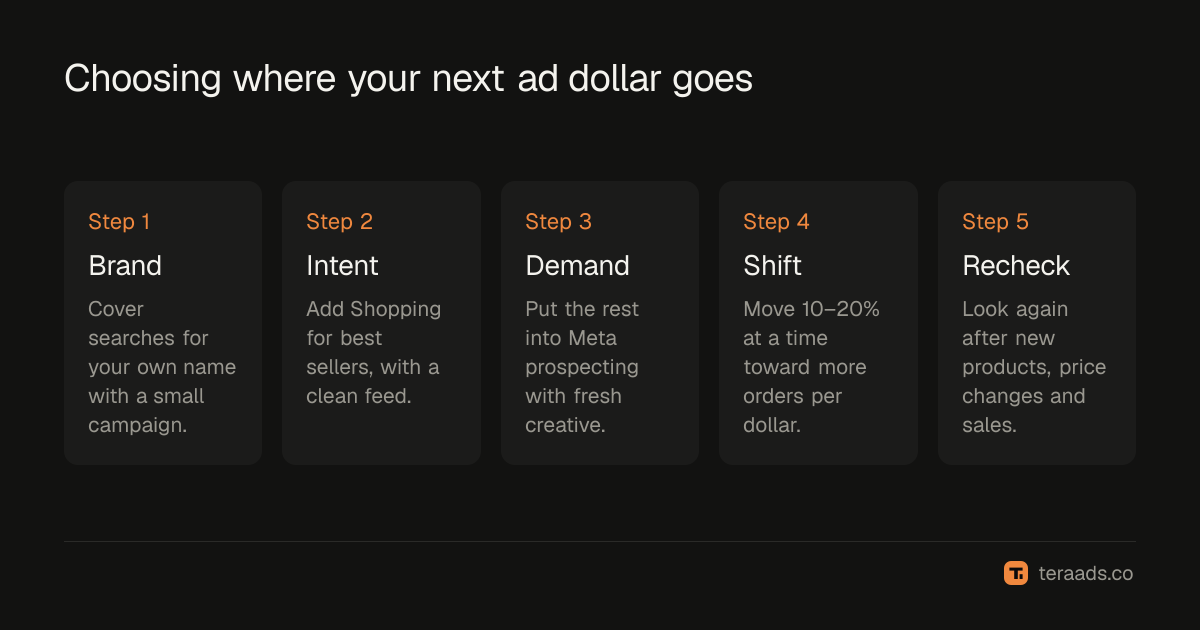
- Cover your own brand. A small brand search campaign catches people already looking for you.
- Capture high-intent search. Add Shopping or Performance Max for your best-selling products, with a clean feed.
- Create demand on Meta. Put the rest into Meta prospecting with fresh creative, if your margin can carry the cost of finding new customers.
- Move money in steps. Shift 10–20% of budget at a time toward the platform adding more orders per dollar, and watch total Shopify orders.
- Recheck after big changes. New products, price changes and sale seasons change where demand comes from.
For a new visual brand, most of the budget usually goes to Meta, because there is little search demand to capture yet. For a store selling a well-known category, Google often takes the larger share. Either way, the split should follow results, not habit.
Compare them on profit, not reported ROAS
Each platform reports its own ROAS, and each counts sales its own way. Google gives credit for conversions after clicks and, for some campaigns, after video views. Meta gives credit inside its attribution window, including some sales after someone saw an ad without clicking. When both reached the same buyer, both claim the order. Why Meta and Shopify never agree covers the details.
The two also feed each other. Someone sees a Meta ad, searches your brand a week later and buys through a Google ad. Google's ROAS looks great and Meta's looks weak, but cut Meta and those brand searches may fall too.
Three checks keep the comparison honest:
- Total Shopify orders and MER. Store revenue over all ad spend shows whether the overall mix is working. MER vs ROAS explains it.
- A holdout test. Pause or cut one platform in some regions or for a few weeks, and watch total orders. Incrementality testing covers how.
- Break-even ROAS. Judge each platform's Shopify-measured ROAS, after returns, against the break-even your margin needs. What is a good ROAS shows how to set it.
Common mistakes
- Comparing cost per click with cost per thousand impressions. They are different units. Compare cost per order, and better, cost per extra order.
- Turning off Meta because Google's ROAS looks better. Google's best sales may be people Meta introduced to you.
- Letting Performance Max claim your brand searches. Without a brand exclusion it can take credit for people already coming. Is Performance Max profitable shows how to check.
- Judging a platform in its first week. Both need time and data to learn. Judge on at least a few weeks of results.
Tera Ads connects Shopify, Google Ads and Meta Ads, and shows every campaign from both platforms in one table with the ROAS each platform reports, beside your store's profit after product costs, ad spend, shipping, payment fees, returns and refunds. It is free for one business.
Frequently asked questions
Is Google Ads or Facebook Ads better for Shopify?
Neither is better for every store. Google Ads suits products people already search for; Facebook (Meta) Ads suits products people need to see first. Many stores use both: Google to capture demand and Meta to create it.
Should a new Shopify store start with Google or Meta?
A new store with a visual or new product usually starts on Meta, because few people search for it yet. A new store in a searched-for category, such as replacement parts or a well-known product type, can start with Google Shopping.
Which is cheaper, Google Ads or Meta Ads?
They charge differently, usually per click on Google Search and per thousand impressions on Meta, so prices can't be compared directly. Compare what each costs per order after returns, and per extra order it adds.
Can I run Google Ads and Meta Ads at the same time?
Yes, and most growing stores do. Expect both to claim some of the same sales, so judge the pair on total Shopify orders and MER as well as on each platform's own reports.
Why do Google and Meta both claim the same sale?
Each platform credits sales inside its own attribution rules and can't see the other's ads. If a customer saw a Meta ad and later clicked a Google ad, both may count the order. Shopify counts it once.
Do I need Google Merchant Center for Shopping ads?
Yes. Shopping ads and Performance Max product ads use the product data in Merchant Center. Shopify's Google & YouTube app can sync your products to it.