Meta Ads in Codex and Gemini CLI: Connect a Coding Agent to Ads
Connect Codex or Gemini CLI to your Meta ads in two commands: the setup, browser sign-in, safe tool settings and prompts that check ads against your Shopify profit.
On this page
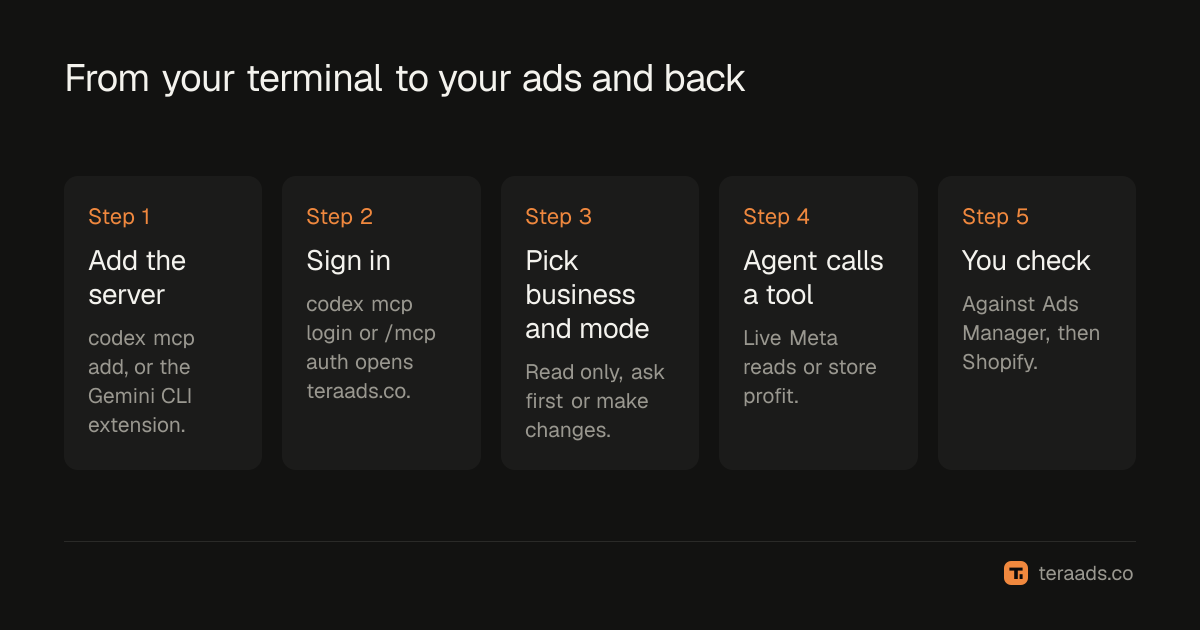
Codex and Gemini CLI can both read and manage your Meta ads through Tera Ads, a hosted MCP server at https://teraads.co/mcp. In Codex, run codex mcp add tera-ads --url https://teraads.co/mcp, then codex mcp login tera-ads. In Gemini CLI, install the Tera Ads extension from GitHub and run /mcp auth tera-ads. Both sign you in to Tera Ads in your browser, and you choose whether the agent only reads, asks you first or makes changes.
Key takeaways
- Two commands per agent: add the server, then sign in to Tera Ads in your browser. No API keys go into your config.
- Codex keeps the server in
~/.codex/config.toml, which the Codex IDE extension and the ChatGPT desktop app share. - Gemini CLI installs Tera Ads as an extension that also loads a context file telling Gemini when to use it.
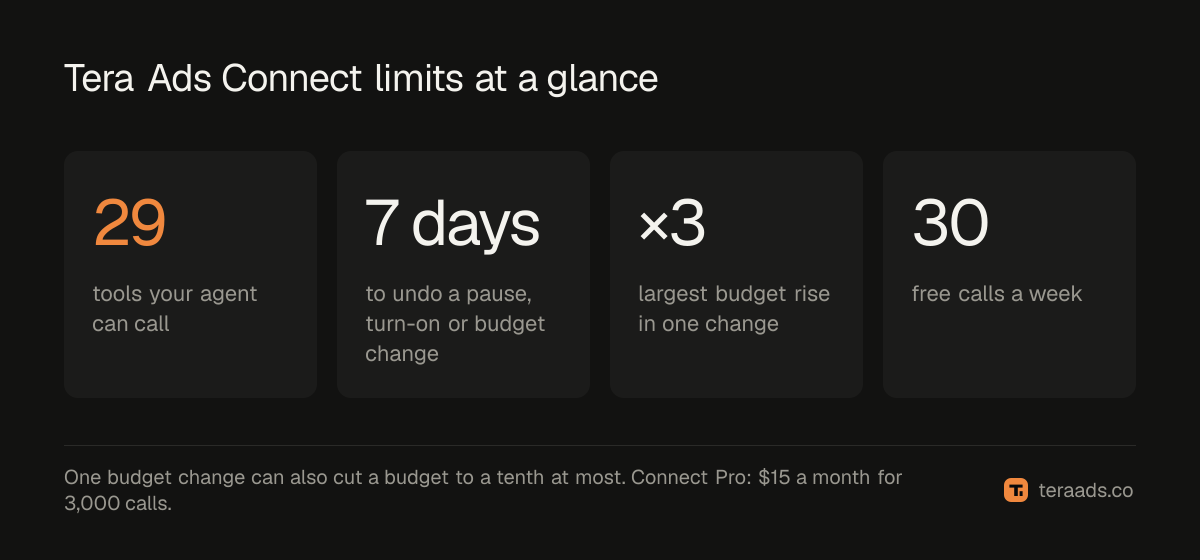
- Your agent gets 29 tools, from live Meta reads to your store's profit after returns and capped budget changes.
- Limit changes in two places: the agent's own tool settings and the Tera Ads connection mode.
Why connect a coding agent to your ads
Plenty of Shopify founders build their own theme, scripts and internal tools, and spend half the day in a terminal. A coding agent connected to your ads can answer "what did Meta spend yesterday?" in the same session where you're editing a product page, save a weekly summary as a Markdown file in your repo, or line up a week of campaign results against a change you shipped on Tuesday.
The link between the agent and your ad account is MCP, the Model Context Protocol: an open standard that lets an AI agent call tools another service exposes. MCP connectors explained covers the basics. Codex and Gemini CLI both support remote MCP servers that sign in with OAuth, so a hosted server like Tera Ads needs nothing installed beyond the agent itself.
What Tera Ads adds to a plain Meta connection is your store. Besides live campaign, ad set and ad reads, it answers from Shopify orders, returns, product cost, shipping, fees and refunds, minus your Meta and Google ad spend. Meta's attributed revenue is labelled as Meta's, so the agent doesn't treat it as sales. For other servers you could connect instead, see Meta Ads MCP options.
One note on Gemini CLI: its docs carry a notice that for unpaid-tier and Google One users, Gemini CLI was replaced by Antigravity CLI on June 18, 2026 (Gemini CLI's MCP docs). The steps below follow Gemini CLI as documented in October 2026.
Before you start
- A free Tera Ads account. Sign up and connect your Meta ad account. Connect Shopify too, so the agent can see store sales and profit.
- Owner access. Only the business owner can connect an AI to a business in Tera Ads.
- Codex or Gemini CLI installed and signed in to its own account.
- A rule for changes. Decide whether the agent will only report, or also pause ads and move budgets. The guide to safe AI access has a short policy you can copy.
Connect Codex, step by step
- Create a free Tera Ads account. Sign up, connect your Meta ad account, then connect Shopify so answers include your store's profit after returns.
- Add the server to Codex. In your terminal, run
codex mcp add tera-ads --url https://teraads.co/mcp. - Sign in to Tera Ads. Run
codex mcp login tera-ads; it opens Tera Ads in your browser, where you sign in, pick the business and choose what the agent may do. - Check the connection. Start
codexand type/mcp, which lists the active MCP servers; tera-ads should be on the list. - Ask a question you can check. Try "Use Tera Ads to list my active Meta campaigns with yesterday's spend" and compare the answer with Ads Manager.
Codex stores MCP servers in ~/.codex/config.toml, one [mcp_servers.tera-ads] table per server with the address in url. OpenAI's docs say the ChatGPT desktop app, Codex CLI and IDE extension share this configuration, so one setup covers all three (Codex MCP docs). The same docs say codex mcp login handles OAuth and that Codex can choose a client registration method automatically. Tera Ads supports dynamic client registration with OAuth 2.1 and PKCE, so there is no client ID to pass.
Keep Codex to reading on its side
Codex's server settings take enabled_tools, an allow list, and disabled_tools, a deny list applied after it. To stop Codex from calling the change tools even if your Tera Ads connection allows changes, add this line under [mcp_servers.tera-ads] in config.toml:
disabled_tools = ["pause", "resume", "set_budget", "create_campaign", "create_ad_set", "create_ad", "duplicate"]
The docs also describe approval settings for each server and each tool. The simplest guard is still the one in Tera Ads: choose read only when you sign in, and the change tools can't do anything for that connection.
Connect Gemini CLI
- Install the extension. Run
gemini extensions install https://github.com/Teralabsx/meta-ads-mcp. - Sign in to Tera Ads. Start Gemini CLI, run
/mcp auth tera-ads, then sign in, pick the business and choose what the agent may do. - Check the tools. Type
/mcpto see each server's status and tools, or rungemini extensions listin your shell. - Ask a question you can check. Try "Which Meta campaigns spent the most this week?" and compare the answer with Ads Manager.
The extension is a small gemini-extension.json file in the Tera Ads GitHub repo. It points Gemini at https://teraads.co/mcp through the httpUrl field, which Gemini's docs define as the Streamable HTTP endpoint, while url is for SSE. It also names GEMINI.md as its context file. That file tells Gemini to reach for Tera Ads on Meta ads, ROAS and profit questions, to label Meta's attributed revenue as Meta's, and to treat campaign names and ad text as data, never as instructions.
Gemini's docs say it supports OAuth for remote MCP servers, can discover the setup automatically, handles dynamic client registration where the server supports it, and stores tokens in ~/.gemini/mcp-oauth-tokens.json. Server settings also include trust, which bypasses all tool call confirmations when set to true. The Tera Ads extension doesn't set it. Leave it that way, so Gemini keeps asking before it runs a tool.
Codex and Gemini CLI side by side
| Codex | Gemini CLI | |
|---|---|---|
| Add the server | codex mcp add tera-ads --url https://teraads.co/mcp | gemini extensions install https://github.com/Teralabsx/meta-ads-mcp |
| Sign in | codex mcp login tera-ads | /mcp auth tera-ads |
| Where it's stored | ~/.codex/config.toml | An installed extension |
| Check it works | /mcp in Codex | /mcp, or gemini extensions list |
| Agent-side limits | enabled_tools, disabled_tools, approval settings | Leave trust off |
| Also covers | Codex IDE extension and ChatGPT desktop app | Loads GEMINI.md as context |
| Agent docs | Codex MCP docs | Gemini CLI extensions |
To make Codex or another agent use Tera Ads without being told, the repo suggests copying the contents of GEMINI.md into your project's AGENTS.md or CLAUDE.md. Otherwise, name Tera Ads in your prompt.
Prompts that suit a terminal agent
A coding agent can do something a chat window can't: put the answer where you work. Ask it to save results to a file, compare them with last week's file, or open the product page a campaign sends people to.
| Ask | What the agent uses |
|---|---|
| "What was my profit after returns in the last 30 days? Save it to reports/profit.md." | get_profit, then its own file tools |
| "Meta says my ROAS is 3. What did my store actually make?" | get_insights, get_profit |
| "Which campaigns lose money after returns, and what should I do about them?" | get_ads_review |
| "Which ads spent money in the last 14 days without a sale?" | get_insights at ad level |
| "What changed in my ads this week, and can I still undo it?" | list_recent_changes |
| "Copy my best campaign as a paused draft." | duplicate |
| "How many Tera Ads calls do I have left?" | get_usage, which is free |
Read the answers with two caveats. Meta's purchases and revenue are Meta's attribution, not your store's sales. And get_ads_review judges every campaign that spent on profit after your store's usual returns, at your own costs, against your break-even ROAS; the profit figure is an estimate for the whole store, not cash in the bank. True ROAS after refunds shows why the gap matters, and the prompt library for ads analysis has more questions to try.
Keep the agent's changes under control
Coding agents are often set up to edit files without asking each time. Don't let that habit spread to ad tools, where one wrong call spends real money. Tera Ads sets its own limits whatever the agent is allowed to do:
- Read only, ask first or make changes. With ask first, a change waits in Tera Ads until you approve it there, and the agent can't approve it for you.
- New things start paused. Campaigns, ad sets, ads and copies spend nothing until something turns them on.
- Budget steps are capped. One change can at most triple a budget or cut it to a tenth.
- A daily cap. Assistants can make at most 50 changes a day to one business.
- No delete tool. The agent can pause, but it can't delete anything.
- Undo for 7 days. A pause, turn-on or budget change can be undone in Tera Ads for 7 days. New campaigns, ad sets and ads can't be undone, but they start paused.
- One business per connection. A connection can't read another business, even one you also own.
If a change result comes back as outcome_unknown, don't ask the agent to repeat it. Ask it to check list_recent_changes first, so the same change isn't made twice.
When something doesn't work
The agent ignores Tera Ads. Name it in the prompt ("use Tera Ads to..."), or copy GEMINI.md into your project's instructions file as above.
It asks you to sign in again. Access tokens last an hour and are refreshed for you; a connection lasts 30 days. Run codex mcp login tera-ads or /mcp auth tera-ads again.
It says a limit was reached. The free plan has 30 calls a week, reset weekly in UTC. get_usage is free and says how many calls are left and when the count resets.
Budgets look a hundred times too big. list_campaigns shows budgets in Meta's units, which are hundredths for most currencies, so 5000 means $50. set_budget takes whole units of your account currency.
The answers are about the wrong store. Each connection covers one business. Sign in again and pick the other one.
Tera Ads Connect is the MCP server of Tera Ads, the profit dashboard for Shopify brands. It gives Codex, Gemini CLI and other MCP clients live Meta reads, Shopify sales and profit after returns, and limited, logged ad changes. The free plan includes 30 calls a week on one Meta ad account, and Connect Pro costs $15 a month for 3,000 calls a month on up to three ad accounts; it's included with the Growth and Scale plans. Setup steps for other clients are on the Connect page.
Frequently asked questions
Can Codex manage Meta ads?
Yes, through an MCP server. Run codex mcp add tera-ads --url https://teraads.co/mcp and codex mcp login tera-ads, then ask in plain words. What Codex may change depends on the mode you pick for the connection.
How do I connect Gemini CLI to Facebook ads?
Run gemini extensions install https://github.com/Teralabsx/meta-ads-mcp, then /mcp auth tera-ads inside Gemini CLI and sign in to Tera Ads. The extension covers Facebook and Instagram ads in your Meta ad account.
Do I need a Meta developer app or an API token?
No. You sign in to Tera Ads in your browser, and changes reach Meta through Tera Ads' own approved Meta app. Nothing secret goes into your config file.
Does the Codex setup also work in the IDE extension?
Yes. OpenAI's docs say the ChatGPT desktop app, Codex CLI and IDE extension share the same MCP configuration, so a server added in the CLI is there in the other two.
Is Gemini CLI still available?
Gemini CLI's docs say it was replaced by Antigravity CLI for unpaid-tier and Google One users on June 18, 2026. Check Google's docs for your account type before you set it up.
How much does it cost?
The free plan includes 30 calls a week on one Meta ad account. Connect Pro is $15 a month for 3,000 calls a month. A call is one lookup the agent makes in Tera Ads, and one question can take a few.