Meta Ads MCP in Cursor, VS Code and Claude Code: Setup Guide
Connect Meta Ads to Cursor, VS Code or Claude Code with one MCP address: the exact config for each editor, how sign-in works and how to keep ad changes in your hands.
On this page
You can put Meta Ads inside Cursor, VS Code or Claude Code by adding one remote MCP server address, https://teraads.co/mcp, and signing in to Tera Ads in your browser. There is nothing to install or host. Cursor and VS Code take a short JSON entry, Claude Code takes one command, and all three can then read your live campaigns and your Shopify store's profit after returns. You choose per connection whether your AI only reads, asks you first or makes changes.
Key takeaways
- One address works in all three editors:
https://teraads.co/mcp, a hosted MCP server with browser sign-in and no API keys in your config. - Cursor reads
~/.cursor/mcp.jsonfor every project or.cursor/mcp.jsonfor one; VS Code uses MCP: Add Server or.vscode/mcp.json. - Claude Code needs one
claude mcp addcommand, or a plugin that adds the server plus six ready-made ad skills. - Your AI gets 29 tools: live Meta reads, your store's profit after returns, and pauses, turn-ons and budget changes within fixed limits.
- Decide what the AI may do before you connect: read only, ask first or make changes.
Why connect Meta Ads to your code editor
If you build your Shopify theme, scripts or internal tools yourself, your editor is already where you spend the day. An AI agent there can answer an ad question without a trip to Ads Manager, write the answer into a file in your repo, or check whether the landing page you just changed is the one your best ads send people to.
MCP, the Model Context Protocol, is the open standard that makes this work: the editor's agent calls tools that a server exposes, and the server talks to the ad platform. MCP connectors explained covers how it works. Cursor's documentation lists stdio, SSE and Streamable HTTP as supported transports and says it supports OAuth for servers that need it (Cursor's MCP docs). Claude Code signs in to remote servers with OAuth through its /mcp command (Claude Code's MCP docs). So a hosted server needs no keys pasted into a config file.
Tera Ads Connect is that kind of server, built for Shopify brands. Besides live Meta reads, it answers from your store: orders, returns, product cost, shipping, fees and refunds, minus your Meta and Google ad spend. Meta's attributed revenue is labelled as Meta's, so your AI doesn't mistake it for sales. If you want the wider picture of servers you could use instead, Meta Ads MCP options compares them.
Before you start
- A free Tera Ads account. Sign up and connect your Meta ad account. Connect Shopify too, so your AI can see store sales and profit.
- Owner access. Only the business owner can connect an AI to a business in Tera Ads.
- Your editor. Cursor, VS Code with its chat view, or Claude Code in the terminal.
- A decision about changes. Decide whether the AI will only report, or also pause ads and change budgets. The guide to safe AI access has a short policy you can copy.
Set up in five steps
- Create a free Tera Ads account. Sign up, connect your Meta ad account, then connect Shopify so answers include your store's profit after returns.
- Add the server address to your editor. Paste
https://teraads.co/mcpinto Cursor's or VS Code's MCP settings, or run one command in Claude Code; the sections below give the exact entry for each. - Sign in to Tera Ads in your browser. The editor opens Tera Ads, where you sign in and pick the one business to share.
- Choose what your AI may do. Pick read only, ask me first or make changes for this connection; you can switch between the last two later under AI connections in Tera Ads.
- Ask a question you can check. Start with something like "What did I spend on Meta yesterday?" and compare the answer with Ads Manager before you rely on anything bigger.
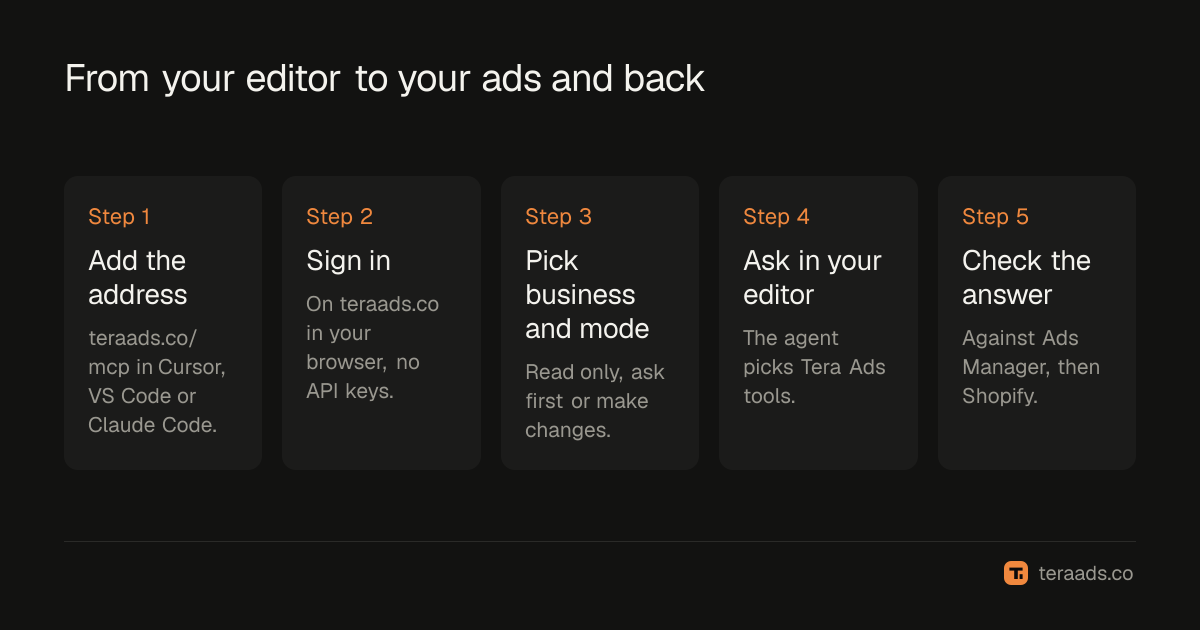
Sign-in uses OAuth 2.1 with PKCE, and the server supports dynamic client registration, so your editor registers itself and you never handle a client ID or secret. Tera Ads stores tokens only as one-way hashes. Access tokens last an hour and are refreshed for you; a connection lasts 30 days before you sign in again.
Cursor
Cursor reads MCP servers from a JSON file. Its docs say ~/.cursor/mcp.json in your home folder makes tools available everywhere, and .cursor/mcp.json inside a project keeps them to that project (Cursor's MCP docs). Add this entry, the same one Tera Ads publishes as configs/cursor/mcp.json in its GitHub repo:
{"mcpServers": {"tera-ads": {"url": "https://teraads.co/mcp"}}}
If the file already lists other servers, add the "tera-ads" entry inside the existing mcpServers object rather than replacing it. When Cursor asks, sign in to Tera Ads in your browser. There is no API key or header to add.
By default, Cursor asks for approval before it uses an MCP tool. Its docs also describe allowlisting tools so they run without asking. If you use that, allowlist read tools such as get_insights and get_profit only, and keep the change tools (pause, resume, set_budget, duplicate and the create tools) behind a prompt.
VS Code
VS Code gives you two routes:
- MCP: Add Server. Open the Command Palette, run MCP: Add Server, choose HTTP, paste
https://teraads.co/mcpand give the server the IDtera-ads. - A workspace file. Add the entry from the repo's
configs/vscode/mcp.jsonto.vscode/mcp.json:{"servers": {"tera-ads": {"type": "http", "url": "https://teraads.co/mcp"}}}. VS Code usesserverswhere Cursor usesmcpServers, so don't copy one editor's file into the other.
VS Code's MCP documentation now steers new setups through its guided flow and says workspace .vscode/mcp.json files remain available for compatibility, so either route works. Start the server, sign in to Tera Ads when VS Code asks, then switch Tera Ads on under Configure Tools in the chat input. VS Code's docs advise approving only actions you understand, which is the right habit for any request that touches a budget.
Claude Code
One command adds the server:
claude mcp add --transport http tera-ads https://teraads.co/mcp
Start Claude Code, type /mcp, choose tera-ads and sign in to Tera Ads in your browser. Claude Code's docs say /mcp runs the OAuth login and that tokens are stored and refreshed automatically; claude mcp list shows whether each server is connected or needs authentication.
The server is added at local scope by default: only you, only in the current project. Add --scope user to have it in all your projects, or --scope project to write it to a .mcp.json file shared through version control. A shared file only shares the address. Each person signs in separately, and only the business owner can connect an AI to a Tera Ads business.
The plugin, with six skills
To add the server together with ready-made workflows, install Tera Ads as a plugin instead. Run claude plugin marketplace add Teralabsx/meta-ads-mcp, then claude plugin install tera-ads@tera-ads. Claude Code's plugin docs say a plugin adds its skills, agents, hooks and MCP servers, and that its skills appear in the form /<plugin>:<skill>, so the first one below is /tera-ads:profit-check.
| Skill | What it does |
|---|---|
profit-check | Puts Meta's numbers next to your store's profit after returns |
weekly-ads-review | Compares this week with last week and suggests changes, without making any |
pause-wasted-spend | Finds ads spending without sales and pauses the ones you pick |
scale-a-winner | Raises a winner's budget in safe steps, or copies it as a paused draft |
launch-paused-campaign | Builds a whole campaign, ad set and ad, all paused, for you to check |
refresh-ad-copy | Writes new versions of a tired ad as paused ads beside it |
The same docs say plugins from third-party marketplaces don't update automatically by default. To pick up a new version, run claude plugin update tera-ads@tera-ads.
The three editors side by side
| Cursor | VS Code | Claude Code | |
|---|---|---|---|
| Where the setting goes | ~/.cursor/mcp.json or .cursor/mcp.json | MCP: Add Server, or .vscode/mcp.json | claude mcp add, at local, user or project scope |
| Entry format | mcpServers with a url | servers with "type": "http" and a url | One command, no file to edit |
| Sign-in | Browser, when Cursor asks | Browser, after you start the server | /mcp, then browser |
| Before first use | Nothing more | Switch it on under Configure Tools | Nothing more |
| Extras | None | None | Plugin with six skills |
| Editor docs | Cursor | VS Code | Claude Code |
What to ask first
Start with questions whose answers you can check in Ads Manager in a minute. Once the numbers match, move to the ones that need your store's data. The prompt library for ads analysis and questions to ask AI about your ads have more.
| Ask | What your AI looks up |
|---|---|
| "Which campaigns spent the most this week, and what did they bring in?" | get_insights |
| "What was my profit after returns in the last 30 days?" | get_profit |
| "Meta says my ROAS is 3. What did my store actually make?" | get_insights, get_profit |
| "Which campaigns lose money after returns, and what should I do about them?" | get_ads_review |
| "Which ads spent money in the last 14 days without a sale?" | get_insights at ad level |
| "What changed in my ads this week, and can I still undo it?" | list_recent_changes |
Two things to keep in mind when you read the answers. First, Meta's purchases and revenue are Meta's attribution, not your store's sales; why Meta Ads and Shopify disagree explains the gap. Second, get_ads_review judges every campaign that spent on profit after your store's usual returns, at your own costs, against your break-even ROAS. Profit itself is an estimate for the whole store, built from your orders at your margin setting, not cash in the bank.
Keep ad changes under your control
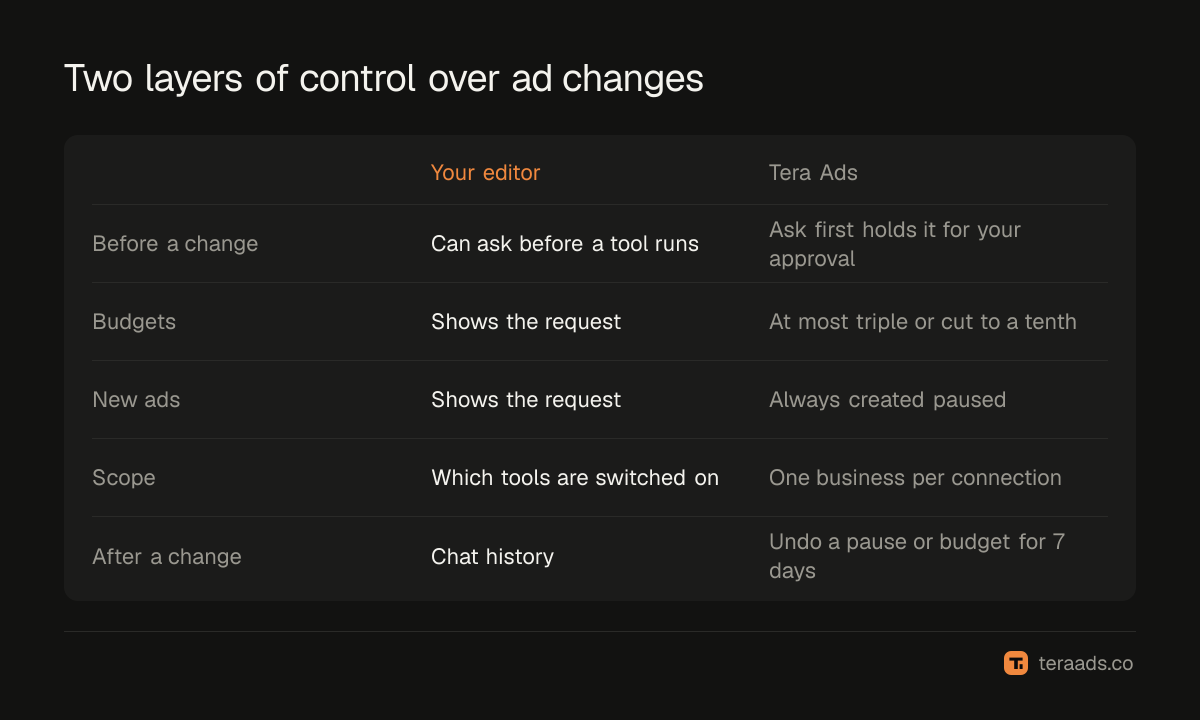
Changes are controlled in two places: your editor, which can ask before each tool runs, and Tera Ads, which decides what the connection may do at all.
- Read only, ask first or make changes. With ask first, a change waits in Tera Ads until you approve it there, and your AI can't approve it for you.
- New things start paused. Campaigns, ad sets, ads and copies spend nothing until something turns them on.
- Budget steps are capped. One change can at most triple a budget or cut it to a tenth.
- A daily cap. Assistants can make at most 50 changes a day to one business.
- No delete tool. Your AI can pause, but it can't delete anything.
- Undo for 7 days. A pause, turn-on or budget change can be undone in Tera Ads for 7 days. New campaigns, ad sets and ads can't be undone, but they start paused.
- One business per connection. A connection can't read another business, even one you also own.
Campaign names and ad text reach your AI as data, and Tera Ads tells it not to follow instructions inside them. Claude Code's docs make the general point too: servers that fetch outside content can expose you to prompt injection, so connect only servers you trust. If you want to see every change before it happens, choose ask first.
When something doesn't work
The server says it needs sign-in. In Claude Code, run /mcp and choose tera-ads; claude mcp list shows that it needs authentication until you do. In Cursor and VS Code, restart the server and finish the browser sign-in.
The tools don't appear in VS Code chat. Open Configure Tools in the chat input and switch Tera Ads on.
Your AI says a limit was reached. The free plan has 30 calls a week, reset weekly in UTC. Ask your AI to run get_usage, which is free and says how many calls are left and when the count resets.
Budgets look a hundred times too big. list_campaigns shows budgets in Meta's units, which are hundredths for most currencies, so 5000 means $50. set_budget takes whole units of your account currency.
The answers are about the wrong store. Each connection covers one business. Connect again and pick the other business.
Tera Ads Connect is the MCP server of Tera Ads, the profit dashboard for Shopify brands. It gives your editor live Meta reads, Shopify sales and profit after returns, and limited, logged ad changes. The free plan includes 30 calls a week on one Meta ad account, and Connect Pro costs $15 a month for 3,000 calls a month on up to three ad accounts; it's included with the Growth and Scale plans. Setup steps for every client are on the Connect page.
Frequently asked questions
Does Meta Ads MCP work in Cursor?
Yes. Cursor supports remote MCP servers with OAuth sign-in. Add the Tera Ads entry to ~/.cursor/mcp.json or .cursor/mcp.json, then sign in to Tera Ads when Cursor asks.
How do I add Meta Ads MCP to VS Code?
Run MCP: Add Server, choose HTTP and paste https://teraads.co/mcp, or add the entry to .vscode/mcp.json. Start the server, sign in, then switch Tera Ads on under Configure Tools in chat.
What is the Claude Code command for Meta Ads MCP?
claude mcp add --transport http tera-ads https://teraads.co/mcp. Then type /mcp in Claude Code and sign in. For six ready-made ad skills, install the plugin with claude plugin marketplace add Teralabsx/meta-ads-mcp and claude plugin install tera-ads@tera-ads.
Do I need an API key or a Meta developer app?
No. You sign in to Tera Ads in your browser, and changes reach Meta through Tera Ads' own approved Meta app. Nothing secret goes into your config file.
Can the AI in my editor change my ads?
Only if you allow it for that connection. Even then, new things start paused, one budget change can at most triple or cut to a tenth, and a pause, turn-on or budget change can be undone in Tera Ads for 7 days.
How much does it cost?
The free plan includes 30 calls a week on one Meta ad account. Connect Pro is $15 a month for 3,000 calls a month. A call is one lookup your AI makes in Tera Ads, and one question can take a few.